
Automate Your .NET DI Setup with Scrutor (Step-by-Step Guide)
Learn how to use Scrutor in .NET to automatically register dependencies and simplify your DI setup. This step-by-step guide covers setup, lifetimes, conventions, and best practices for clean architecture.
There's a specific moment every .NET developer has experienced. You've just finished adding three new services to your app. You flip over to Program.cs, scroll past the fifty lines of AddScoped calls you wrote last week, and feel a little piece of your soul leave your body as you type:
builder.Services.AddScoped<IOrderNotificationService, OrderNotificationService>();
Not wrong. Not broken. Just... exhausting.
And the worst part? It only gets worse. A medium-sized project in Clean Architecture can easily have 40–80 service registrations, all sitting in your startup file like uninvited guests who refuse to leave. Every time a colleague asks "why is the app crashing with Unable to resolve service?", nine times out of ten, someone forgot to register something.
There's a better way, and it goes by the name Scrutor.
First, Let's Talk About What Actually Goes Wrong
Before jumping into the solution, it's worth understanding why manual DI registration falls apart, because "it gets long" is only part of the story.
The real issue is that it violates the Open/Closed Principle. Every time you add a new service to your codebase, you're forced to modify Program.cs. Your startup file becomes a living changelog of every service that ever existed in the project. It has no business logic in it, yet it's one of the most-edited files in the repository.
There's also the problem of knowledge dependency. When a developer creates a new IReportService and its implementation but forgets to register it, the app compiles fine. No warnings. No errors. The failure only shows up at runtime, and only on the specific request path that actually uses that service. If you're lucky, you catch it in development. If you're not, you catch it in production.
This is the gap that convention-based registration fills. Instead of maintaining an ever-growing list by hand, you define a rule once, such as "register everything that ends in Service as scoped", and the framework applies that rule automatically, forever.
Meet Scrutor: Convention Over Configuration for DI
Scrutor is a small, focused open-source library by Kristian Hellang. The name comes from the Latin scrutor, meaning "to examine thoroughly, to probe." That's exactly what it does: at startup, it examines your assemblies, finds types that match your rules, and registers them in .NET's built-in DI container.
A key point: Scrutor is not a replacement DI container. It doesn't compete with Autofac or Castle Windsor. It sits on top of Microsoft.Extensions.DependencyInjection and enhances it with two main superpowers:
- Assembly scanning: automatically discover and register services by convention
- Service decoration: wrap existing services with decorator implementations
Most articles focus almost entirely on the first feature and skip the second. We'll cover both, because the decorator support is honestly one of the most underrated things in the .NET ecosystem.
Getting Started: Installation
Scrutor is available from NuGet and takes about five seconds to install:
dotnet add package Scrutor
Or via the Package Manager Console:
Install-Package Scrutor
No other configuration needed. The library extends IServiceCollection, so it plugs right in wherever you already write your DI setup.
The Core API: Scan()
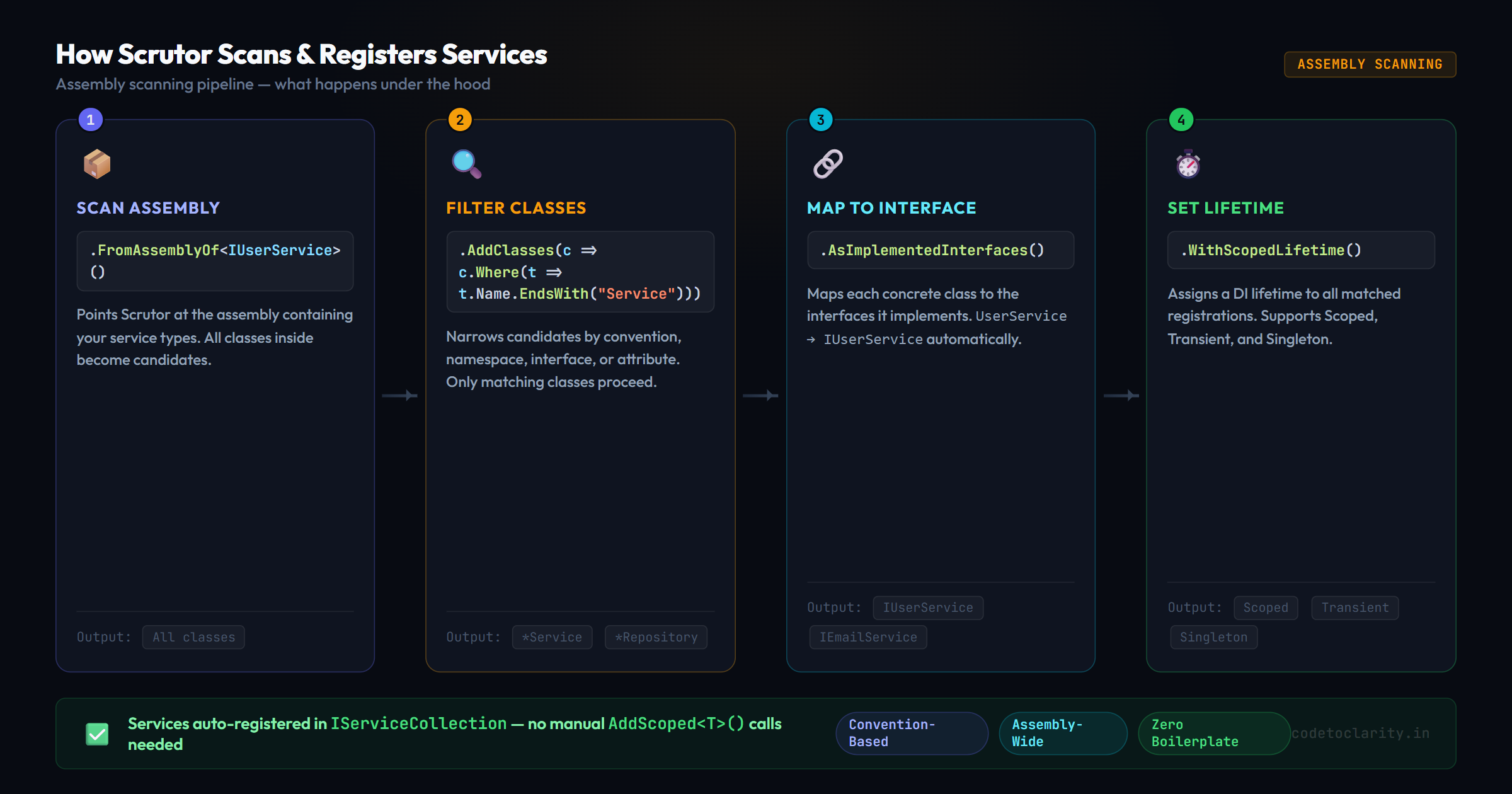
The entry point for everything scanning-related is the Scan() method. Its structure follows a simple four-step pattern:
- Where to look: which assembly or assemblies to scan
- What to include: filter by class name, namespace, or interface
- How to register it: map to implemented interfaces, self, or a specific type
- What lifetime: Scoped, Transient, or Singleton
Here's a minimal example. Suppose your project has a handful of services like this:
public interface IOrderService { }
public class OrderService : IOrderService { }

public interface IProductService { }
public class ProductService : IProductService { }

public interface IReportService { }
public class ReportService : IReportService { }
Instead of three separate AddScoped calls, you write this once:
builder.Services.Scan(scan => scan
    .FromAssemblyOf<OrderService>()
    .AddClasses(classes => classes.Where(t => t.Name.EndsWith("Service")))
    .AsImplementedInterfaces()
    .WithScopedLifetime());
That's it. Every current *Service class gets registered. Every future *Service class will also get registered without touching this code again.
Let's unpack each piece:
FromAssemblyOf<T>()tells Scrutor which assembly to scan. You pass any type that lives in that assembly. Scrutor doesn't care which one; it just uses it to locate the assembly.AddClasses(...)applies a filter over all public, non-abstract classes in that assembly. Here we're keeping only classes whose name ends with "Service".AsImplementedInterfaces()tells Scrutor to map each class to all the interfaces it implements. SoOrderService : IOrderServicegets registered as mappingIOrderServicetoOrderService.WithScopedLifetime()registers them all as Scoped services (one instance per request).
Controlling Duplicate Registrations with Registration Strategies
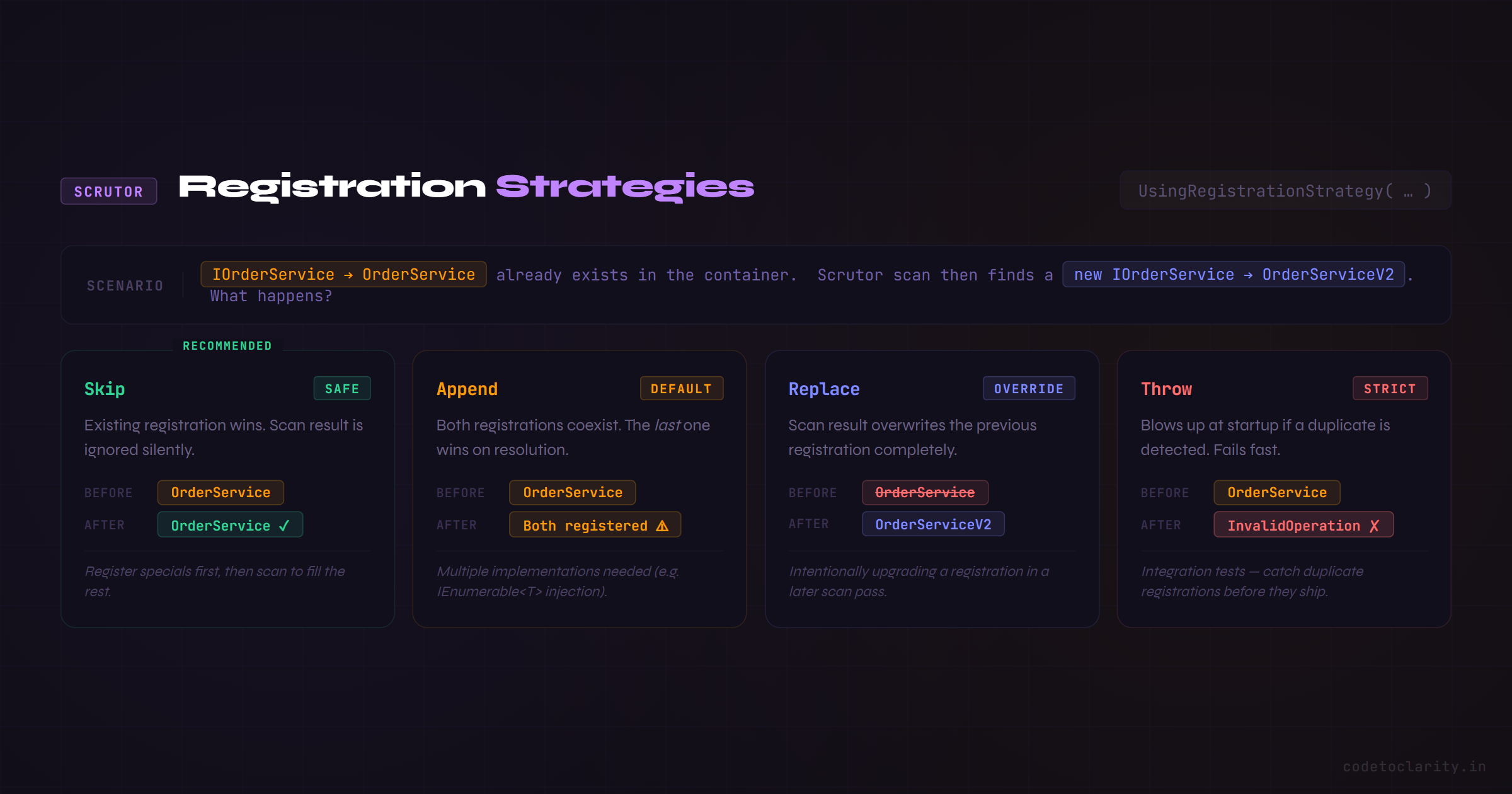
Here's something most tutorials skip that causes real headaches: what happens when Scrutor tries to register a service that's already registered?
By default, Scrutor appends the new registration. This means if IOrderService is already registered (say, from a manual AddScoped call earlier), you'll end up with two registrations for the same interface. The last one wins in most resolution scenarios, which can lead to subtle bugs.
Scrutor gives you explicit control over this with UsingRegistrationStrategy():
builder.Services.Scan(scan => scan
    .FromAssemblyOf<OrderService>()
    .AddClasses(classes => classes.Where(t => t.Name.EndsWith("Service")))
    .UsingRegistrationStrategy(RegistrationStrategy.Skip)   // Don't overwrite existing
    .AsImplementedInterfaces()
    .WithScopedLifetime());
Your three options are:
RegistrationStrategy.Skip: if the service is already registered, leave it aloneRegistrationStrategy.Append: add the new registration alongside any existing ones (the default)RegistrationStrategy.Replace(): overwrite any existing registration with this oneRegistrationStrategy.Throw: throw an exception if a duplicate is detected (great for catching bugs in tests)
For most real-world scenarios, Skip is what you want. It lets you manually register special cases first and then let the scan fill in everything else.
Scanning Multiple Assemblies: The Clean Architecture Case
In a Clean Architecture setup, your code is spread across multiple projects → Application, Infrastructure, Domain. Each has its own services that need to be registered. Scrutor handles this cleanly:
// Application layer services (from CodeToClarity.Application assembly)
builder.Services.Scan(scan => scan
    .FromAssemblyOf<CodeToClarityApplicationMarker>()
    .AddClasses(c => c.InNamespaceOf<CodeToClarityApplicationMarker>())
    .UsingRegistrationStrategy(RegistrationStrategy.Skip)
    .AsImplementedInterfaces()
    .WithScopedLifetime());

// Infrastructure layer services (from CodeToClarity.Infrastructure assembly)
builder.Services.Scan(scan => scan
    .FromAssemblyOf<CodeToClarityInfrastructureMarker>()
    .AddClasses(c => c.InNamespaceOf<CodeToClarityInfrastructureMarker>())
    .UsingRegistrationStrategy(RegistrationStrategy.Skip)
    .AsImplementedInterfaces()
    .WithScopedLifetime());
Notice the marker interface pattern: CodeToClarityApplicationMarker is just an empty interface (or class) that exists purely so you can reference its assembly. It's a common and clean pattern when you need to point Scrutor at a specific project.
You can also be more specific with namespaces or naming conventions:
// Register only repositories from the infrastructure layer
.AddClasses(c => c.Where(t => t.Name.EndsWith("Repository")))

// Register only things in a specific namespace
.AddClasses(c => c.InNamespace("CodeToClarity.Infrastructure.Persistence"))
The combination of these filters means you can draw very precise boundaries about what gets registered from each layer, which is exactly what Clean Architecture demands.
Attribute-Based Registration: When Conventions Aren't Enough
Naming conventions handle 80% of real-world cases. But what about utility classes, helper types, or third-party wrappers that don't follow your naming rules?
This is where attribute-based registration shines. You define a custom attribute and decorate the exact classes you want registered:
// Define the marker attribute
[AttributeUsage(AttributeTargets.Class)]
public class RegisterServiceAttribute : Attribute { }

// Apply it to services you want scanned
[RegisterService]
public class CodeToClarityEmailSender : IEmailSender { }

[RegisterService]
public class AuditLogger : IAuditLogger { }

// In Program.cs
builder.Services.Scan(scan => scan
    .FromAssemblyOf<CodeToClarityEmailSender>()
    .AddClasses(c => c.WithAttribute<RegisterServiceAttribute>())
    .AsImplementedInterfaces()
    .WithScopedLifetime());
Only classes explicitly decorated with [RegisterService] get picked up. Everything else is ignored. This approach is particularly useful in shared libraries where you can't rely on naming conventions being consistent.
The Hidden Gem: Service Decoration with Decorate()
This is the feature that genuinely changes how you think about cross-cutting concerns.
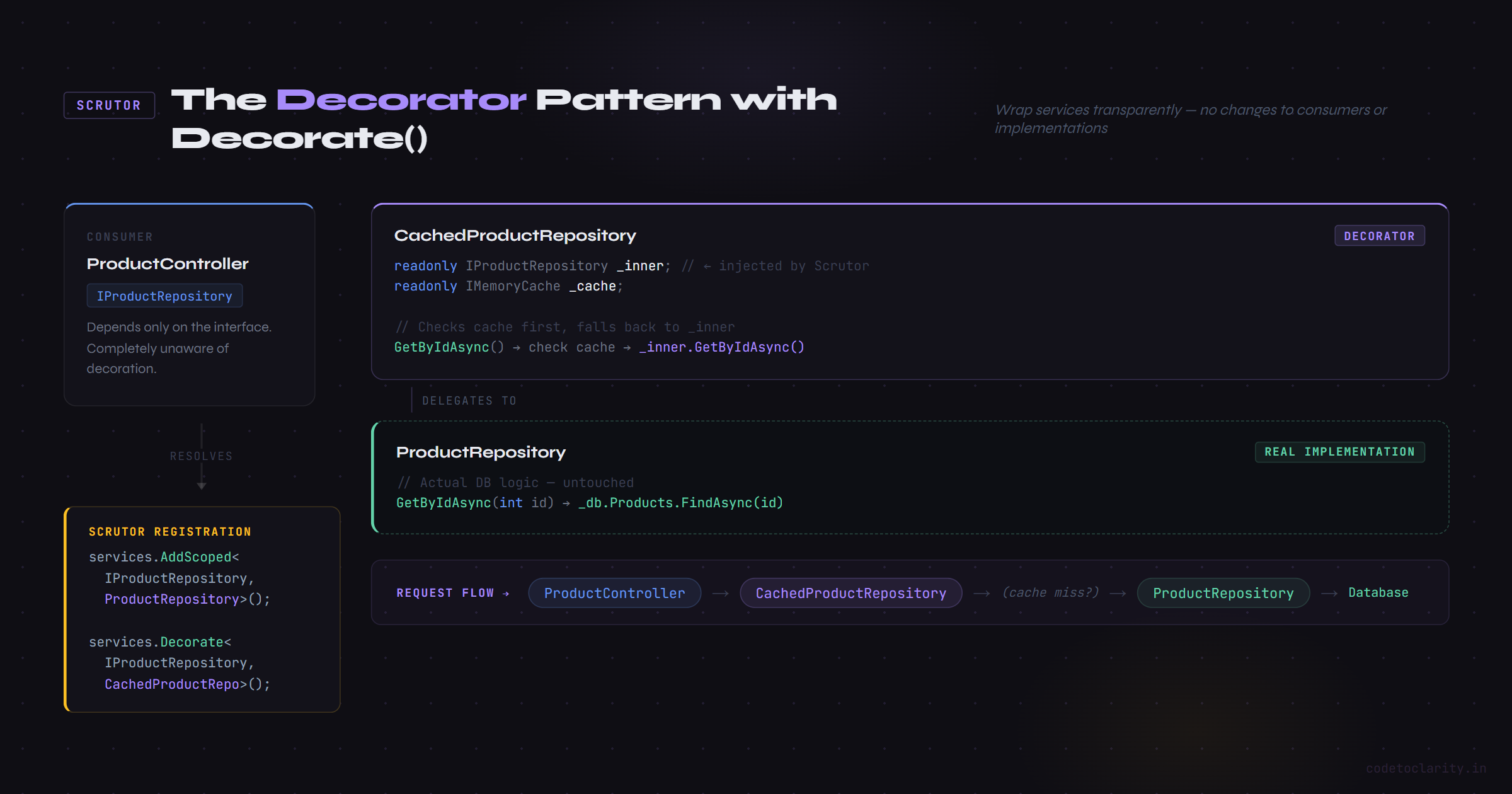
Imagine you have a ProductRepository that hits the database. You want to add caching to it, but you don't want to clutter the repository with cache logic. The classic solution is the Decorator pattern: wrap the real repository in a CachedProductRepository that checks the cache first, falls back to the real implementation if needed.
In standard .NET DI, implementing the decorator pattern is awkward. You have to manually unwrap and rewrap types. Scrutor makes it a one-liner:
// Register the real implementation first
builder.Services.AddScoped<IProductRepository, ProductRepository>();

// Now wrap it with the caching decorator
builder.Services.Decorate<IProductRepository, CachedProductRepository>();
CachedProductRepository receives IProductRepository in its constructor, and Scrutor injects the real ProductRepository into it automatically. The consumer of IProductRepository has no idea the decorator even exists.
public class CachedProductRepository : IProductRepository
{
    private readonly IProductRepository _inner;
    private readonly IMemoryCache _cache;

    public CachedProductRepository(IProductRepository inner, IMemoryCache cache)
    {
        _inner = inner;
        _cache = cache;
    }

    public async Task<Product?> GetByIdAsync(int id)
    {
        var cacheKey = $"product:{id}";
        if (_cache.TryGetValue(cacheKey, out Product? cached))
            return cached;

        var product = await _inner.GetByIdAsync(id);
        _cache.Set(cacheKey, product, TimeSpan.FromMinutes(5));
        return product;
    }
}
You can stack multiple decorators. You can add logging, metrics, or retry logic, each as a clean, separate class, without ever modifying the original implementation. This is cross-cutting concerns done right.
Organizing Everything: Extension Methods Are Your Friend
As your scanning rules grow, keeping them all in Program.cs defeats the purpose of the cleanup. A clean pattern is to move them into layer-specific extension methods:
// In CodeToClarity.Application
public static class ApplicationServiceExtensions
{
    public static IServiceCollection AddApplicationServices(this IServiceCollection services)
    {
        services.Scan(scan => scan
            .FromAssemblyOf<ApplicationServiceExtensions>()
            .AddClasses(c => c.Where(t => t.Name.EndsWith("Service")))
            .UsingRegistrationStrategy(RegistrationStrategy.Skip)
            .AsImplementedInterfaces()
            .WithScopedLifetime());

        return services;
    }
}

// In CodeToClarity.Infrastructure
public static class InfrastructureServiceExtensions
{
    public static IServiceCollection AddInfrastructureServices(this IServiceCollection services)
    {
        services.Scan(scan => scan
            .FromAssemblyOf<InfrastructureServiceExtensions>()
            .AddClasses(c => c.Where(t => t.Name.EndsWith("Repository")))
            .UsingRegistrationStrategy(RegistrationStrategy.Skip)
            .AsImplementedInterfaces()
            .WithScopedLifetime());

        return services;
    }
}
Now Program.cs looks like this:
builder.Services
    .AddApplicationServices()
    .AddInfrastructureServices();
Clean. Readable. Each layer owns its own registration logic. New team members can find exactly where services are wired up without scrolling through hundreds of lines.
Things to Watch Out For
Scrutor is a joy to work with, but a few gotchas are worth knowing upfront:
Over-registration is a real risk. If your filter is too broad, you might accidentally register types you didn't mean to. Internal helper classes, or abstract base types that happen to implement an interface, can sneak in. Start with specific filters and loosen them only if you have a reason to.
Generic open types work, but need explicit syntax. If you have something like ICommandHandler<TCommand>, Scrutor can register all implementations like this:
.AddClasses(c => c.AssignableTo(typeof(ICommandHandler<>)))
.AsImplementedInterfaces()
.WithScopedLifetime()
Note the typeof(ICommandHandler<>): passing the open generic type, not a closed one.
Startup performance. Assembly scanning adds a few milliseconds at startup time. For most web applications, this is totally negligible. If you're working on a serverless function or a cold-start-sensitive app, it's worth profiling, though in practice it rarely matters.
Compiler-generated types. By default, Scrutor excludes compiler-generated types from its filters, which is usually what you want. If you're working with UI frameworks like Avalonia that generate views at compile time, you can explicitly opt in with .WithAttribute<CompilerGeneratedAttribute>(), but that's a niche scenario.
Practical Decision Guide: When to Use Scrutor vs. Manual Registration
Not every service should be auto-registered. Here's a simple mental model:
| Scenario | Recommendation |
|---|---|
| Application services following a naming convention | Scrutor scan |
| Infrastructure repositories in a known namespace | Scrutor scan |
Third-party services like AddDbContext, AddHttpClient | Keep manual |
| Services with complex initialization logic | Keep manual |
| One-off services that don't fit any pattern | Keep manual |
| Services you're wrapping with decorators | Scrutor Decorate() |
Scrutor and manual registration coexist peacefully. Use Scrutor for the 80% that follows a pattern, and keep your manual registrations for the cases that need special attention.
A Note on Testing
One overlooked benefit of convention-based registration: it makes writing integration tests that verify your DI configuration much more reliable. With manual registration, a missing AddScoped call can slip through code review. With Scrutor, if a class exists and matches your convention, it gets registered, period.
A useful pattern is to write a single test that builds the service provider and resolves a representative service from each layer. If something isn't registered, this test fails fast, before you push to any environment.
Wrapping Up
Scrutor doesn't do anything magic. It just turns an implicit human task, "remember to register every new service you create", into an explicit machine task: "scan the assembly and register everything that matches this rule."
That shift has real consequences. Smaller Program.cs. Fewer runtime surprises. Easier onboarding for new developers. And with the Decorate() API, a clean, idiomatic way to implement cross-cutting concerns without butchering your core classes.
If you're on any project of medium size or larger, and you're still managing DI registrations by hand, give Scrutor an afternoon. The cleanup alone is satisfying. The time it saves you afterward is the real win.
References & Further Reading
- Scrutor on NuGet: Official Package Page
- Scrutor GitHub Repository by Kristian Hellang
- Dependency Injection in .NET: Microsoft Learn

Kishan Kumar
Software Engineer / Tech Blogger
A passionate software engineer with experience in building scalable web applications and sharing knowledge through technical writing. Dedicated to continuous learning and community contribution.