
Build High-Performance APIs with .NET Minimal APIs (Beginner Friendly Guide)
Build fast and scalable APIs using .NET Minimal APIs. A beginner friendly guide with clear explanations, real world examples, and proven performance best practices.
Have you ever looked at a traditional ASP.NET Core MVC project and felt overwhelmed by the sheer number of files and folders? You are not alone. For years, building an API in .NET meant creating a Controllers folder, writing classes that inherit from ControllerBase, decorating them with various routing attributes, and wiring everything up. It felt like a lot of ceremony just to return some simple JSON data.
Then, Microsoft introduced Minimal APIs.
If you are relatively new to the .NET ecosystem, or if you are an experienced developer looking to optimize your microservices, Minimal APIs represent a massive shift in how we build web applications. They allow you to create fully functional, high-performance HTTP APIs with just a few lines of code, directly inside your Program.cs file.
In this comprehensive guide, we will explore exactly what Minimal APIs are, why they perform so incredibly well, and how you can leverage them to build modern, cloud-native applications. We will also dive into advanced features introduced in .NET 8 and .NET 9 that take performance to the absolute limit. Let us get started!
The Evolution of the .NET Web API
To truly appreciate Minimal APIs, it helps to understand where we came from. In the past, the standard way to build an API in .NET was using the Controller-based approach.
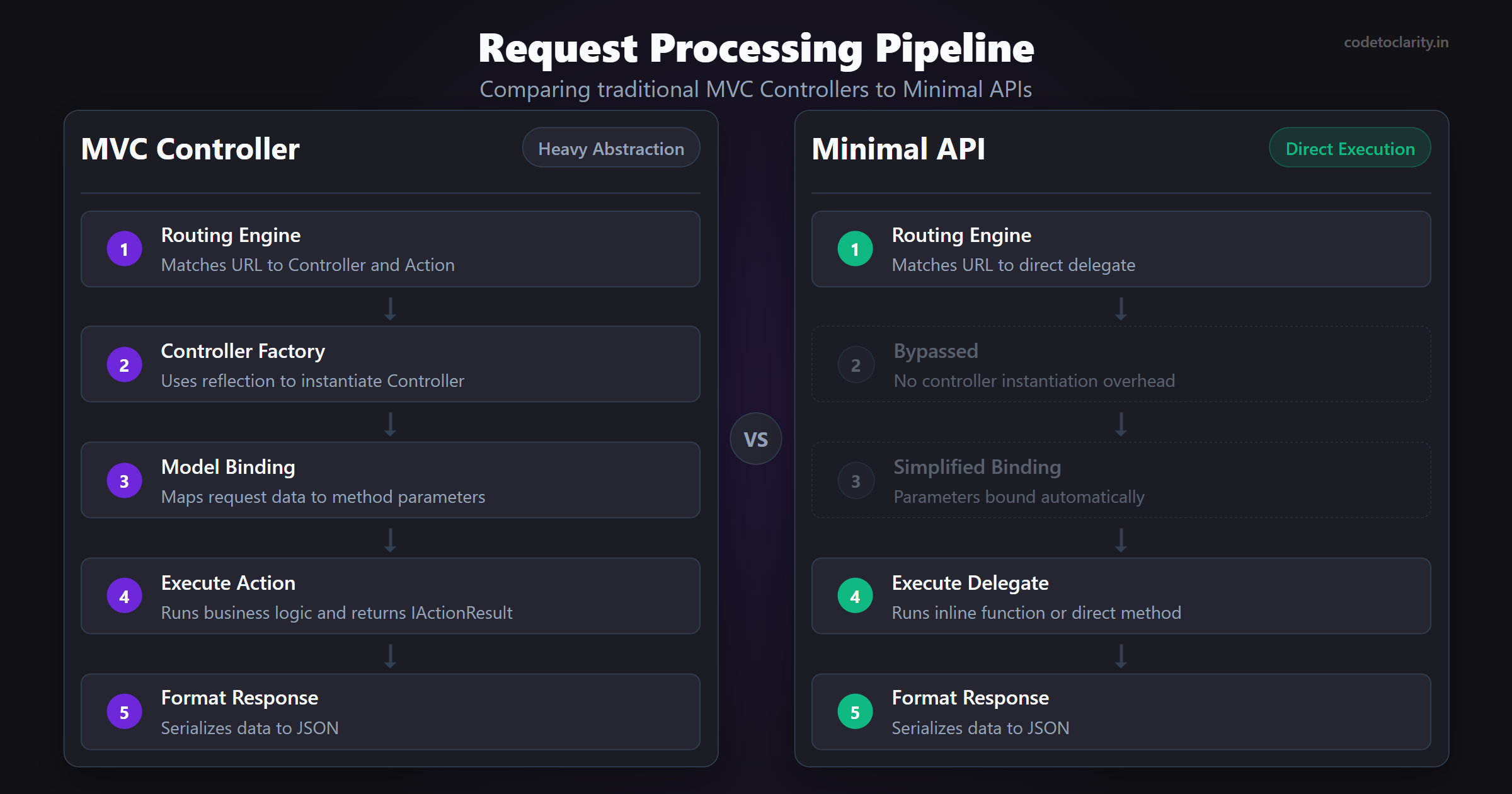
In a traditional setup, the framework has to do a lot of heavy lifting behind the scenes. When a request comes in, the ASP.NET Core routing engine has to figure out which controller to instantiate, which method to call, how to bind the incoming data to the method parameters, and then format the response. All of this relies heavily on reflection. Reflection is a mechanism that allows code to inspect other code at runtime. While powerful, reflection is notoriously slow and memory-intensive.
Minimal APIs change this paradigm completely. Instead of relying on heavy reflection and complex class hierarchies, Minimal APIs let you map HTTP verbs (like GET, POST, PUT, DELETE) directly to inline functions or delegates. By stripping away the MVC abstractions, you remove layers of overhead.
Think of it like ordering food. A Controller-based API is like going to a fancy restaurant. You have a host who seats you, a waiter who takes your order, a chef who cooks it, and a food runner who brings it out. A Minimal API is like a food truck. You walk up to the window, place your order, and get your food directly. Both get you a meal, but the food truck has far less overhead and serves you much faster.
Creating Your First Minimal API
Let us see how simple this actually is. If you have the .NET SDK installed, you can create a new Minimal API project using the command line.
Open your terminal and run:
dotnet new web -n CodeToClarity.MinimalApiDemo
cd CodeToClarity.MinimalApiDemo
If you open the generated Program.cs file, you will see something remarkable. The entire application setup looks like this:
var builder = WebApplication.CreateBuilder(args);
var app = builder.Build();

app.MapGet("/", () => "Hello World!");

app.Run();
That is it. Four lines of code. There are no namespaces, no class declarations, and no controller folders.
Let us break down what these four lines are doing:
WebApplication.CreateBuilder(args)sets up the configuration, logging, and dependency injection container.builder.Build()creates the actual web application instance.app.MapGet("/", ...)tells the application to listen for HTTP GET requests at the root URL ("/") and execute the provided function.app.Run()starts the web server and begins listening for incoming requests.
If you run this application and navigate to the local host port provided in your terminal, you will see "Hello World!" printed in your browser. You have just built a high-performance web server.
Why Are Minimal APIs So Fast?
When we talk about high performance in backend development, we are generally measuring two things. We measure throughput, which is how many requests your server can handle per second. We also measure latency, which is how long it takes to process a single request.
Minimal APIs excel at both metrics. But how do they achieve this?
1. Reduced Middleware Overhead
Every ASP.NET Core application uses a middleware pipeline. Middleware components are pieces of code that handle requests and responses. In a traditional MVC app, the pipeline is packed with components for handling views, model binding, authorization, and routing. Minimal APIs allow you to opt out of the heavy MVC middleware entirely. You only add the middleware you actually need for your specific use case.
2. Fewer Memory Allocations
Memory allocation is the enemy of performance. Every time your application creates an object, the .NET Garbage Collector eventually has to clean it up. If your application creates too many objects, the Garbage Collector pauses your application to clean up the memory. This causes noticeable latency spikes. Minimal APIs are designed from the ground up to allocate significantly fewer objects per request compared to Controllers.
3. Direct Delegate Execution
Instead of using reflection to find and invoke controller methods, Minimal APIs use delegates. When you call MapGet, you are providing a direct pointer to a C# function. The routing engine knows exactly where to go without having to search through your codebase. This direct execution path is blazing fast. You can explore the architectural details of this in the official Microsoft Documentation on Minimal APIs.
Core Concepts Explained
Now that we understand the performance benefits, let us look at the practical implementation. Building a real-world application requires more than just returning text. You need to handle parameters, inject services, and return structured JSON data.
Routing and Parameter Binding
Minimal APIs make it incredibly easy to extract data from incoming requests. The framework automatically binds parameters based on their names and types.
// Binding from route parameters
app.MapGet("/users/{id}", (int id) =>
{
    return $"Fetching user with ID: {id}";
});

// Binding from query string
app.MapGet("/search", (string keyword, int page) =>
{
    return $"Searching for '{keyword}' on page {page}";
});
Notice how natural this feels. You define the expected parameters in your function signature, and the framework figures out where to get them. If someone visits /users/42, the id parameter automatically becomes the integer 42.
What about POST requests where you need to read JSON from the request body? That is just as simple. You define a C# record or class, and include it in your parameters.
public record UserDto(string Name, string Email);

app.MapPost("/users", (UserDto newUser) =>
{
    // Save to database here
    return Results.Created($"/users/1", newUser);
});
The framework automatically deserializes the incoming JSON body into the UserDto object. It is seamless, highly optimized, and requires zero configuration.
Dependency Injection Made Easy
Dependency Injection is a core concept in modern software architecture. It allows you to pass services into your code rather than creating them manually. This makes your application significantly easier to test and maintain over time.
In traditional controllers, you inject services through the class constructor. In Minimal APIs, you inject services directly into the endpoint delegate.
Let us say we have a service that generates random quotes.
public interface IQuoteService
{
    string GetRandomQuote();
}

public class CodeToClarityQuoteService : IQuoteService
{
    public string GetRandomQuote() => "Code is like humor. When you have to explain it, it is bad.";
}
First, we register the service in the dependency injection container inside Program.cs:
var builder = WebApplication.CreateBuilder(args);
builder.Services.AddSingleton<IQuoteService, CodeToClarityQuoteService>();
var app = builder.Build();
Then, we simply add the interface as a parameter to our endpoint:
app.MapGet("/quote", (IQuoteService codetoclarityService) =>
{
    return codetoclarityService.GetRandomQuote();
});
The framework is smart enough to know that IQuoteService is not a value coming from the user request. It knows it must resolve this service from the Dependency Injection container.
Taking Performance to the Next Level in .NET 8 and .NET 9
Minimal APIs were introduced in .NET 6, but Microsoft has continuously improved them. With the recent releases of .NET 8 and .NET 9, we gained powerful new tools to maximize performance, particularly for cloud-native and serverless workloads.
Native AOT (Ahead-of-Time Compilation)
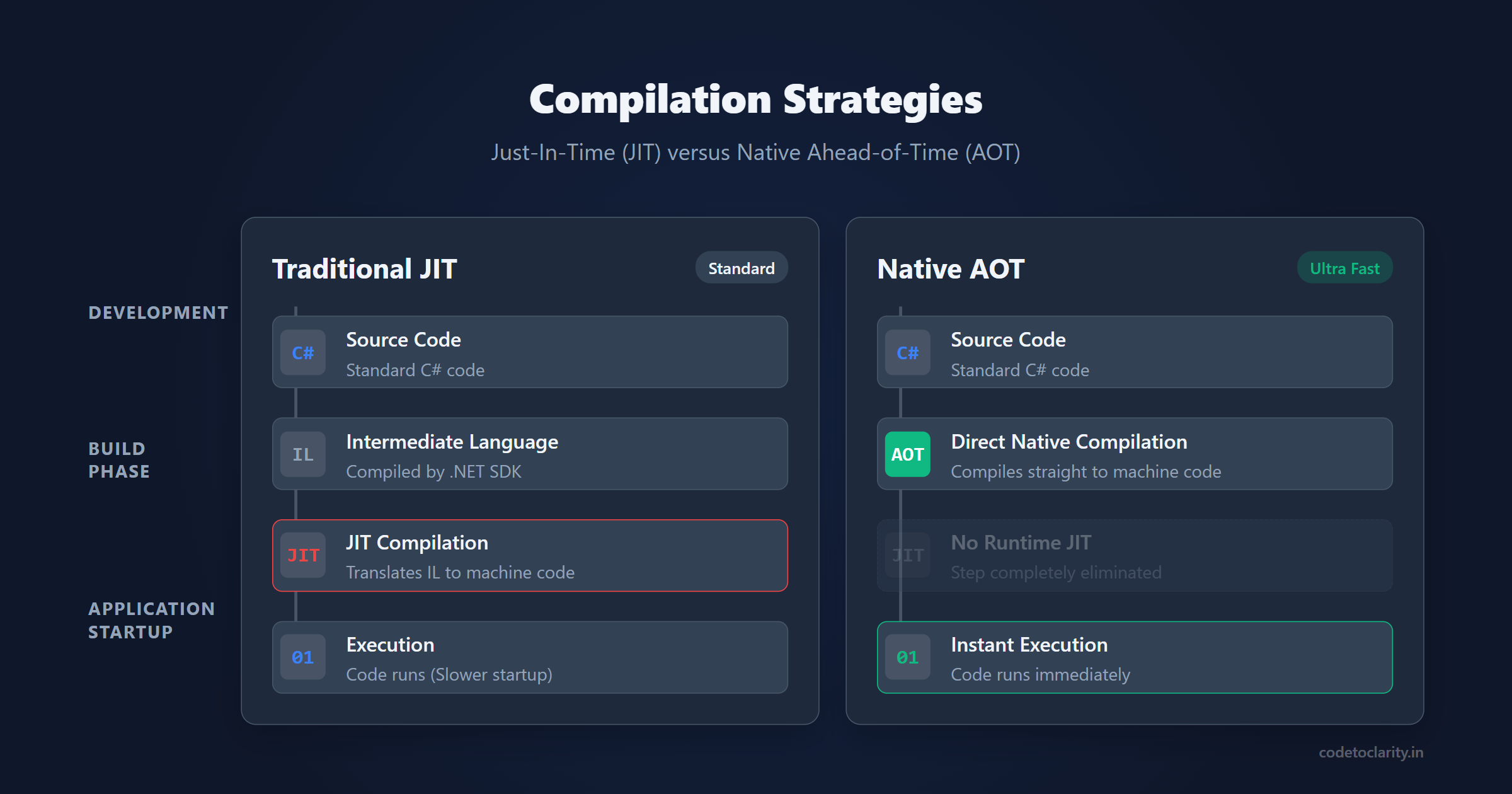
Perhaps the most exciting performance feature in modern .NET is Native AOT. Traditionally, .NET code is compiled into Intermediate Language. When you run the application, the Just-In-Time compiler translates that intermediate code into machine code optimized for your specific processor. This takes time, which results in slower application startup times.
Native AOT changes this entirely. It compiles your C# code directly into native machine code during the build process. This means there is no Just-In-Time compilation at runtime.
The benefits are staggering. Native AOT applications start up almost instantly and use a fraction of the memory compared to standard .NET applications. This makes them perfect for AWS Lambda, Azure Functions, or high-density Kubernetes clusters where startup time and memory footprint directly impact your hosting costs.
Minimal APIs are the recommended way to build Native AOT web applications because they rely heavily on source generators rather than runtime reflection. You can learn exactly how to configure your projects for AOT compilation by checking out the official Microsoft documentation on Native AOT.
Output Caching
Database calls and complex calculations are expensive. If your API returns the same data frequently, you should not be processing that data on every single request. Caching is the simplest way to drastically improve API performance.
Microsoft recently introduced a highly optimized Output Caching middleware. Output caching stores the fully rendered HTTP response. When a subsequent request comes in for the same URL, the server bypasses your endpoint logic entirely and just serves the cached response.
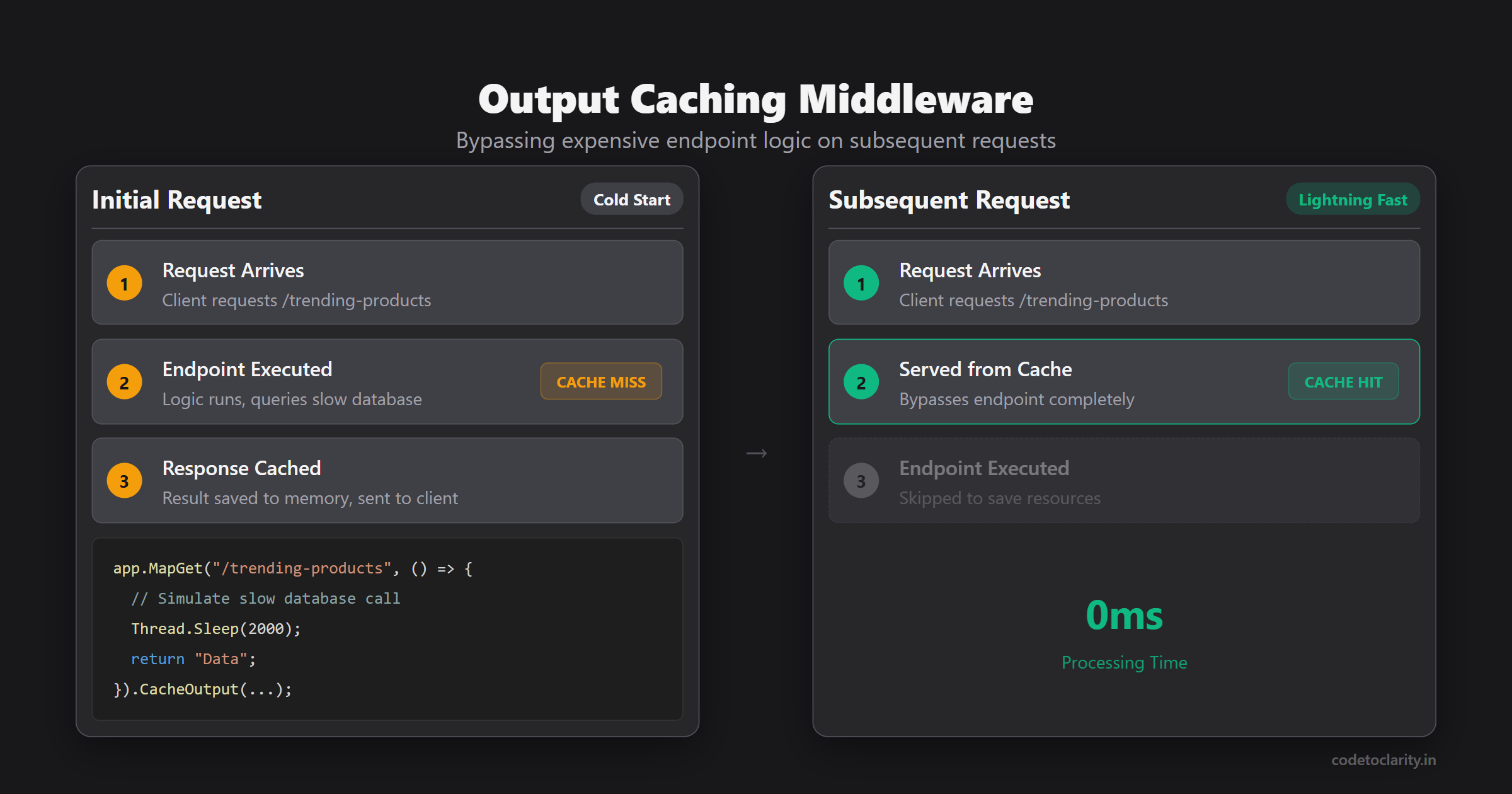
var builder = WebApplication.CreateBuilder(args);
builder.Services.AddOutputCache();
var app = builder.Build();

app.UseOutputCache();

app.MapGet("/trending-products", () =>
{
    // Simulate slow database call
    Thread.Sleep(2000);
    return "These are the trending products!";
}).CacheOutput(x => x.Expire(TimeSpan.FromMinutes(5)));
In this example, the first request will take two seconds. Every subsequent request for the next five minutes will return instantly because the response is served directly from memory.
TypedResults for Better Performance and OpenAPI Specs
When you return data from a Minimal API, you typically use the Results static class to return things like Results.Ok() or Results.NotFound(). While convenient, returning an abstract IResult interface means the framework has to do extra work at runtime to figure out exactly what HTTP status code and response type to format.
To optimize this, and to improve Swagger and OpenAPI generation, you should use TypedResults. TypedResults returns concrete types instead of interfaces.
app.MapGet("/products/{id}", Results<Ok<Product>, NotFound> (int id) =>
{
    var product = GetProductFromDatabase(id);
    if (product is null)
    {
        return TypedResults.NotFound();
    }

    return TypedResults.Ok(product);
});
By returning strongly typed results, the compiler knows exactly what the endpoint returns. This makes your code more allocation-free and provides rich, accurate OpenAPI documentation without needing extra metadata attributes.
Organizing Your Minimal APIs with Route Groups
A common criticism of Minimal APIs from developers coming from MVC is that Program.cs can quickly become a messy dumping ground for hundreds of endpoints. If you have fifty different API routes, putting them all in one file creates unmaintainable spaghetti code.
The solution is Route Groups. Route Groups allow you to define a common prefix and apply middleware or filters to an entire group of endpoints at once. This keeps your code clean and highly organized.
Let us organize a set of customer-related endpoints. We can create an extension method to keep our Program.cs clean.
public static class CustomerEndpoints
{
    public static void MapCustomerEndpoints(this IEndpointRouteBuilder app)
    {
        var group = app.MapGroup("/api/customers")
                       .WithTags("Customers")
                       .RequireAuthorization(); // Secures the whole group

        group.MapGet("/", GetAllCustomers);
        group.MapGet("/{id}", GetCustomerById);
        group.MapPost("/", CreateCustomer);
    }

    private static IResult GetAllCustomers()
    {
        // Business logic here
        return TypedResults.Ok(new List<string> { "Alice", "Bob" });
    }

    // Other methods omitted for brevity
}
Now, in your Program.cs, you only need one line of code to register all of these endpoints:
app.MapCustomerEndpoints();
This pattern gives you the organizational benefits of Controllers without the performance overhead of the MVC pipeline.
Real-World Best Practices for Production
If you are planning to take your Minimal APIs to production, keep these best practices in mind to ensure they remain maintainable and performant under heavy load.
1. Always Use Async and Await for I/O Operations
If your endpoint talks to a database, calls another API, or reads from a file, it must be asynchronous. Using synchronous blocking calls in a web server will quickly exhaust your thread pool and cause your application to crash under load. Always use async delegates and await your tasks.
2. Implement Robust Validation
Minimal APIs will happily deserialize a JSON body, but they do not automatically validate the data like MVC controllers do with Data Annotations. You need to validate input manually to protect your database. The industry standard way to handle this in Minimal APIs is by using a library called FluentValidation. You can read exactly how to set this up in my dedicated guide on How to Use FluentValidation in ASP.NET Core.
3. Keep Business Logic Out of the Endpoint
The endpoint delegate should act as a traffic cop. It should receive the request, validate it, hand the data off to a service class to perform the actual business logic, and then format the response. Do not write hundreds of lines of complex if-statements and database queries directly inside the MapGet or MapPost functions. Inject a service and keep your architecture clean.
4. Optimize Data Access
An API is only as fast as its database queries. Using high-performance data access techniques is crucial. While Entity Framework Core is fantastic, for ultra-high-performance read operations, many developers prefer using a micro-ORM. The most popular choice is Dapper. Dapper maps SQL queries directly to C# objects with virtually zero overhead, making it a perfect companion for Minimal APIs.
When Should You Use Minimal APIs?
Minimal APIs are not a complete replacement for MVC Controllers. They are a different tool for a different job.
You should absolutely choose Minimal APIs if you are building microservices, serverless functions, or high-throughput REST APIs where performance is your primary concern. They are also fantastic for beginners learning C# because the barrier to entry is so low.
However, if you are building a massive enterprise monolith that relies heavily on HTML rendering, complex view models, or legacy MVC architecture, sticking with traditional Controllers might make more sense. The MVC framework has years of maturity and built-in conventions that work incredibly well for large-scale MVC web applications.
Summary
.NET Minimal APIs offer a brilliant way to build modern, scalable web services. By removing the abstractions and overhead of traditional controllers, developers can achieve incredible performance metrics. When combined with advanced features like Native AOT, Output Caching, and strongly typed results, .NET provides one of the fastest web frameworks on the planet.
The shift away from controllers might feel strange at first, but once you embrace the simplicity of mapping delegates directly to routes, you will find it hard to go back. Keep your endpoints small, organize them with Route Groups, always use asynchronous programming, and your APIs will handle massive traffic with ease. Happy coding!

Kishan Kumar
Software Engineer / Tech Blogger
A passionate software engineer with experience in building scalable web applications and sharing knowledge through technical writing. Dedicated to continuous learning and community contribution.