
IEnumerable vs IQueryable in C#: Explained with Examples (Beginner’s Guide)
Learn the real difference between IEnumerable and IQueryable in C#. Understand how they work, when to use which, and how they impact performance with practical examples.
When working with data in modern .NET applications, developers often face a common and highly debated question. Should you use IEnumerable or IQueryable?
Both are incredibly powerful interfaces that let you query and manipulate data. However, they work very differently under the hood. Choosing the wrong interface can drastically affect your application performance, memory utilization, and scalability.
Picture this scenario. A junior developer writes a quick LINQ query to find ten active users from a database table that has over a million records. The code compiles successfully. The test passes locally because the local database only has fifty users. When the feature gets deployed to production, the server crashes.
What went wrong? The developer accidentally used IEnumerable instead of IQueryable. They unknowingly downloaded all one million rows into the server's memory just to filter out ten of them in C#.
In this guide, we are going to break down everything about IEnumerable and IQueryable step by step. Even if you are just starting your journey with .NET, you will understand exactly how they work, where they shine, and when to use each one. We will dive into real code examples, look at how Entity Framework translates your queries, and learn how to avoid common performance traps.
What is IEnumerable? Understanding In-Memory Data
The IEnumerable<T> interface represents a sequence of objects that can be sequentially iterated over. It lives under the System.Collections.Generic namespace and is the absolute foundation of collections in C#.
If you have ever used a List<T>, an Array, or a Dictionary<TKey, TValue>, you have used IEnumerable. You can think of it as a tool designed specifically to work with data that is already loaded into your application's memory space.
How IEnumerable Execution Works
IEnumerable supports deferred execution. When you write a LINQ query chaining methods like .Where() or .Select(), the execution does not happen immediately. It only executes when you actually begin looping over the data. This usually happens when you use a foreach loop or call a materializing method like .ToList().
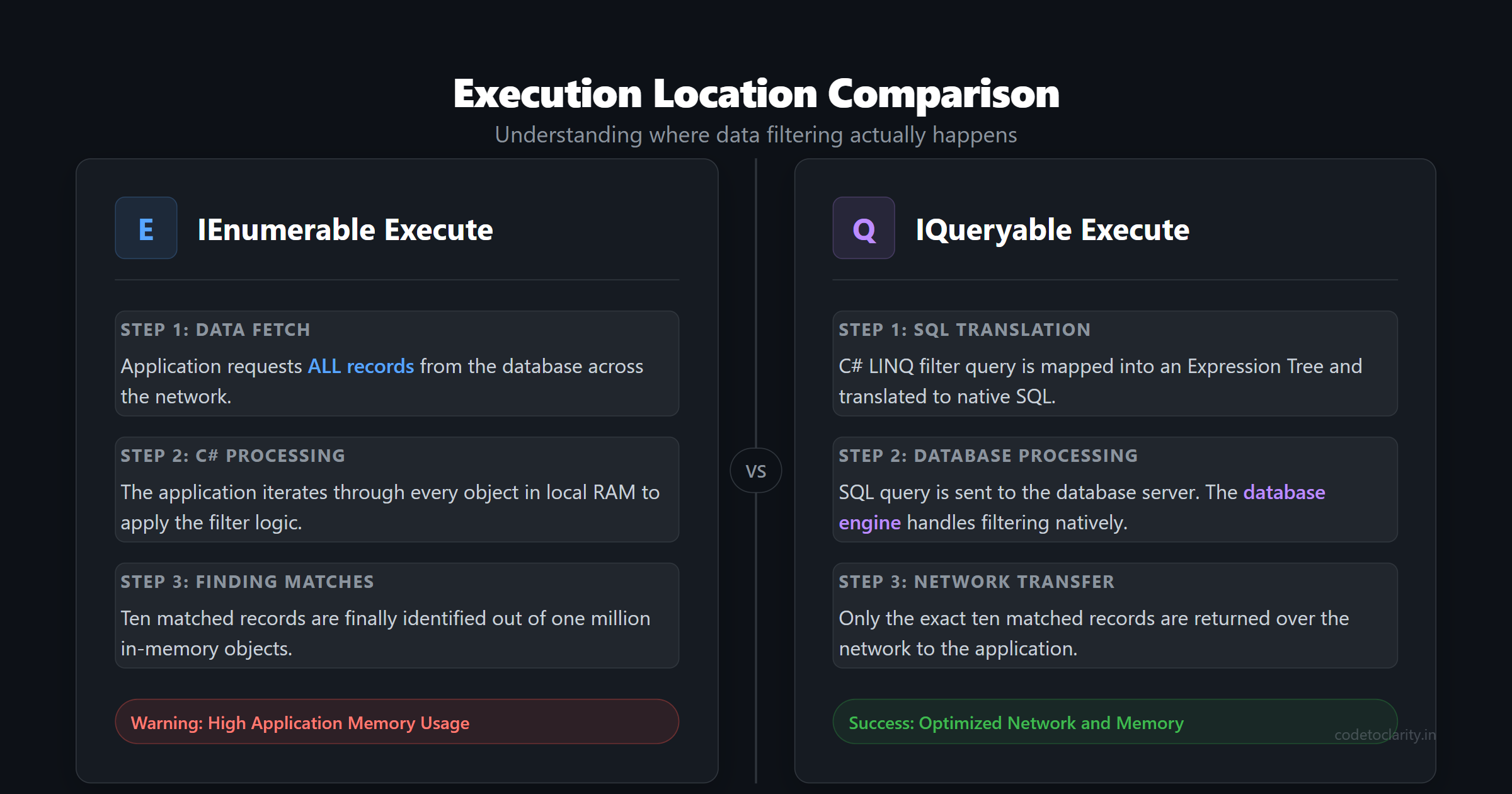
The crucial detail here is execution location. When you use IEnumerable methods, the C# compiler executes the filtering logic inside your application process. If you apply a filter to a collection, the program iterates through every single item in memory and applies your condition one by one.
The Magic Under the Hood: The Yield Keyword
To truly understand IEnumerable, you must understand how C# implements state machines under the hood using the yield keyword. When you write a method that returns an IEnumerable<T>, you do not actually have to create a concrete list and return it. Instead, you can yield results one by one.
public IEnumerable<int> GenerateNumbers()
{
    Console.WriteLine("Producing 1");
    yield return 1;

    Console.WriteLine("Producing 2");
    yield return 2;

    Console.WriteLine("Producing 3");
    yield return 3;
}
If you call this method, nothing is printed to the console immediately. The C# compiler generates a hidden state machine class. The code inside the generator method only runs when you explicitly call MoveNext() on the underlying enumerator. This lazy evaluation means you can theoretically have an IEnumerable that represents an infinite sequence of numbers without ever exhausting your system memory.
A Practical IEnumerable Example
Let us look at a simple example of using IEnumerable to filter an in-memory list.
using System;
using System.Collections.Generic;
using System.Linq;

class Program
{
    static void Main()
    {
        // Data is already sitting in application memory
        List<int> codetoclarityNumbers = new List<int> { 1, 5, 8, 12, 15, 20 };

        // The query is defined, but nothing executes yet
        IEnumerable<int> evenNumbers = codetoclarityNumbers.Where(n => n % 2 == 0);

        // Execution happens right here during the iteration
        foreach (var num in evenNumbers)
        {
            Console.WriteLine(num);
        }
    }
}
In this snippet, all the data already exists in memory. The filter is executed entirely within your application. For small sets of data, this approach is perfectly fine and lightning fast.
What is IQueryable? Remote Execution and Expression Trees
As your applications grow, you will inevitably need to query remote data sources like a SQL server database. This is where IQueryable<T> enters the heavily lifted data ring.
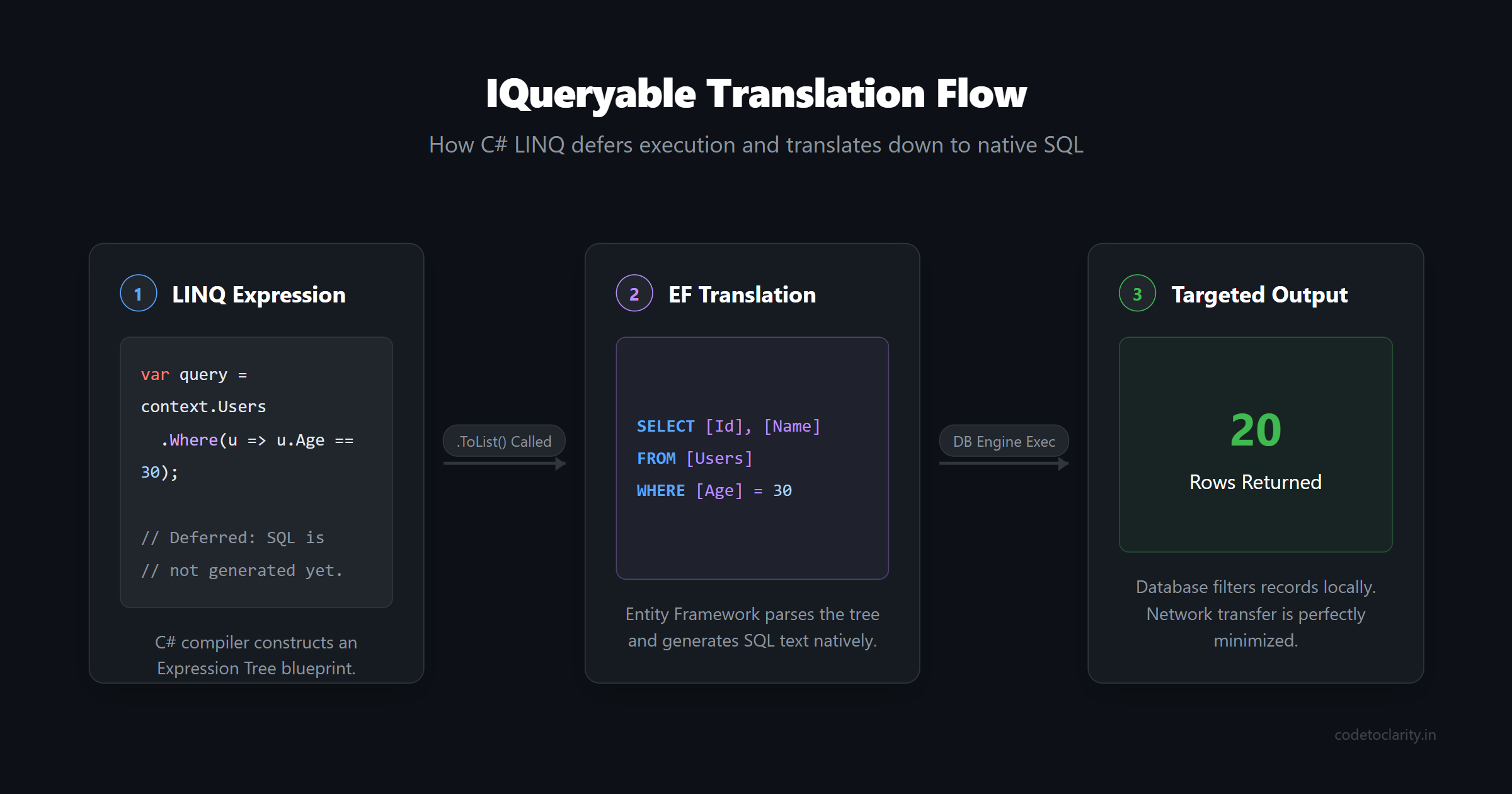
The IQueryable<T> interface actually inherits from IEnumerable<T>, but it adds some magical behavior. It resides securely within the System.Linq namespace. Instead of holding raw objects in memory, an IQueryable holds an expression tree. An expression tree is basically a programmatic blueprint of your query.
When you use an Object Relational Mapper like Entity Framework Core, IQueryable acts as a translator. It takes your C# LINQ query, breaks down the expression tree, and translates it into native SQL before sending it to the database server.
The Power of IQueryable Remote Querying
The ultimate superpower of IQueryable is that it pushes the heavy lifting to the database engine. Relational databases are highly optimized for filtering, sorting, and aggregating data. Instead of bringing the data to the application, IQueryable brings the query to the data.
A Practical IQueryable Example
Let us see how IQueryable behaves when paired with Entity Framework Core.
using System;
using System.Linq;
using Microsoft.EntityFrameworkCore;

class User
{
    public int Id { get; set; }
    public string Name { get; set; }
    public int Age { get; set; }
}

class AppDbContext : DbContext
{
    public DbSet<User> Users { get; set; }
}

class Program
{
    static void Main()
    {
        using var context = new AppDbContext();

        // Building the query expression tree
        IQueryable<User> adultUsers = context.Users.Where(u => u.Age >= 18);

        // The exact moment the SQL is generated and executed
        foreach (var user in adultUsers)
        {
            Console.WriteLine($"{user.Name} is an adult.");
        }
    }
}
When this code runs, Entity Framework examines the filter clause and converts it into a SQL statement. The database server applies the filter. Your application memory only receives the rows that perfectly match the condition.
The Ultimate Clash: IEnumerable vs IQueryable
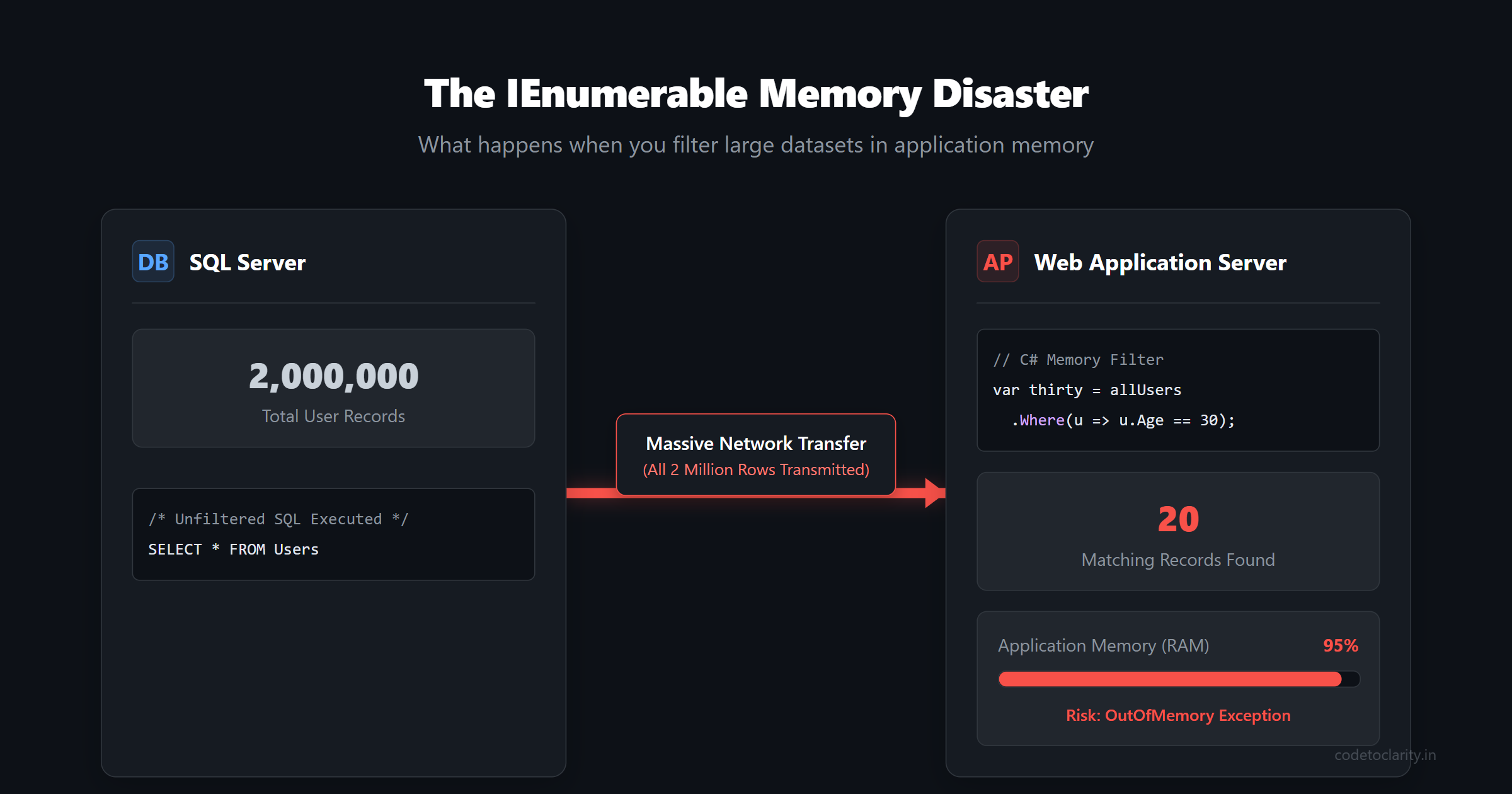
To truly appreciate the distinction, let us put them side by side in a real-world disaster scenario. Imagine your database has a table with two million records. You want to retrieve users who are precisely 30 years old.
Scenario A: The IEnumerable Memory Disaster
// Calling ToList() materializes the data as IEnumerable immediately
IEnumerable<User> allUsers = context.Users.ToList();

// This filter runs in C# memory
IEnumerable<User> thirtyYearOlds = allUsers.Where(u => u.Age == 30);
What actually happens here? The materialization call forces Entity Framework to execute an unfiltered query that selects everything from the database. The database sends all two million records across the network to your web server. Your application allocates hundreds of megabytes of RAM to store these objects. Then, the filtering clause painstakingly iterates through all two million objects in memory to find the handful of 30-year-olds. Your server crashes from an OutOfMemory exception.
Scenario B: The IQueryable Savior
// Working with the DbSet as an IQueryable
IQueryable<User> thirtyYearOlds = context.Users.Where(u => u.Age == 30);

// Data is only fetched when we materialize it
var resultList = thirtyYearOlds.ToList();
In this scenario, we do not call a materialization method right away. We apply the filter directly to the IQueryable root object. Entity Framework analyzes this expression and generates the following highly efficient SQL.
SELECT [Id], [Name], [Age]
FROM [Users]
WHERE [Age] = 30
The database server, utilizing its indexes, quickly locates the twenty matching rows. Only those twenty rows are transmitted over the network and loaded into your application memory. Your application hums along smoothly with minimal memory footprint footprint.
Core Differences Summarized
To make things easier to remember, here is a quick breakdown of their core differences.
- Namespace Scope: IEnumerable lives in
System.Collections. IQueryable lives inSystem.Linq. - Execution Location: IEnumerable executes your query logic in the application memory space. IQueryable hands off your query logic to a remote provider like a database.
- SQL Translation: IEnumerable does not translate to SQL. IQueryable parses your query and translates it to native SQL syntax.
- Best Use Case: IEnumerable is best for small, local collections. IQueryable is mandatory for querying large databases and remote data providers.
When Should Developers Use Which?
Making the right choice will save you countless hours of debugging performance bottlenecks. Use these rules of thumb to guide your architecture.
When to absolutely use IEnumerable
You should reach for IEnumerable whenever your data is already sitting comfortably in memory. This includes working with simple integer arrays, lists of strings, or dictionaries. Furthermore, if you consume data from an external REST API using an HTTP client, the resulting deserialized JSON will become an IEnumerable. You simply cannot execute a database query against a raw list of JSON objects you just downloaded into application runtime.
When to absolutely use IQueryable
You must use IQueryable whenever you are querying a remote database via Entity Framework Core or NHibernate. Any operation that restricts the amount of data coming back over the network should happen on an IQueryable. This includes all forms of paging, filtering, grouping, and server-side sorting.
Advanced Pitfalls and Hidden Gotchas
Even experienced .NET developers occasionally trip over advanced nuances when mixing these two interfaces. Let us explore some common pitfalls to watch out for.
The Implicit Cast Trap
Because IQueryable implements IEnumerable, you can technically pass an IQueryable into any method that accepts an IEnumerable. This seems helpful but conceals a dangerous trap.
public void ProcessData(IEnumerable<User> users)
{
    // The moment the first item is accessed, the query evaluates!
    var activeUsers = users.Where(u => u.IsActive).ToList();
}

// Somewhere else in the codebase
var query = context.Users;
ProcessData(query);
When you pass the database query into the processing method, the compiler treats it as an IEnumerable from that point forward. The active filter applied inside the method will not be translated into SQL. Instead, all users are pulled from the database, and the active filtering happens in memory. Always ensure your methods accept IQueryable<T> if you intend to append more database-side filters.
Mastering AsEnumerable and AsQueryable
Sometimes you explicitly want to switch contexts during a complex operation.
Calling .AsEnumerable() on a database query forces the evaluation to move from the database side to the client side. This is extremely useful if you need to perform a filter using a custom C# method that Entity Framework cannot translate into SQL.
var users = context.Users
                   .Where(u => u.Age > 18) // Runs in SQL
                   .AsEnumerable()         // Switches to in-memory processing
                   .Where(u => codetoclarityService.IsSpecialUser(u)) // Runs in C#
                   .ToList();
In contrast, calling .AsQueryable() is often used when writing mock repositories for unit testing. It allows you to wrap an in-memory list so it mimics a database set, enabling you to test your data access logic without needing an actual SQL database spun up.
Client Evaluation Warnings
Older versions of Entity Framework would silently switch from IQueryable to IEnumerable if it encountered a LINQ command it could not translate to SQL. This implicit client evaluation resulted in massive performance degradation that went completely unnoticed until production loads hit.
Thankfully, modern versions of Entity Framework Core explicitly throw a runtime exception if a query cannot be translated. This fail-fast approach forces you to identify the untranslatable code and resolve it explicitly.
The Problem of Disguised Queries
Sometimes developers will fetch an IQueryable of parent records, and then loop over them using a foreach loop, which forces the collection to act as an IEnumerable. If they access a closely related child property within the loop, Entity Framework will trigger a brand new SQL query for every single iteration. This is famously known as the N+1 query problem. To prevent this, developers must explicitly shape their data using an include method or write a specific selection projection on the IQueryable before the loop ever begins.
Real-World Scenario: Building an Efficient Search API
Let us put all this knowledge together. Imagine you are building a product search API. A user might filter by name, categorize by department, or specify a minimum price. Not all parameters will be provided on every single request.
We want to build an efficient, dynamic SQL query using IQueryable.
public IEnumerable<Product> GetProducts(string searchName, string category, decimal? minPrice)
{
    // Start with the base query table
    IQueryable<Product> query = context.Products;

    // Dynamically build the expression tree based on provided parameters
    if (!string.IsNullOrEmpty(searchName))
    {
        query = query.Where(p => p.Name.Contains(searchName));
    }

    if (!string.IsNullOrEmpty(category))
    {
        query = query.Where(p => p.Category == category);
    }

    if (minPrice.HasValue)
    {
        query = query.Where(p => p.Price >= minPrice.Value);
    }

    // Sort the final result set
    query = query.OrderBy(p => p.Name);

    // Take a small page to prevent massive downloads
    query = query.Take(50);

    // The SQL is only translated and executed right here
    return query.ToList();
}
Notice how we meticulously layer conditions onto the query object. We never call materialization methods until the very bottom. When materialization is finally invoked, Entity Framework examines all the layered expressions and compiles them into a single perfectly optimized SQL command. Only a maximum of fifty relevant products will ever cross the network.
Conclusion and Final Thoughts
Mastering the difference between IEnumerable and IQueryable elevates you from a developer who just writes code that works, to a developer who writes code that scales elegantly.
Always respect the boundary between your application memory and your database server. By keeping in-memory operations tied to IEnumerable and leaving database offloading to IQueryable, you will build .NET applications capable of supporting massive volumes of traffic without breaking a sweat.
Think carefully before writing your next data access statement. Pause and ask yourself where the data currently resides. That simple question makes all the difference in the world.

Kishan Kumar
Software Engineer / Tech Blogger
A passionate software engineer with experience in building scalable web applications and sharing knowledge through technical writing. Dedicated to continuous learning and community contribution.