
Middleware in ASP.NET Core: Beginner’s Complete Guide
Learn everything about Middleware in ASP.NET Core! Understand request pipelines, built-in and custom middleware, execution order, and best practices for building scalable Web APIs.
Every HTTP request that hits your ASP.NET Core application goes on a journey before your actual code ever sees it. It gets checked, logged, authenticated, maybe redirected, and sometimes turned away at the door entirely. The machinery behind all of that? Middleware.
If you have been building ASP.NET Core APIs and hearing the word "middleware" thrown around without it fully clicking, you are in the right place. By the end of this post, you will know exactly what middleware is, how it works under the hood, how to use the built-in ones effectively, and how to write your own from scratch.
Let's dig in.
Think of It Like Airport Security
Before you board a plane, you go through a series of checkpoints. Ticket verification, ID check, security screening, maybe a customs stop. Each checkpoint has one job. If you fail at any point, you don't proceed. If you pass them all, you board the plane.
ASP.NET Core middleware works exactly like this.
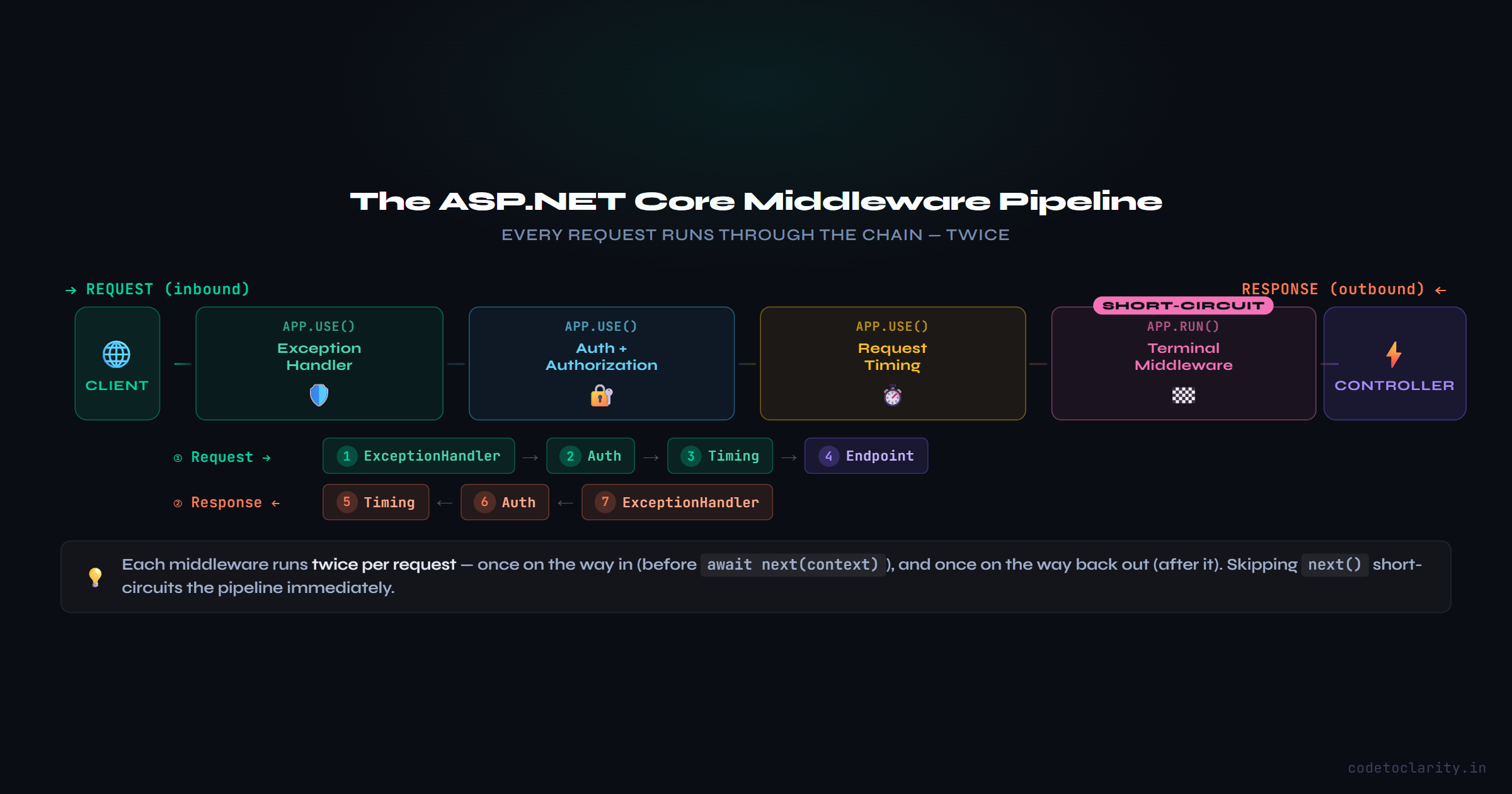
When an HTTP request arrives at your application, it does not go straight to your controller. It passes through a pipeline of middleware components, one by one. Each component can inspect the request, do something with it, and either pass it along or respond immediately and stop the pipeline.
On the way back out (the response), the same components get a second chance to act, in reverse order.
This is the ASP.NET Core request pipeline.
The Pipeline
Here is what actually happens when a request comes in:
- The request enters the first middleware in the pipeline.
- That middleware does its thing (logs something, checks a header, whatever its job is).
- It calls
await next(), which hands the request to the next middleware in line. - Eventually, the request reaches your endpoint (controller, minimal API, etc.).
- A response is generated and bubbles back through the same middleware, in reverse order.
The key insight here is that middleware runs twice per request: once on the way in, once on the way out. This makes it incredibly useful for things like timing how long a request takes or logging both the incoming path and the outgoing status code.
You configure this pipeline in Program.cs using the app object, which is an instance of WebApplication.
How Middleware Is Wired Up
Every middleware call in Program.cs uses one of three methods:
app.Use() : Runs the middleware and continues to the next one.
app.Run() : Runs the middleware and terminates the pipeline. Nothing after this will execute.
app.Map() : Branches the pipeline based on a URL path.
Here is a simple example to illustrate the execution flow:
app.Use(async (context, next) =>
{
    Console.WriteLine("CodeToClarity: Request coming in");
    await next(context);
    Console.WriteLine("CodeToClarity: Response going out");
});

app.Use(async (context, next) =>
{
    Console.WriteLine("CodeToClarity: Second middleware start");
    await next(context);
    Console.WriteLine("CodeToClarity: Second middleware end");
});

app.Run(async context =>
{
    Console.WriteLine("CodeToClarity: Terminal middleware — sending response");
    await context.Response.WriteAsync("Hello from CodeToClarity!");
});
When a request hits this app, the console output will look like this:
CodeToClarity: Request coming in
CodeToClarity: Second middleware start
CodeToClarity: Terminal middleware — sending response
CodeToClarity: Second middleware end
CodeToClarity: Response going out
Notice how the response phase runs in reverse. That is the pipeline folding back on itself. This is what makes middleware so elegant for cross-cutting concerns like performance monitoring and request logging.
For a deeper look at how the pipeline works internally, the official ASP.NET Core middleware documentation is an excellent reference.
The Two Things Every Middleware Touches: HttpContext and RequestDelegate
Every middleware component receives two things to work with.
HttpContext
This is the object that represents the entire current HTTP request and its response. It is your window into everything:
// What method is this? GET, POST, DELETE?
string method = context.Request.Method;

// What path did they hit?
string path = context.Request.Path;

// What did the browser send in headers?
string userAgent = context.Request.Headers["User-Agent"];

// Read a query string parameter
string search = context.Request.Query["q"];

// Set a response status code
context.Response.StatusCode = 200;

// Write to the response body
await context.Response.WriteAsync("All good.");

// Is this user logged in?
bool isLoggedIn = context.User.Identity?.IsAuthenticated ?? false;
HttpContext also gives you access to things like the request body, cookies, the connection info, and dependency-injected services via context.RequestServices.
RequestDelegate
This is the next you call to hand control to the next middleware. Under the hood, RequestDelegate is just a C# delegate. If that word is unfamiliar, check out What Is a Delegate in C#? before continuing, it will make this click much faster. Its type signature looks like this:
public delegate Task RequestDelegate(HttpContext context);
When you write await next(context), you are invoking this delegate. If you skip calling it, the pipeline stops right there and whatever is in context.Response gets sent back to the client.
Built-In Middleware You Will Use All the Time
ASP.NET Core ships with a solid collection of ready-to-use middleware. You don't need to build most common functionality yourself. Here are the ones you will encounter in almost every project:
Exception Handling
app.UseExceptionHandler("/error");
This catches any unhandled exception in the pipeline and redirects to an error endpoint. In development, you can swap this for app.UseDeveloperExceptionPage() to see full stack traces in the browser.
HTTPS Redirection
app.UseHttpsRedirection();
Automatically redirects any HTTP request to the HTTPS equivalent. Simple but important for production.
Static Files
app.UseStaticFiles();
Serves files from the wwwroot folder without ever touching your controllers. CSS, JavaScript, images, all served directly.
Routing
app.UseRouting();
This is what allows ASP.NET Core to match an incoming URL to the correct endpoint. Without it, your controllers would never receive a request.
Authentication and Authorization
app.UseAuthentication();
app.UseAuthorization();
These two always go together and always in this order. Authentication figures out who the user is. Authorization decides what they are allowed to do. Swapping the order would mean authorizing anonymous requests before anyone has identified themselves, which breaks the logic entirely.
CORS
app.UseCors("MyCorsPolicy");
Handles Cross-Origin Resource Sharing. If your front end lives on a different domain than your API, CORS middleware is what allows (or blocks) those requests.
Response Compression
app.UseResponseCompression();
Compresses response payloads using gzip or Brotli. This reduces bandwidth and speeds up responses for clients that support it.
Writing Your Own Middleware
Here is where it gets really useful. You can write middleware for anything that applies across multiple requests: rate limiting, request timing, custom logging, adding security headers, and so on.
There are two ways to create custom middleware.
Option 1: Inline with a Lambda
For quick, simple jobs, you can write middleware directly in Program.cs:
app.Use(async (context, next) =>
{
    // Add a custom header to every response
    context.Response.Headers["X-Powered-By"] = "CodeToClarity API";
    await next(context);
});
This works well for small tweaks. However, for anything more complex, a dedicated class is the cleaner approach.
Option 2: Middleware Class
This is the standard pattern for real-world middleware. Create a class that accepts a RequestDelegate in its constructor and implements an InvokeAsync method:
public class RequestTimingMiddleware
{
    private readonly RequestDelegate _next;
    private readonly ILogger<RequestTimingMiddleware> _logger;

    public RequestTimingMiddleware(RequestDelegate next, ILogger<RequestTimingMiddleware> logger)
    {
        _next = next;
        _logger = logger;
    }

    public async Task InvokeAsync(HttpContext context)
    {
        var stopwatch = System.Diagnostics.Stopwatch.StartNew();

        await _next(context);

        stopwatch.Stop();

        _logger.LogInformation(
            "CodeToClarity | {Method} {Path} completed in {ElapsedMs}ms with status {StatusCode}",
            context.Request.Method,
            context.Request.Path,
            stopwatch.ElapsedMilliseconds,
            context.Response.StatusCode
        );
    }
}
Register it in Program.cs:
app.UseMiddleware<RequestTimingMiddleware>();
Tip: Create an Extension Method for Clean Registration
If you are building a library or just want cleaner Program.cs code, wrap the registration in an extension method:
public static class CodeToClarityMiddlewareExtensions
{
    public static IApplicationBuilder UseRequestTiming(this IApplicationBuilder builder)
    {
        return builder.UseMiddleware<RequestTimingMiddleware>();
    }
}
Now in Program.cs:
app.UseRequestTiming();
Much cleaner, especially when you have several custom middleware components.
Short-Circuiting: When You Want to Stop the Pipeline Early
Sometimes you need to intercept a request and respond immediately without letting it go further. A maintenance mode middleware is a classic example:
public class MaintenanceModeMiddleware
{
    private readonly RequestDelegate _next;
    private static readonly bool _isUnderMaintenance = true;

    public MaintenanceModeMiddleware(RequestDelegate next) => _next = next;

    public async Task InvokeAsync(HttpContext context)
    {
        if (_isUnderMaintenance)
        {
            context.Response.StatusCode = 503;
            context.Response.ContentType = "text/plain";
            await context.Response.WriteAsync("CodeToClarity is under scheduled maintenance. Check back soon.");
            return; // Pipeline stops here
        }

        await _next(context);
    }
}
Notice there is no await _next(context) inside the if block. The method returns early, so nothing downstream ever runs. This is short-circuiting the pipeline.
This pattern is also common for things like returning cached responses, rejecting requests with missing API keys, or blocking specific IP addresses.
Middleware Order Matters More Than You Think
This is one of the most common sources of confusion and bugs for developers new to ASP.NET Core. The order in which you register middleware is the exact order it runs.
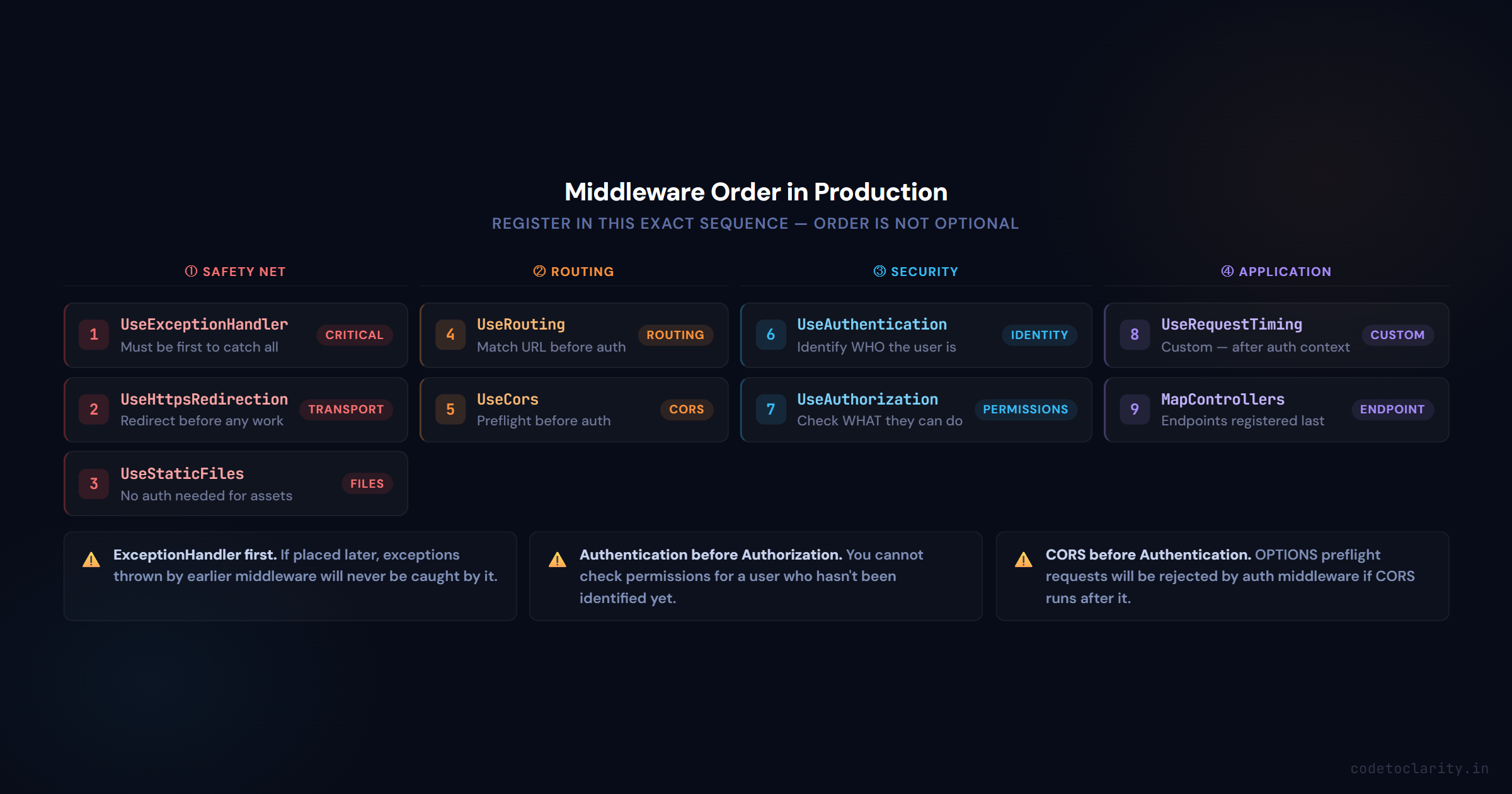
Here is the recommended order for a production Web API:
var app = builder.Build();

app.UseExceptionHandler("/error");       // Must be first to catch all exceptions
app.UseHttpsRedirection();               // Redirect HTTP before anything else
app.UseStaticFiles();                    // Serve static files early, no auth needed
app.UseRouting();                        // Route matching before auth decisions
app.UseCors();                           // CORS must come before auth
app.UseAuthentication();                 // Identify the user first
app.UseAuthorization();                  // Then check if they have access
app.UseRequestTiming();                  // Custom middleware after auth
app.MapControllers();                    // Map endpoints last

app.Run();
A few things worth calling out:
Exception handling should always be first. If it comes later in the pipeline, any exceptions thrown by earlier middleware will not be caught by it.
Authentication before Authorization. This one trips people up. You cannot check permissions for a user who has not been identified yet.
CORS before Authentication. Preflight OPTIONS requests need to be handled before auth middleware rejects them for missing credentials.
Structured Logging with Middleware
One of the most practical uses of middleware is request logging. Rather than sprinkling log statements throughout your controllers, you can capture every request and response in one place.
If you are using Serilog (which is excellent for structured logging in ASP.NET Core), the Serilog.AspNetCore NuGet package provides a UseSerilogRequestLogging() middleware that handles this out of the box with minimal configuration. If you have not set up Serilog yet or want a solid walkthrough, I have a full guide on structured logging with Serilog in .NET that covers it step by step.
You get structured log entries with method, path, status code, and elapsed time without writing a single line of custom middleware.
Middleware vs. Filters: What Is the Difference?
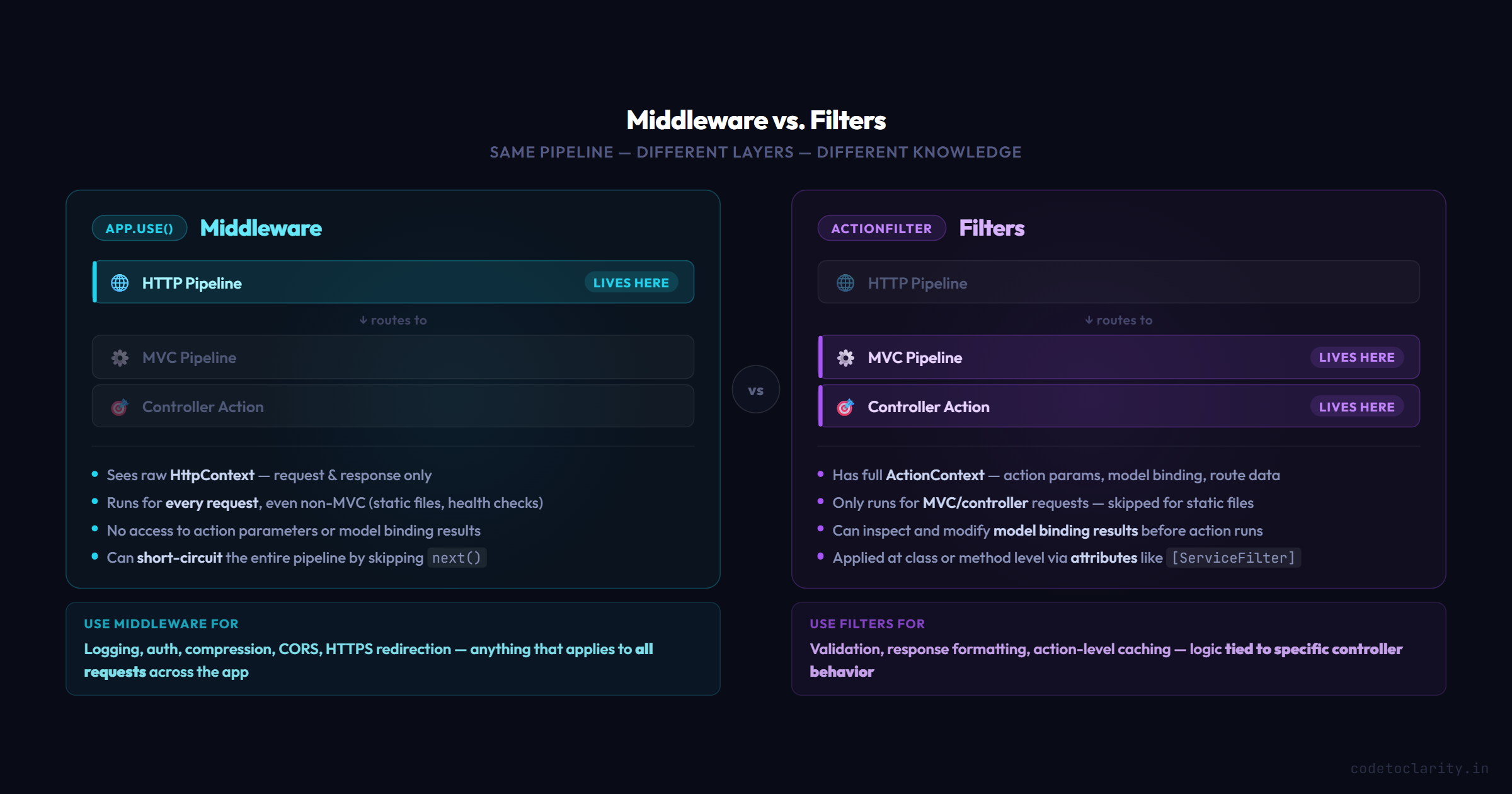
A common question at this stage is how middleware compares to ASP.NET Core filters like ActionFilter or ExceptionFilter.
Here is the short version:
Middleware operates at the HTTP pipeline level. It knows about requests and responses but has no knowledge of controllers, actions, or model binding. It is framework-agnostic in the sense that it runs regardless of what handles the request.
Filters operate within the MVC/controller pipeline. They have access to action parameters, model binding results, and the ActionContext. They are the right choice for logic tied specifically to controller actions.
Use middleware for cross-cutting concerns that apply to all requests (logging, authentication, compression). Use filters for behavior tied to specific controller logic (validation, response formatting, action-level caching).
Avoid These Common Middleware Mistakes
Blocking calls inside middleware. Always use async/await. Synchronous blocking in middleware can starve the thread pool under load and tank your application performance.
Capturing scoped services in the constructor. Middleware is a singleton by nature. If you inject a scoped service like a DbContext into the constructor, you will get unexpected behavior. Instead, inject scoped services through the InvokeAsync method parameters:
public async Task InvokeAsync(HttpContext context, ICodeToClarityService codetoclarityService)
{
    // codetoclarityService is scoped, safely resolved per request
    await _next(context);
}
Putting too much logic into a single middleware. Middleware should do one thing well. If you find yourself writing a middleware that logs, validates, and transforms all in one class, split it up.
Forgetting to call await next(). If you accidentally omit the next call, your request will get a blank 200 response (or whatever you last wrote to context.Response) and never reach your controllers. This is surprisingly easy to miss during development.
Wrapping Up
Middleware is one of those concepts that, once it clicks, completely changes how you think about building web applications. It gives you a clean, composable way to handle everything that needs to happen around your actual business logic: security, logging, performance monitoring, error handling, and more.
The key ideas to carry with you:
Every request goes through a sequential pipeline of middleware components. Order matters and getting it wrong can break authentication or leave exceptions uncaught. You can short-circuit the pipeline at any point by not calling next. Custom middleware should be class-based, async, and single-purpose. Scoped services belong in InvokeAsync, not in the constructor.
Once you are comfortable with the fundamentals here, the ASP.NET Core GitHub repository is a goldmine for seeing how the built-in middleware components are actually implemented. Reading real framework code is one of the fastest ways to level up.
Now go build something with it.

Kishan Kumar
Software Engineer / Tech Blogger
A passionate software engineer with experience in building scalable web applications and sharing knowledge through technical writing. Dedicated to continuous learning and community contribution.