
SQL Query Optimization: Tips to Speed Up Your Database
Learn how to optimize SQL queries to speed up your database performance. Understand the importance of indexes, joins, and proper query structure with real examples and best practices.
We’ve all experienced that infamous moment. You write a shiny new feature. You test it locally with 1,000 records, and it runs in less than a millisecond. You push your code, pat yourself on the back, and head out for lunch.
But then, production traffic hits. Your perfectly fine code encounters a table with 10 million rows, and suddenly, what took milliseconds locally is taking 15 seconds. The database CPU hits 100%, connections start queuing up, server alerts trigger, and your phone lights up with PagerDuty notifications.
Sound familiar? Welcome to the world of sluggish SQL queries.
If you are working with data-heavy applications whether it’s an e-commerce storefront, an analytics dashboard, or a busy SaaS product, slow queries are the silent killers of your software's performance. They choke application memory, frustrate end users, and cost serious money in unnecessary cloud resource scaling.
But here’s the good news: query optimization isn't dark magic. It is simply about working with the database engine instead of fighting against it. By applying a core set of fundamental principles, you can take a query that takes 12 seconds and reduce its execution time to under 0.15 seconds.
In this comprehensive guide, we are going to dive deep into the most effective techniques for writing faster, smarter, and highly optimized SQL queries. No dense academic theories just practical, real-world strategies you can apply to your next pull request.
The "Give Me Everything" Problem (SELECT *)
Let’s start with the most common, and arguably the most damaging, habit among developers learning SQL: writing SELECT * FROM table.
It is incredibly easy to type. When you are rapidly exploring data, SELECT * feels like a natural shortcut. But when deployed in production code, it is an absolute disaster for performance.
Why Databases Hate SELECT *
When you request every column from a table, you create massive overhead across multiple layers of your infrastructure:
- Storage I/O Overhead: The database engine has to physically read more data pages from disk into memory.
- Network Bottlenecks: Transporting the data from the database server to your application server consumes significantly more network bandwidth. If you only needed the
order_idandamount, but you also downloaded a massivecustomer_logstext block, you're saturating your network for no reason. - Memory Waste: Your application code (for example, Entity Framework Core, Dapper, or Node.js Knex) must allocate RAM to store and map all those extra, unused columns into objects.
The Fix
Be explicit about exactly what you need.
-- The slow, resource-heavy approach
SELECT *
FROM orders
WHERE customer_id = 9942;

-- The optimized approach
SELECT order_id, order_date, total_amount
FROM orders
WHERE customer_id = 9942;
When you specify columns explicitly, you give the SQL Server execution engine the opportunity to use an "Index Cover." If a non-clustered index exists that contains order_id, order_date, and total_amount, the database doesn't even need to look at the actual data table. It simply reads the index and returns the result instantly.
The Magic of Indexing (Used Correctly)
If you have ever tried to find a specific topic in a 500-page textbook without an index, you know how painful it is. You have to flip through every single page from cover to cover. In the database world, this is called a Full Table Scan, and it is the enemy of performance.
Indexes provide a map. They allow the database engine to jump immediately to the row it needs via a highly efficient B-Tree data structure.
Clustered vs. Non-Clustered Indexes
To master indexing, you need to understand the two main types:
- Clustered Indexes: This dictates how the data is physically stored on the disk. A table can only have one clustered index (usually the Primary Key). If your table is a phone book, it’s organized alphabetically by last name—this is the clustered index.
- Non-Clustered Indexes: These are separate structures built alongside the main data table, much like the index at the back of a textbook. You can have many non-clustered indexes, but each one takes up disk space and must be updated every time you insert or edit a row.
A Common Mistake: Over-Indexing
When junior developers discover indexes, they often go wild, adding an index to every single column just in case.
This introduces a severe write penalty. Every time you run an INSERT, UPDATE, or DELETE, the database doesn't just update the table; it has to rebalance and rewrite every single index associated with that table. If you have 15 indexes on your Users table, an insert that should take 5 milliseconds might take 100 milliseconds, grinding your write throughput to a halt.
Best Practice: Only add indexes to columns that are heavily used in WHERE, JOIN, and ORDER BY clauses. For a deep architectural understanding, consult the official SQL Server Index Architecture and Design Guide.
SARGable Queries: The Secret to Making Indexes Work
Here is a heartbreaking scenario: You successfully added an index to the sale_date column. You run your query... but it’s still scanning millions of rows. It takes 10 seconds. You verify the index exists, so what went wrong?
You likely wrote a query that wasn't SARGable.
SARGable stands for "Search Argument-Able." It means that your WHERE clause is written in a way that allows the database engine to actually use the index. The golden rule is: Never wrap an indexed column in a function.
The Problem with Functions in WHERE Clauses
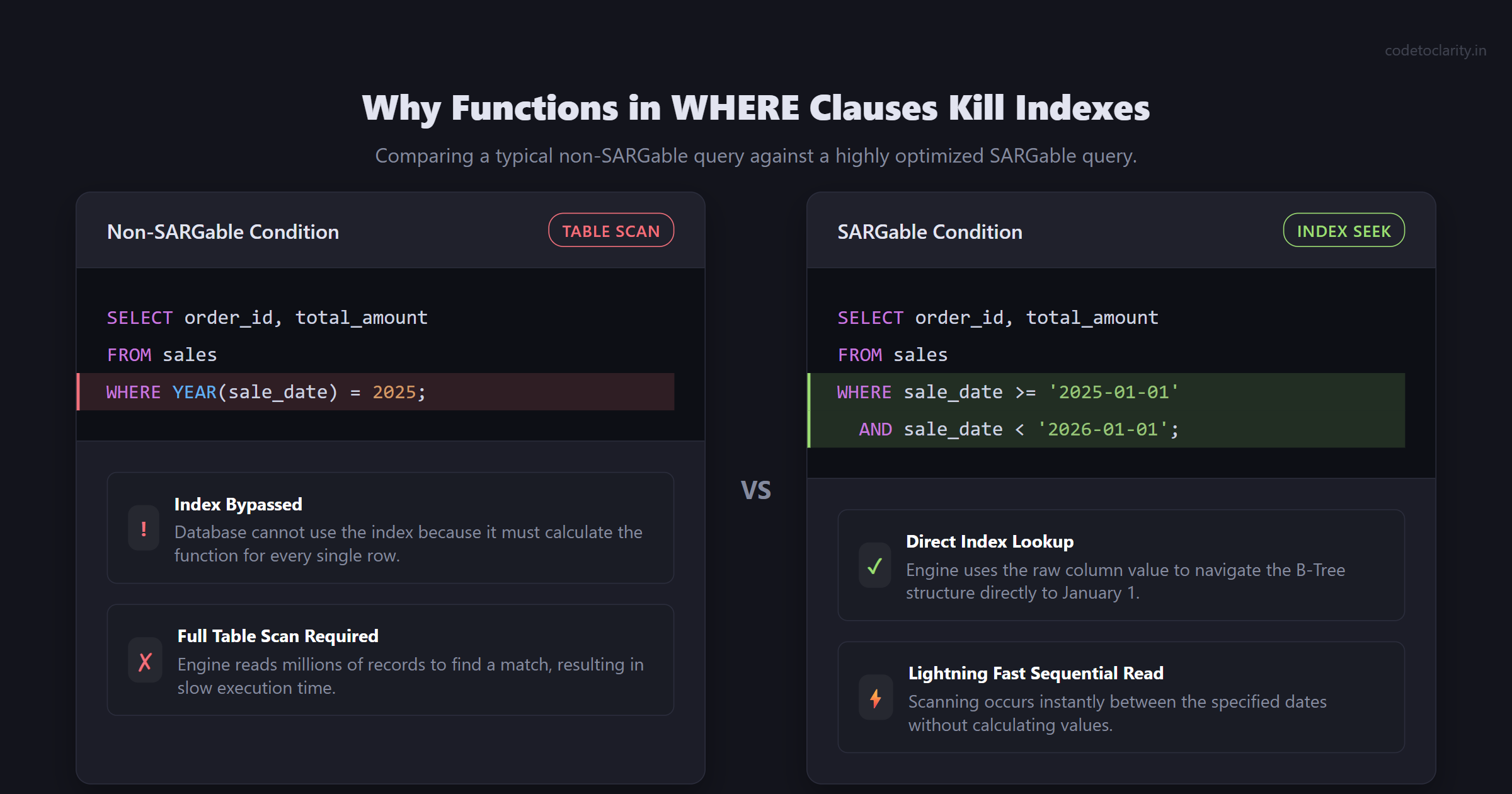
Take this query, aimed at finding all sales in the year 2025:
-- NOT SARGable
SELECT order_id, total_amount
FROM sales
WHERE YEAR(sale_date) = 2025;
Because you wrapped sale_date in the YEAR() function, the database engine cannot simply look up '2025' in the index. The database doesn’t know the result of YEAR(sale_date) until it calculates it. Consequently, it must pull every single row in the table, calculate YEAR() for each row, and then evaluate the match. Your index is effectively ignored, resulting in a disastrous full table scan.
The SARGable Solution
Instead of modifying the column to fit your criteria, modify your criteria to fit the column.
-- Highly SARGable
SELECT order_id, total_amount
FROM sales
WHERE sale_date >= '2025-01-01' AND sale_date < '2026-01-01';
By presenting a concrete range, the database engine can jump straight to January 1, 2025, in the index and read sequentially until it hits January 1, 2026. This transforms a multi-second table query into a near-instant lookup.
Other common SARGability destroyers include:
LIKE '%term'(leading wildcards prevent index usage)- Math operations:
WHERE salary * 1.10 > 50000(Rewrite asWHERE salary > 50000 / 1.10) ISNULL(status, 'Active') = 'Active'
The Silent Killer: The N+1 Query Problem
While slow native SQL queries are bad, modern Object-Relational Mappers (ORMs) like Entity Framework Core or Hibernate introduce an entirely different beast: the N+1 query problem. It happens when an ORM translates simple developer code into a horrific storm of database queries.
How It Happens
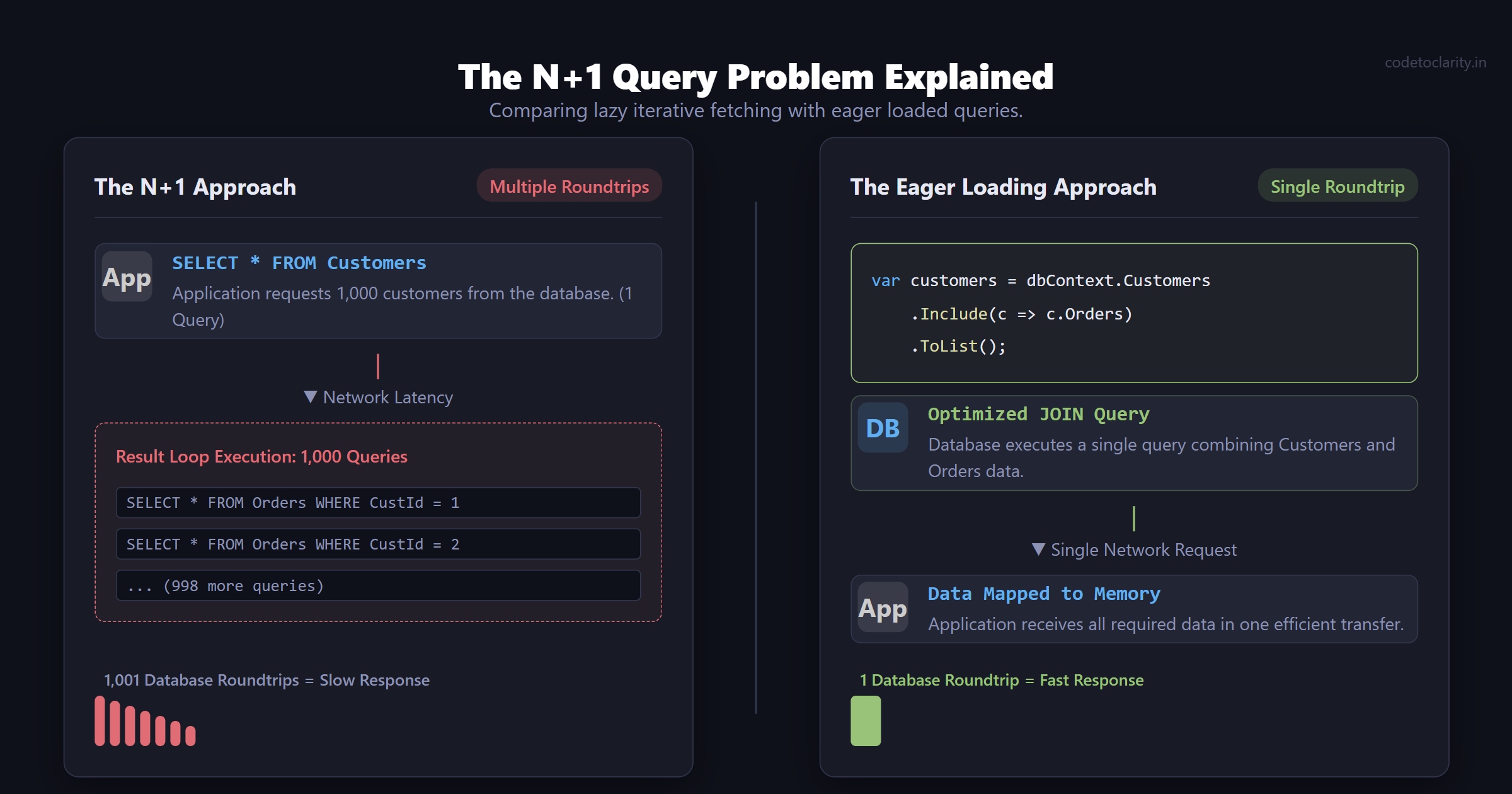
Imagine you are fetching a list of e-commerce customers, and for each customer, you want to display their most recent orders. You write the following C# code:
var CodeToClarityCustomers = dbContext.Customers.ToList(); // Executes 1 query

foreach(var customer in CodeToClarityCustomers)
{
    // Executes 1 query for EVERY customer in the list
    var orders = customer.Orders.ToList();
}
If you have 1,000 customers in the database, this underlying logic executes 1 initial query to get the customers, and then 1,000 individual queries to get the orders for each. This equates to 1,001 separate roundtrips to your database server.
The network latency alone ensures that your web application page takes several seconds to load.
The Solution: Eager Loading
The fix is explicitly telling your ORM to fetch all the related data upfront in a single, well-optimized query using JOIN logic, rather than loop-based lazy fetching.
In Entity Framework Core, we fix this by utilizing the .Include() method for eager loading:
// Fetches customers and orders simultaneously mapping them in memory
var CodeToClarityCustomers = dbContext.Customers
    .Include(c => c.Orders)
    .ToList();
For large, complex object graphs with multiple tables, you can run into "Cartesian Explosion" where the single generated SQL query returns massive amounts of duplicated, joined data. In these situations, utilize .AsSplitQuery() to keep queries highly optimized while still eliminating the N+1 problem. For extensive details, refer to the official Entity Framework Querying Related Data documentation.
Pagination That Doesn't Break the Bank
As your application grows, fetching everything is impossible, so you implement pagination. The most common way developers implement pagination is utilizing OFFSET / FETCH (or LIMIT / OFFSET in PostgreSQL and MySQL).
The Offset Penalty
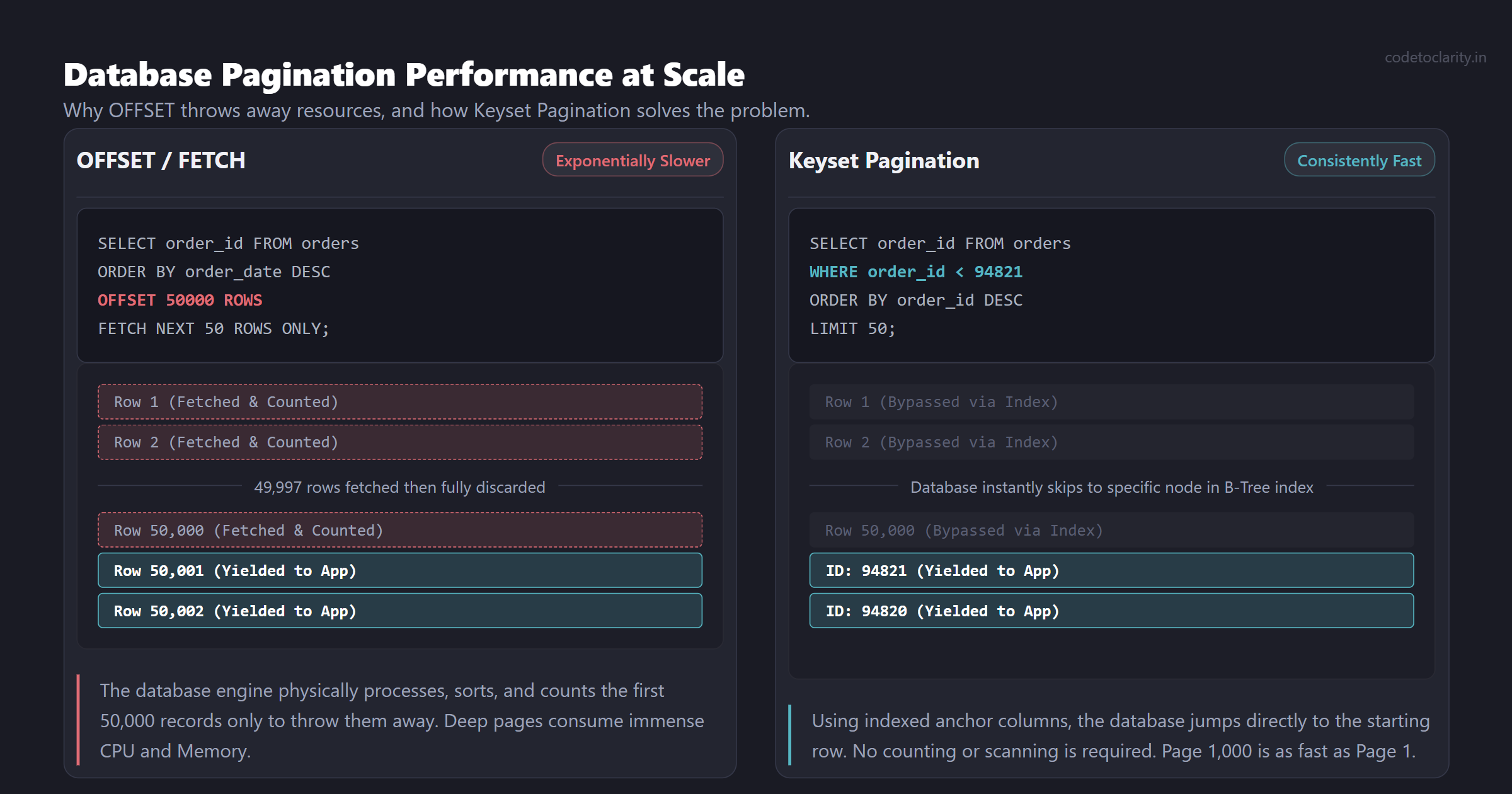
SELECT order_id, order_date, total_amount
FROM orders
ORDER BY order_date DESC
OFFSET 50000 ROWS
FETCH NEXT 50 ROWS ONLY;
This query looks innocent, but it has a massive flow. To give you rows 50,001 to 50,050, the database engine must fetch, sort, and literally count the first 50,000 rows, only to throw them away. As users navigate deeper into the pagination (say, page 1,000), the query becomes exponentially slower.
Keyset Pagination (The Cursor Method)
A far more scalable approach for massive datasets is known as Keyset Pagination. Instead of telling the database to skip 50,000 records, you tell the database where to start based on the primary key or sorting value of the very last record retrieved on the previous page.
-- Provide the ID of the last row on the previous page
SELECT order_id, order_date, total_amount
FROM orders
WHERE order_id < 94821
ORDER BY order_id DESC
LIMIT 50;
Assuming order_id is indexed, the database engine jumps instantly to ID 94821 and reads the next 50 rows. No scanning, no counting, no throwing away data. The 1,000th page will load just as fast as the 1st page.
Efficient Joins: Keeping Connected Data Fast
The relational aspect of SQL databases involves joining tables. However, carelessly joining massive tables can result in unmanageable performance.
When writing JOIN operations:
- Always join on indexed columns (typically Primary and Foreign Keys).
- Be intentional with
LEFT JOIN. If you write aLEFT JOINbut yourWHEREclause filters out NULLs on the right-hand table, you are logically executing anINNER JOINbut potentially confusing the query optimizer. - Avoid blindly joining tables you do not need data from. If you just need a customer's
customer_idand it implies the Customer exists because of referential integrity, don't execute a join simply to grab the Customer's mapping.
Reading the Map: Execution Plans
How do you know if your queries are using SELECT *, lacking an index, or performing terrible joins without manually hunting them down? You look under the hood using Execution Plans.
An execution plan visually maps out the step-by-step physical operations the SQL engine takes to resolve a query.
In Microsoft SQL Server Management Studio, clicking "Include Actual Execution Plan" shows block diagrams with percentage costs allocated to each operation. In MySQL and PostgreSQL, prefixing your query with the EXPLAIN keyword accomplishes the same thing.
What to Look For:
When viewing an execution plan, the biggest red flags are Table Scan and Clustered Index Scan. The word "Scan" usually means the database is reading the entire table to find matches. You want to see operations labeled Index Seek—where the engine is intelligently searching the B-Tree for exact matches.
The execution plan also accurately calculates the memory requirements and I/O costs of your data sort operations. To dive deeper into interpreting these diagnostics, reading the Microsoft Docs on Execution Plans is well worth the time investment.
Real-World Recap: The Power of Optimization
Let's look at how combining all these techniques results in dramatic performance gains.
The Bad Multi-Second Query:
SELECT * FROM orders
WHERE YEAR(order_date) = 2025
  AND status_code = 1
ORDER BY order_date DESC
OFFSET 100000 ROWS FETCH NEXT 50 ROWS ONLY;
Why it fails: It uses SELECT *, destroys SARGability with YEAR(), forces the database to count 100,000 rows, and creates a full table scan. Time to execute: 12 seconds.
The Lightning-Fast Refactor:
SELECT order_id, order_date, total_amount
FROM orders
WHERE order_date >= '2025-01-01' AND order_date < '2026-01-01'
  AND status_code = 1
  AND order_id < 800000 /* Keyset pagination from previous page */
ORDER BY order_id DESC
LIMIT 50; /* Uses TOP or LIMIT depending on engine */
Why it wins: It specifies explicit columns, leverages index covering, uses a SARGable date range, entirely bypasses offset counting with Keyset pagination, and hits Index Seeks all the way down. Time to execute: 0.15 seconds.
Conclusion
SQL query optimization is an ongoing journey of maintaining the balance between logic, indexing, and architecture. By moving away from SELECT *, implementing proper SARGable WHERE clauses, utilizing Keyset Pagination over deep Offsets, and keeping a watchful eye out for the N+1 query problem from your ORMs, you can massively increase application resilience.
Your databases are incredibly powerful pieces of technology. When you feed them smart, targeted queries, they will reward you with lightning-fast speeds and reliable performance even at massive scale. Start analyzing your execution plans today, apply these fundamentals, and stop killing your database!

Kishan Kumar
Software Engineer / Tech Blogger
A passionate software engineer with experience in building scalable web applications and sharing knowledge through technical writing. Dedicated to continuous learning and community contribution.