
What Is Docker? A Beginner-Friendly Guide with Real CI/CD Examples
Struggling to understand Docker? Learn what Docker is, how containers work, and how Docker fits into CI/CD pipelines with simple real-world examples.
If you have spent any time writing code, you have almost certainly encountered one of the most frustrating phrases in software development. You pull the latest code from your team's repository, run the application, and it immediately crashes with a bizarre error. You ask your teammate for help, and they reply with the classic excuse.
"It works on my machine."
This scenario plays out in offices and remote teams around the world every single day. The problem in these situations is rarely bad code. Instead, the issue stems from the fact that software heavily depends on its underlying environment.
Your machine might be running a different operating system than your teammate's machine. You might have a slightly older version of Node.js or .NET installed. Perhaps a specific system library is missing, or an environment variable is configured differently. Managing these tiny differences manually becomes an absolute nightmare as applications grow larger and teams expand.
This exact problem is what Docker was built to solve. Docker completely revolutionizes how we build, share, and deploy software. It helps developers package applications in a way that guarantees they will run exactly the same everywhere. It does not matter if the code is running on your laptop, on a staging server, or in a massive production cluster in the cloud.
In this comprehensive guide, we are going to break down exactly what Docker is, how it works under the hood, and why it has become an absolute necessity for modern software development. We will strip away the heavy jargon and use real-world analogies to make these concepts click.
The Pre-Docker World: A Deployment Nightmare
To truly appreciate Docker, we first need to understand the pain of the past.
Imagine you are building a modern web application for a company. Your technology stack consists of a React frontend, a .NET Web API backend, and a PostgreSQL database.
In the traditional deployment model, getting this application to run on a server required a massive checklist of manual steps. The system administrator had to log into the server and carefully install the exact version of the .NET SDK you used. They had to install Node.js for the frontend build process. They had to set up PostgreSQL, configure the database users, and ensure the server's firewall allowed traffic on specific ports.
If you ever needed to upgrade your .NET version from version 7 to version 8, the administrator had to carefully upgrade the server without breaking other applications that might be sharing that same machine. Deploying to a new environment meant repeating this fragile, error-prone manual process all over again.
This approach was slow. It was incredibly difficult to maintain. It made scaling up to handle more traffic a terrifying prospect.
Enter Docker: The Shipping Container Analogy
To understand how Docker solves this problem, we can look at the physical shipping industry.
Decades ago, transporting global goods was chaotic. A cargo ship might carry wooden crates of apples, steel barrels of oil, and canvas sacks of coffee beans. Every single item had a different shape and required different handling. Loading and unloading these ships took weeks of grueling manual labor.
Then, the industry invented the standardized steel shipping container.
The shipping container changed everything. A crane operator does not need to know if a container holds televisions or car parts. The crane just picks up the standardized steel box. The cargo ship is designed to stack these boxes perfectly. The truck waiting at the port is designed to carry that exact box size. The infrastructure only cares about the container, completely ignoring the contents inside.
Docker brings this exact same standardization to the software world.
Docker allows you to take your application code, your runtime environment, your libraries, and your configuration files, and pack them all into a standardized digital box. We call this box a software container.
Once your application is packed inside this container, the underlying server no longer matters. The server does not need .NET installed. The server does not need Node.js installed. The server only needs one thing installed: Docker. Because Docker knows how to run containers, your application brings its own perfect environment with it wherever it goes.
Demystifying Docker Terminology
When beginners first start learning Docker, they often get overwhelmed by the terminology. Words like images, containers, and registries get thrown around interchangeably. Let us break these core concepts down simply.
What is a Docker Image?
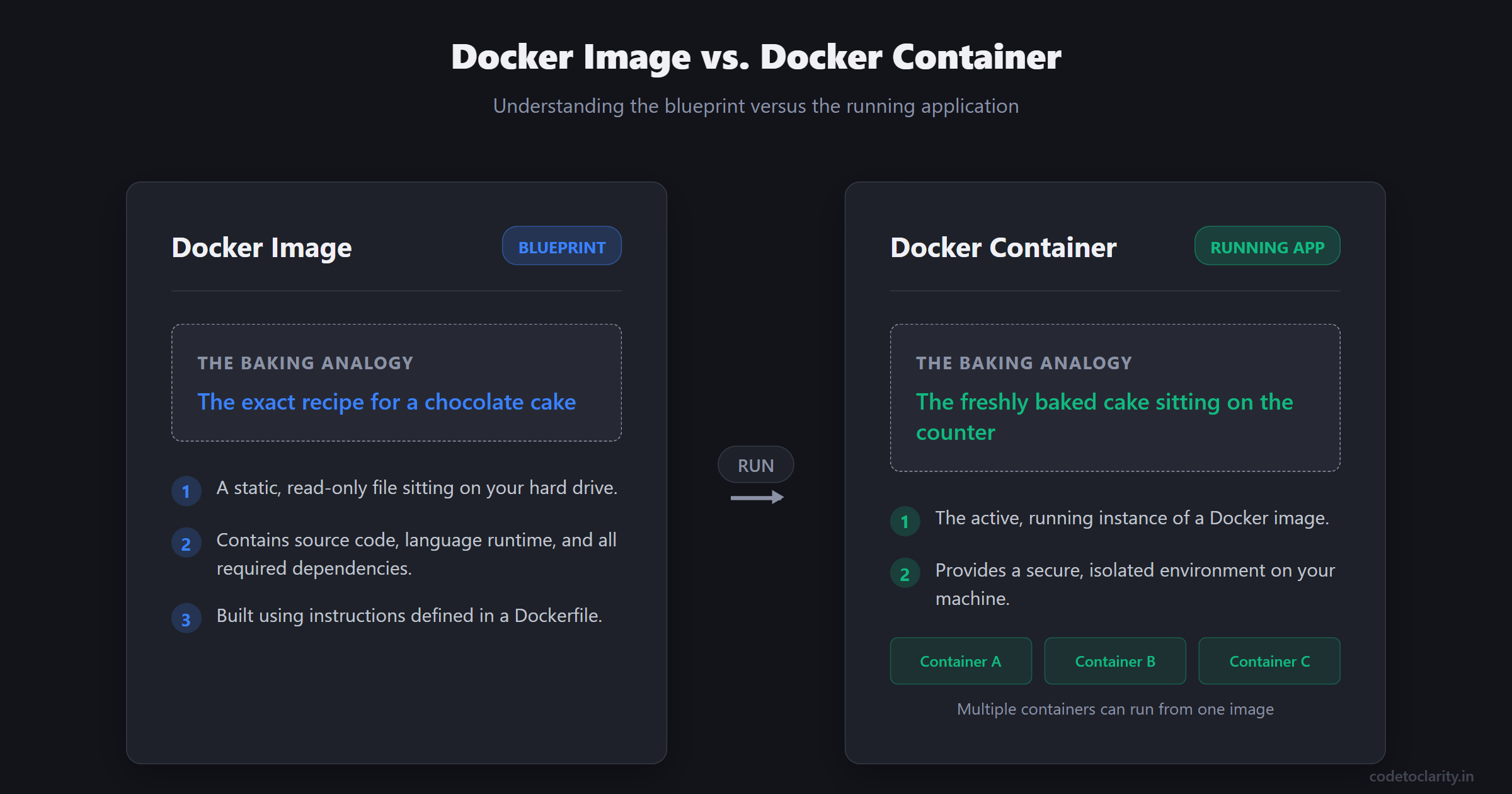
You can think of a Docker image as the blueprint or the recipe for your application.
An image is a static, read-only file that contains everything your application needs to run. It holds your source code, the language runtime, required third-party packages, and basic system tools.
If we use a baking analogy, the Docker image is the exact recipe for a chocolate cake. You cannot eat a recipe. It is just a set of instructions and a list of ingredients. In the same way, a Docker image is not a running application. It is just the frozen blueprint sitting on your hard drive.
What is a Docker Container?
A Docker container is the running instance of a Docker image.
Going back to our baking analogy, if the image is the recipe, the container is the actual, freshly baked chocolate cake sitting on your counter. You can have multiple containers running from the exact same image, just like you can bake multiple cakes using the same recipe.
When you tell Docker to start a container, it looks at the blueprint in the image and spins up a secure, isolated environment on your machine. This environment runs your application independently from anything else happening on your computer.
The Dockerfile: Writing the Recipe
How do we actually create a Docker image? We write a simple set of instructions in a plain text file called a Dockerfile.
The Dockerfile tells the Docker runtime exactly how to assemble our application step by step. Here is a conceptual example of a Dockerfile for a simple .NET Web API named CodeToClarityApi.
# Start with a base image that already has .NET installed
FROM mcr.microsoft.com/dotnet/aspnet:8.0

# Create a folder inside the container to hold our app
WORKDIR /app

# Copy our compiled application files into the container
COPY ./publish .

# Tell the container how to start our application
ENTRYPOINT ["dotnet", "CodeToClarityApi.dll"]
This file is incredibly powerful. It serves as version-controlled documentation for your infrastructure. Any developer on your team can read this file and understand exactly what the application needs to run. They can build the image on their machine using a simple command, and it will produce the exact same result every single time.
The Docker Registry
Once you have built a Docker image, you need a place to store it and share it with your team. This is where a Docker registry comes in.
A registry is essentially a library for Docker images. The most popular public registry is Docker Hub, which hosts millions of pre-built images for databases, web servers, and programming languages. Many companies use private registries, such as Azure Container Registry or Amazon Elastic Container Registry, to securely store their proprietary application images.
Docker vs. Virtual Machines: The Great Debate
When people first hear about Docker creating isolated environments, their first question is usually about virtual machines. Is a Docker container just a tiny virtual machine? The answer is a resounding no. Understanding the difference is crucial.
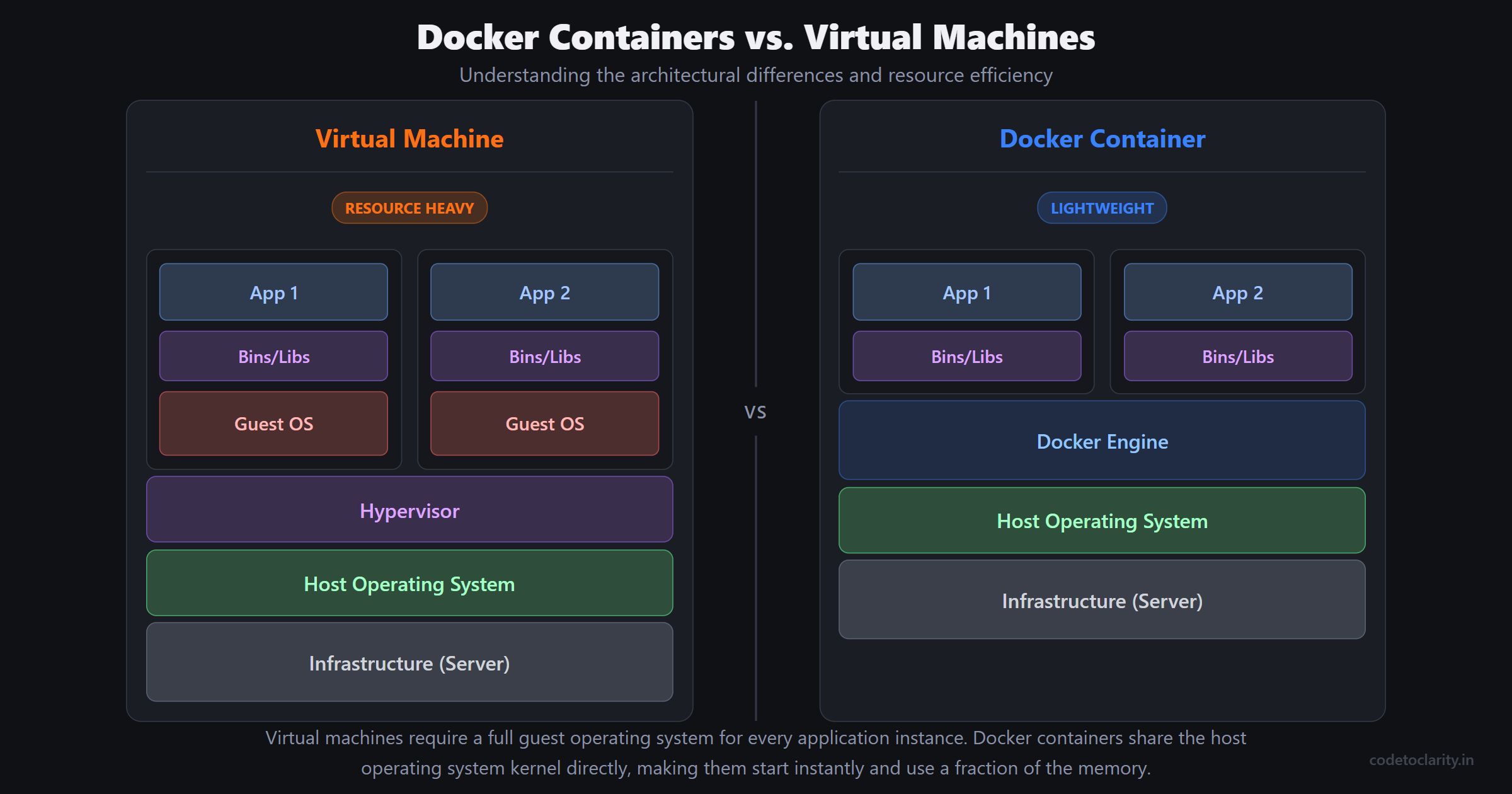
A virtual machine attempts to emulate an entire physical computer. When you run a virtual machine, you have to install a complete guest operating system on top of your host operating system. This means the virtual machine has its own memory management, its own file system drivers, and its own massive background processes. Virtual machines are heavy. They consume gigabytes of RAM just to turn on, and they can take several minutes to boot up.
Docker containers take a completely different, much smarter approach.
Instead of bundling a full operating system, containers share the host machine's operating system kernel. The Docker engine acts as a lightweight manager that keeps the containers securely isolated from each other.
Because containers do not need to boot up a full operating system, they start incredibly fast. A container can typically spin up in milliseconds. They are also highly resource-efficient. You might only be able to run four or five virtual machines on a typical developer laptop before it grinds to a halt. On that same laptop, you could easily run dozens of lightweight Docker containers simultaneously without breaking a sweat.
Why Enterprises Rely on Docker
Docker is not just a fancy tool for local development. It has become the absolute backbone of modern enterprise software architecture. Large companies care deeply about stability, release speed, and resource efficiency. Docker delivers on all of these fronts.
The Rise of Microservices
In the past, companies built massive monolithic applications where the frontend, backend, and database logic were all tangled tightly together. Scaling a monolith is notoriously difficult. If the payment processing feature receives a huge spike in traffic, you have to duplicate and scale the entire massive application.
Docker heavily enabled the shift toward microservices architecture. With microservices, you break your large application down into smaller, independent pieces. Your CodeToClarity user authentication system becomes one microservice. Your payment gateway becomes another.
Each microservice gets its own Docker container. This means teams can write the authentication service in .NET, while another team writes the payment service in Go. Because everything is containerized, they all run perfectly side by side. You can also scale them independently. If the payment service gets busy, you simply spin up ten more payment containers without touching the rest of the application.
Managing Complexity with Docker Compose
Running one container is easy. Running a real-world application with an API, a database, and a caching layer requires coordination. Docker Compose is a tool designed specifically for this problem.
Docker Compose allows you to define all of your application's services in a single configuration file called a YAML file. With one simple command, Docker Compose will download the database image, build your API image, set up a private network so they can talk to each other, and start them all up in the correct order. This provides an incredible developer experience. New hires can clone your repository, run one command, and have the entire complex system running on their laptop in minutes.
The Magic of Docker in CI/CD Pipelines
To truly understand Docker's value, we have to look at how it integrates into the software release process. In modern engineering teams, releasing software is handled by Continuous Integration and Continuous Deployment pipelines, commonly known as CI/CD.
Continuous Integration is the practice of automatically building and testing your code every time a developer makes a change. Continuous Deployment is the practice of automatically releasing that validated code to production servers.
Before Docker, CI/CD was often painful. The build server might compile the code successfully, but the deployment would fail because the production server was slightly out of sync with the build server's environment.
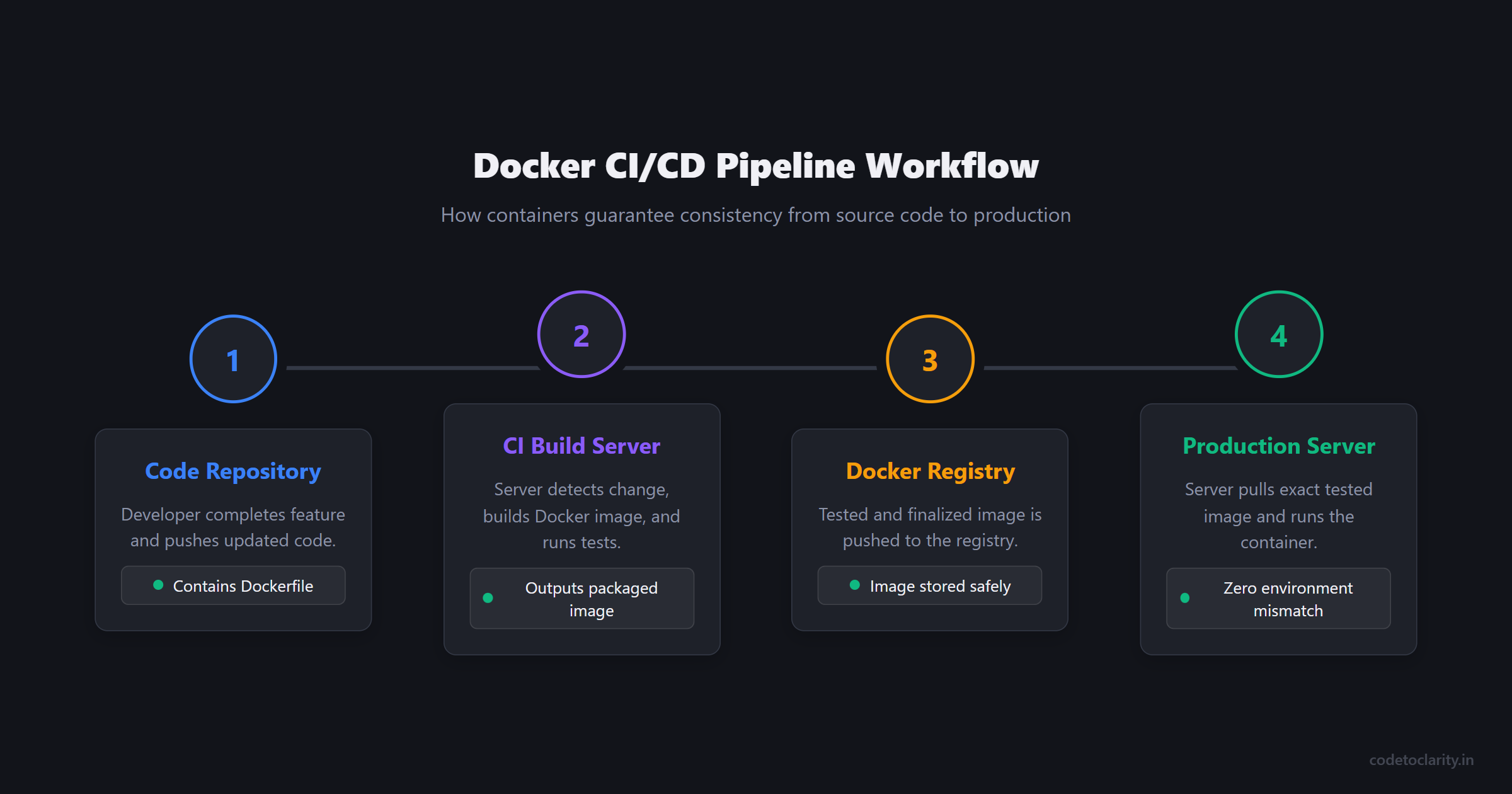
Docker fixes this elegantly. In a Docker-based CI/CD pipeline, the final output of the build process is not just a compiled code binary. The output is a fully packaged Docker image.
Let us trace a real-world scenario. A developer finishes a new feature and pushes their code to the team repository. The CI server detects the change and automatically builds a new Docker image containing the updated application. The CI server then spins up a container from that exact image and runs automated tests against it.
If the tests pass, the CI server pushes that finalized image to the company's Docker registry.
When it is time to deploy, the production servers simply pull that exact same image from the registry and start running it. There is zero risk of environmental mismatch. The exact same digital box that was tested on the build server is the one running in production. This brings massive predictability and peace of mind to release days.
Safe and Instant Rollbacks
Mistakes happen in software development. Sometimes a critical bug makes it into production despite thorough testing. When this happens, speed is everything.
In a traditional deployment, rolling back meant trying to undo server configurations or recompiling old code while customers experienced errors. With Docker, a rollback is trivial. Every Docker image is tagged with a version number. If version 2.0 of your application crashes in production, you simply tell your server to stop the broken container and start a container using the version 1.9 image.
Because the image is completely self-contained, the rollback happens in seconds. The environment is instantly restored to the exact state it was in before the bad release.
Stepping Stones to the Cloud
Once your application is safely packed inside a Docker container, the entire cloud ecosystem opens up to you. Major cloud providers have built massive, highly scalable platforms specifically designed to run containers.
If you are using Amazon Web Services, you can deploy your containers to Elastic Container Service. If you are in the Microsoft ecosystem, you can push your containers to Azure Container Apps. For massive enterprise scale, technologies like Kubernetes act as an orchestrator, automatically managing thousands of Docker containers across hundreds of physical servers, handling load balancing and self-healing automatically.
The beauty of this ecosystem is portability. Because your application is containerized, you are never permanently locked into one hosting provider. The exact same Docker container that runs on AWS will run perfectly on Azure or Google Cloud.
Final Thoughts
Docker has fundamentally shifted the landscape of software engineering. It took the messy, unpredictable process of configuring servers and turned it into a standardized, reliable, and automated workflow.
By packaging your code and its environment together, Docker permanently eliminates the "it works on my machine" excuse. It bridges the gap between development teams who write the code and operations teams who manage the servers. It accelerates developer onboarding, makes CI/CD pipelines bulletproof, and provides the necessary foundation for modern, scalable cloud architectures.
Whether you are building simple hobby projects in Node.js or designing complex enterprise microservices in .NET, taking the time to learn Docker is one of the highest return investments you can make in your technical career. It is no longer just a trendy tool for system administrators. Containerization is a core, fundamental skill for any modern software developer.

Kishan Kumar
Software Engineer / Tech Blogger
A passionate software engineer with experience in building scalable web applications and sharing knowledge through technical writing. Dedicated to continuous learning and community contribution.