
What is Service Discovery in Microservices? (The Complete Beginner's Guide)
Learn what Service Discovery is in microservices, why you need it over static IPs, and the differences between client-side and server-side discovery patterns.
Imagine you have a friend who moves to a new house every five minutes.
If you want to send them a letter, memorizing their address is useless. By the time the mail carrier arrives, your friend is already living somewhere else. Instead of tracking their address yourself, you rely on a magical, real-time post office registry. Before sending anything, you ask the registry, "Where does my friend live right now?" and send the letter to the exact, up-to-the-second location.
This exact problem happens inside modern software applications. In a distributed microservices architecture, services start up, shut down, scale out, and crash constantly. Their network addresses (IP addresses and ports) are always changing. If Service A needs to talk to Service B, it cannot rely on a fixed, hardcoded IP address.
It needs a real-time "phonebook."
That phonebook is Service Discovery.
In this guide, we are going to break down exactly what service discovery is, why it is an absolute necessity in distributed systems, the critical mechanics behind it, the primary patterns (Client-Side vs. Server-Side), the modern Service Mesh approach, and how to apply this concept in your own .NET applications.
The Core Problem: Why Static IP Addresses Are Dead
To understand why we need service discovery, we first need to look at how we used to build software.
In the old days of monolithic applications (which you can read more about in our guide to evolving from a monolith to microservices), deployments were predictable. You had a big application running on a physical server. You knew the server's IP address. If the database was on 192.168.1.50, you hardcoded that into your configuration file. When the application started, it read the configuration, connected to the IP, and everything worked flawlessly.
But the cloud changed everything.
Modern applications are built using microservices and run inside containers (like Docker) orchestrated by platforms like Kubernetes. In these environments, infrastructure is highly ephemeral, meaning it is designed to be temporary and disposable.
Consider a typical scenario in an e-commerce platform:
- Auto-scaling: It is Black Friday. Traffic spikes, and your system automatically spins up 20 new instances of the
InventoryServiceto handle the load. Each new instance gets a completely random, dynamic IP address from the cloud provider's network pool. - Failures and Restarts: A server rack in your cloud provider’s data center loses power. Five instances of your
PaymentServiceinstantly die. Your orchestrator notices and spins up five brand new replacement instances on different servers, all with new IP addresses. - Deployments: You roll out a new version of the
ShippingService. The system starts the new version, waits for it to be healthy, routes traffic to it, and kills the old version. The IP address has changed yet again.
If your OrderService needs to check inventory, process a payment, and arrange shipping, how does it know where to send those network requests?
If you hardcoded the IP addresses in an appsettings.json file, your system would break the moment a service restarts. Updating configuration files manually every time an instance scales up or down is impossible.
You need a system that tracks these dynamic locations automatically.
What Exactly is Service Discovery?
Service Discovery is the automated mechanism that helps services find each other over a network. It acts as the central source of truth for the locations of all running, healthy service instances.
When we talk about Service Discovery, we are usually talking about two distinct components working together:
1. The Service Registry
The Service Registry is the absolute heart of the operation. It is a highly available, distributed database containing the network locations of every active service instance.
When a new instance of a service boots up (for example, a new EmailService container), its first job is to announce itself to the registry: "Hi, I am the EmailService, and you can reach me at 10.0.4.15 on port 8080." This is called Service Registration.
When the instance gracefully shuts down, it tells the registry to remove its entry.
Popular tools used for service registries include:
- Consul by HashiCorp
- Eureka by Netflix
- etcd (the highly consistent key-value store that backs Kubernetes)
- Apache Zookeeper
2. Health Checks and Heartbeats
A registry is completely useless if it hands out phone numbers for dead services. If a service instance crashes unexpectedly, a server loses power, or a network cable is unplugged, the service will not have the chance to gracefully deregister itself.
To solve this, the Service Registry must constantly monitor the health of every registered instance. This is typically done in two ways:
- Active Health Checks: The registry acts actively, pinging a specific
/healthendpoint on the service instance every few seconds (for example, HTTP GET/health). If the endpoint returns an HTTP 200 OK, the instance is healthy. If it returns a 500 error or times out, it is marked as unhealthy. - Passive Heartbeats: The service instance acts actively, sending a periodic "I am still alive" ping (a heartbeat) to the registry, often tied to a Time-To-Live (TTL). If the registry does not receive a heartbeat before the TTL expires, it purges the instance from the list.
If an instance fails a health check or misses a heartbeat, the registry immediately assumes it is dead and stops handing out its IP address to clients. This ensures that clients only ever receive addresses for instances that are actually ready to accept traffic.
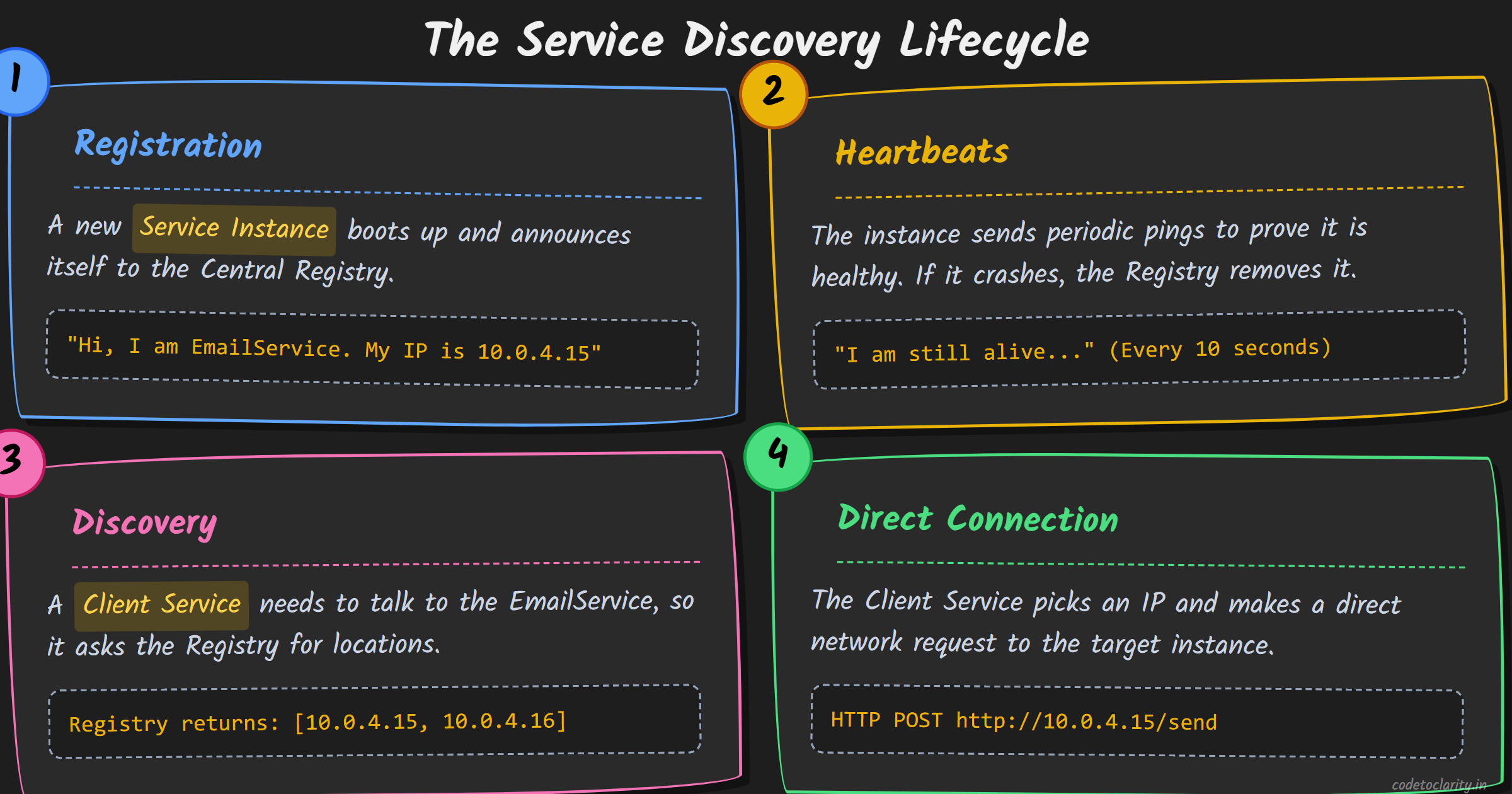
Now that we know what service discovery is, how do services actually use the registry to talk to one another?
Historically, some teams tried to use traditional DNS (Domain Name System) for this. They would map a domain name like billing.internal to multiple IP addresses. However, DNS was designed for the public internet, where IP addresses rarely change. DNS caching is notorious. Browsers, operating systems, and even language runtimes (like older versions of Java or .NET) will cache a DNS lookup for minutes or hours. In a microservices environment where containers live for seconds, DNS caching leads to catastrophic failures as clients repeatedly try to call dead, cached IP addresses.
Because traditional DNS is insufficient for rapid microservice churn, we rely on specific Service Discovery patterns. There are two main architectural approaches: Client-Side and Server-Side discovery.
Pattern 1: Client-Side Service Discovery
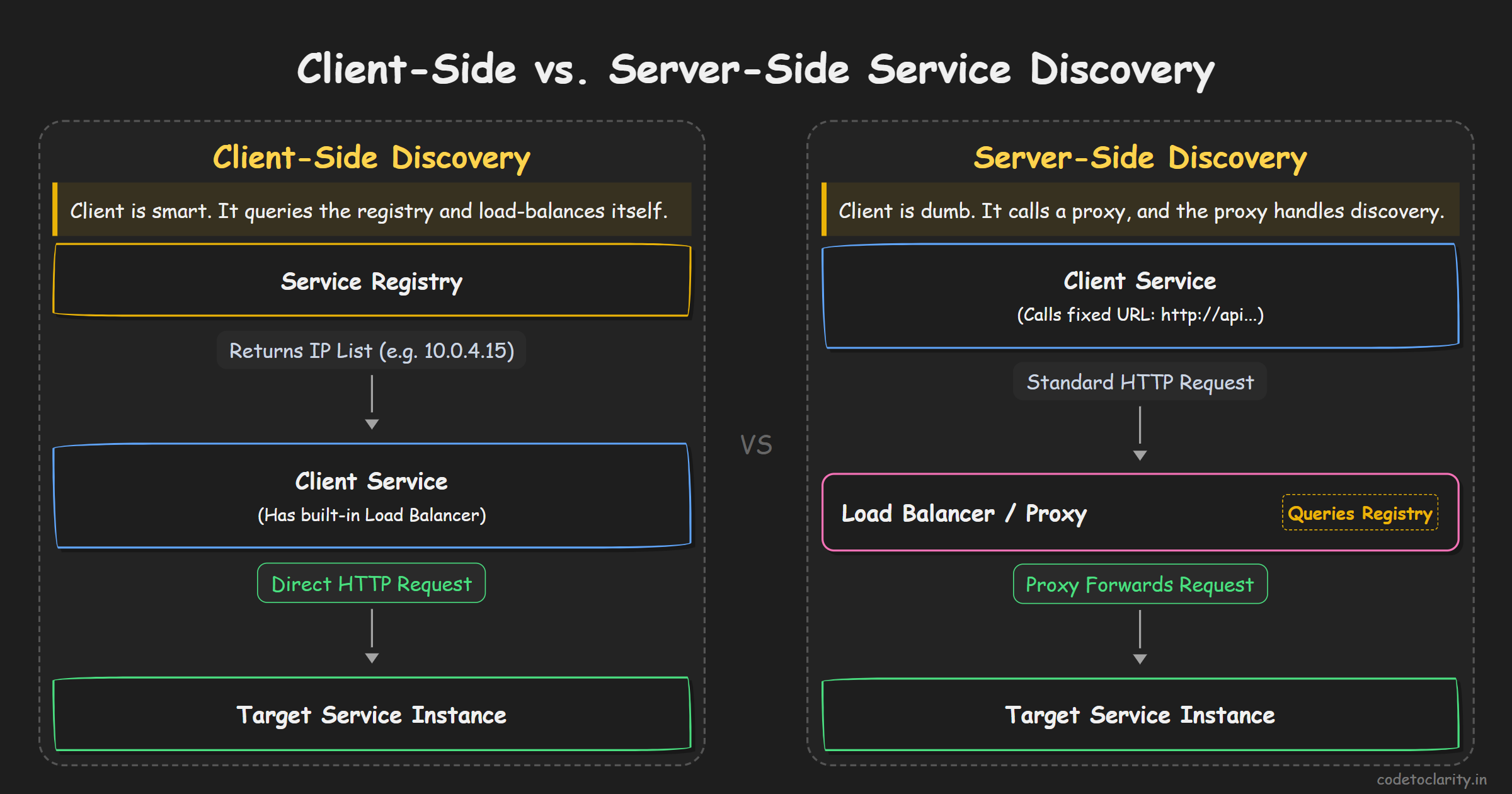
In the Client-Side Service Discovery pattern, the client (the service making the request) is fully responsible for finding the location of the target service and load balancing the request across the available instances.
How it Works
- Query the Registry: The client service needs to call the
BillingService. It reaches out directly to the Service Registry and asks, "Give me the locations of all healthy BillingService instances." - Local Load Balancing: The registry returns a list of IP addresses (for example, three different healthy instances). The client uses a built-in load balancing algorithm (like Round Robin, Random, or Least Connections) to pick one specific instance.
- Direct Connection: The client makes the HTTP or gRPC request directly to the chosen instance's IP address.
The Pros of Client-Side Discovery
- No Extra Network Hops: Because the client talks directly to the target service, latency is kept to an absolute minimum. There is no middleman router, gateway, or proxy sitting in between them slowing down the request.
- Highly Resilient: Clients typically cache the list of IP addresses locally and subscribe to updates from the registry. If the Service Registry goes down temporarily, the client can just use its cached list and the system keeps running smoothly without a central point of failure.
- Custom Load Balancing: Because the client makes the routing decision, it can implement incredibly smart, application-specific load balancing. For example, a client could route traffic to the instance with the lowest response time, or use hash-based routing to ensure requests for a specific user always hit the exact same server instance (sticky sessions).
The Cons of Client-Side Discovery
- Complex Clients: The client service has to do a lot of heavy lifting. It must know how to communicate with the registry, handle local caching, manage retries, and execute load balancing algorithms.
- The Polyglot Nightmare: If your architecture uses C#, Node.js, Python, and Go, you need a complex service discovery and load balancing library for every single one of those languages. Keeping all those libraries updated, bug-free, and behaving consistently is a massive operational headache for infrastructure teams.
- Tight Coupling: Your services become tightly coupled to the specific Service Registry technology you chose. If you use Netflix Eureka, your application code is deeply tied to Eureka's APIs.
A classic example of client-side discovery is the Netflix OSS stack, where Java applications use Netflix Eureka as the registry and Ribbon as the client-side load balancer.
Pattern 2: Server-Side Service Discovery
In the Server-Side Service Discovery pattern, the client service is kept blissfully ignorant. It does not know anything about service registries, heartbeats, caching, or load balancing. It just wants to make a simple request.
How it Works
- Call a Fixed Endpoint: The client sends its request to a stable, fixed endpoint, usually a Load Balancer, an API Gateway, or a reverse proxy. For example, it might just send an HTTP GET request to
http://billing-service/api/invoice. - The Proxy Queries the Registry: The Load Balancer intercepts the request. It is the component that talks to the Service Registry to find out which instances of the
BillingServiceare currently alive. - Forwarding the Request: The Load Balancer picks a healthy instance, forwards the client's request to that specific IP address, and sends the response back to the client.
The Pros of Server-Side Discovery
- Dead Simple Clients: The client code is incredibly simple. You just make a standard HTTP request to a URL. There is no complex discovery logic, caching, or load balancing required in your application code.
- Language Agnostic: Because all the complexity lives in the network infrastructure (the Load Balancer), your services can be written in any language. The router does not care if the request came from a Python script, a Rust application, or a .NET API.
- Centralized Control: Security, monitoring, routing rules, and rate limiting can all be managed in one central place (the Gateway) rather than being scattered and duplicated across hundreds of individual microservices.
The Cons of Server-Side Discovery
- The Extra Hop: Every single service-to-service request must travel through the Load Balancer proxy. This adds a network hop, which marginally increases latency. While this is often negligible (a few milliseconds), it can add up in highly chatty microservice architectures.
- Single Point of Failure: If the Load Balancer or routing tier goes down, your entire system grinds to a halt because services can no longer route traffic to one another. The infrastructure must be made highly available, which requires operational expertise.
If you are using Kubernetes, you are already using Server-Side Service Discovery! When you create a Kubernetes Service, it gives your pods a stable internal DNS name (like my-database-svc.default.svc.cluster.local). Kubernetes handles updating the underlying endpoints and load balancing the traffic via kube-proxy behind the scenes. The calling application just uses the DNS name and Kubernetes handles the rest.
The Modern Evolution: Service Mesh (The Best of Both Worlds)
As microservices matured, the industry realized that both Client-Side and Server-Side patterns had flaws. Client-Side required too much complex code in every language. Server-Side added a central bottleneck and an extra network hop.
Enter the Service Mesh (like Istio or Linkerd).
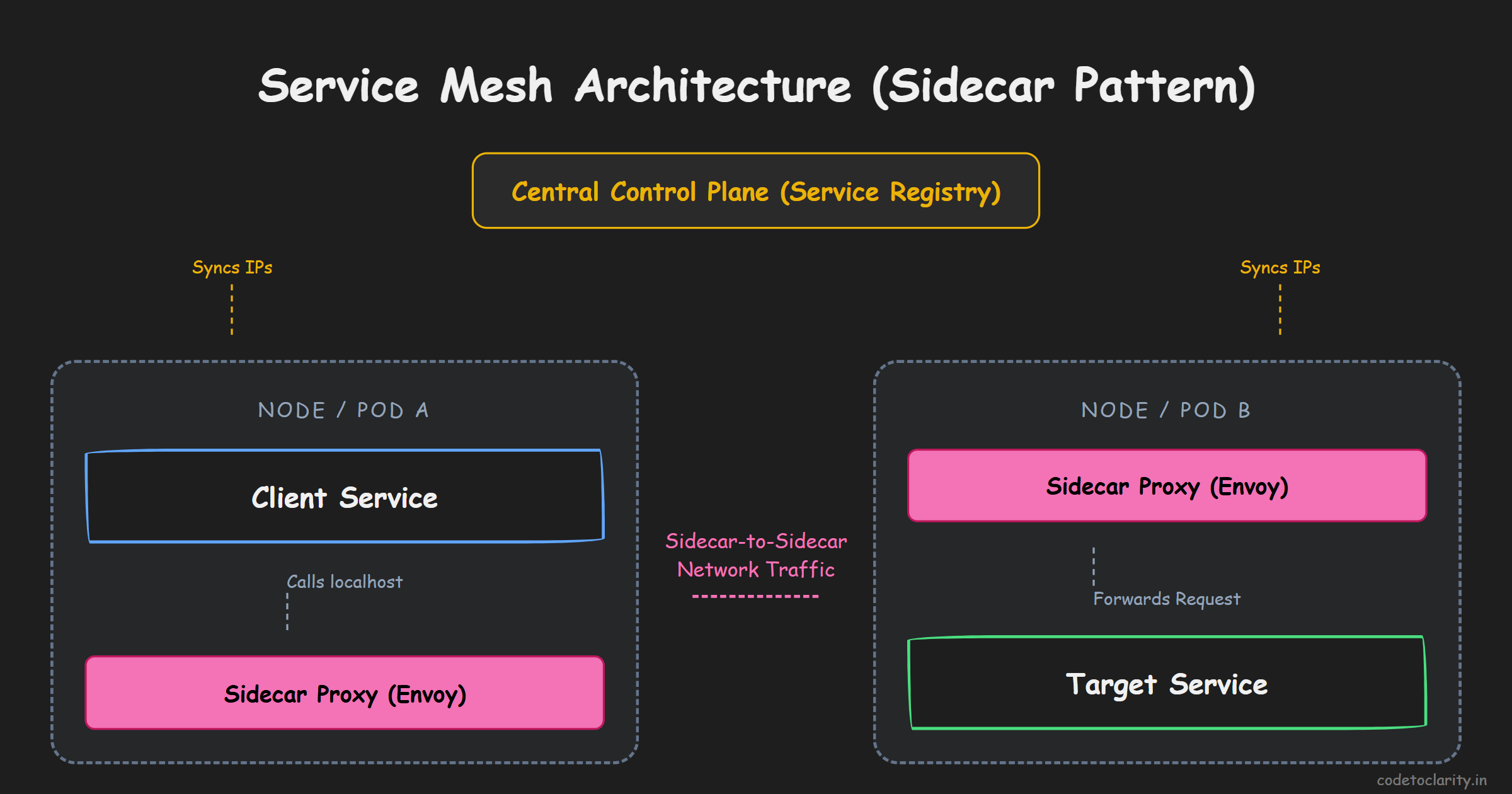
A Service Mesh uses a "Sidecar" pattern. Instead of putting a giant central load balancer in the middle of your architecture, or forcing your application to include heavy libraries, a Service Mesh deploys a tiny, incredibly fast proxy (like Envoy) right next to every single service instance.
When your application wants to call the BillingService, it makes a simple HTTP request to localhost. The sidecar proxy running next to it intercepts the request. The sidecar has already talked to the central Service Registry and knows all the IP addresses. The sidecar load balances the request and sends it directly to the destination's sidecar.
This provides the exact benefits of Client-Side Discovery (no central bottleneck, direct connections, smart load balancing) with the exact benefits of Server-Side Discovery (the application code is dead simple, language agnostic, and unaware of any discovery mechanics). It is the ultimate evolution of service discovery in cloud-native environments.
Implementing Service Discovery in Modern .NET
If you are a .NET developer building distributed systems, Microsoft has heavily invested in making service discovery a first-class citizen in the ecosystem, ensuring you can build highly resilient systems.
Historically, .NET developers had to rely on third-party frameworks like Steeltoe to integrate with registries like Consul or Eureka. While Steeltoe is a fantastic, battle-tested open-source framework, integrating it required a significant amount of configuration and boilerplate code.
Starting with .NET 8 and .NET Aspire, Microsoft introduced the official Microsoft.Extensions.ServiceDiscovery library. It is designed to be lightweight, native, and incredibly easy to use.
Instead of dealing with complex registry APIs or manual client-side load balancing, you simply add the NuGet package and register it in your Program.cs file. The library integrates directly with HttpClient, allowing you to use logical names instead of physical IPs.
Here is what a modern, built-in discovery setup looks like in .NET:
var builder = WebApplication.CreateBuilder(args);

// 1. Add the Service Discovery mechanics to the dependency injection container
builder.Services.AddServiceDiscovery();

// 2. Configure an HttpClient to use Service Discovery
builder.Services.AddHttpClient<CodetoclarityBillingClient>(client =>
{
    // Notice we use a logical name 'billing-service' instead of a hardcoded IP
    client.BaseAddress = new Uri("https://billing-service");
})
.AddServiceDiscovery(); // This magical extension method hooks up the discovery logic!

var app = builder.Build();
Behind the scenes, when your CodetoclarityBillingClient makes a request to https://billing-service/api/invoice, the HttpClient pipeline intercepts the request. It uses the configured discovery provider (which could be reading from configuration, querying DNS SRV records, or looking up a local Aspire registry) to resolve billing-service to a real, healthy IP address like 10.0.4.55:5001. It then routes the request there seamlessly.
You get the benefits of dynamic discovery without polluting your business logic with infrastructure concerns. You can read more about this official package and its advanced configuration options in the Microsoft Docs on Service Discovery.
Furthermore, because this integrates natively with HttpClient, you can easily chain it with libraries like Polly to add resilience. Service Discovery ensures you find a healthy node, but what if the node dies while your request is in transit? By combining Service Discovery with Polly's retry policies and circuit breakers, you ensure that if a request fails, your application automatically asks the discovery service for a different node and tries again transparently.
Conclusion
Service discovery might sound like a complex, invisible piece of backend plumbing, but it is the foundational glue that holds modern distributed systems together.
Without it, scaling applications, deploying new versions, and maintaining resilience would be a fragile mess of broken IP addresses, failing requests, and manual configuration file updates. The dynamic nature of the cloud absolutely demands automation in how services locate one another.
Whether you rely on the built-in server-side discovery of Kubernetes, adopt a Service Mesh to handle routing transparently via sidecars, or utilize native client libraries like Microsoft.Extensions.ServiceDiscovery in .NET, understanding how services find each other is critical.
Mastering these concepts allows you to debug network failures faster, scale your system to millions of users without crippling your infrastructure, and build software architectures that are truly resilient to the chaotic nature of the cloud.
So the next time your microservice makes a successful HTTP call to a database, a cache (which you can learn more about in our caching guide), or a partner API, take a moment to appreciate the real-time phonebook working tirelessly behind the scenes!

Kishan Kumar
Software Engineer / Tech Blogger
A passionate software engineer with experience in building scalable web applications and sharing knowledge through technical writing. Dedicated to continuous learning and community contribution.