Automating Code Reviews with CodeRabbit: A Developer's Complete Guide
Discover how CodeRabbit transforms code reviews using AI. Learn about its sandboxed analysis, custom YAML configurations, and powerful Model Context Protocol (MCP) integrations.
Have you ever waited days for a code review, only to get a single, unhelpful comment saying, "Can we rename this variable?" We have all been there. Code reviews are an essential part of the software development lifecycle, but let us be brutally honest for a second. They can also be incredibly slow, inconsistent, and sometimes, a massive bottleneck. You want to ship features and move on to the next exciting task, but instead, you find yourself stuck in a never-ending game of ping-pong over stylistic preferences and trivial debates.
Enter AI-powered code reviews. Now, before you roll your eyes and think, "Not another AI tool that hallucinates bad code," hear me out. We are not talking about generic chatbots that invent APIs or suggest completely unusable design patterns. We are talking about CodeRabbit. This is a purpose-built, AI-powered assistant that integrates directly into your pull requests. It acts like that senior developer on your team who never sleeps, never gets tired, and catches elusive bugs before they make it to production.
In this comprehensive guide, we are going to dive deep into exactly how CodeRabbit works under the hood, how you can configure it for your specific team needs, and why integrating it into your workflow might just be the best decision you make this year. Whether you are a solo developer trying to maintain high quality standards or part of a large enterprise team seeking consistency, understanding this tool will fundamentally change how you think about code reviews.
The Broken State of Traditional Code Reviews
Before we look at the solution, let us take a moment to truly understand the problem. Why do traditional code reviews often feel so fundamentally broken?
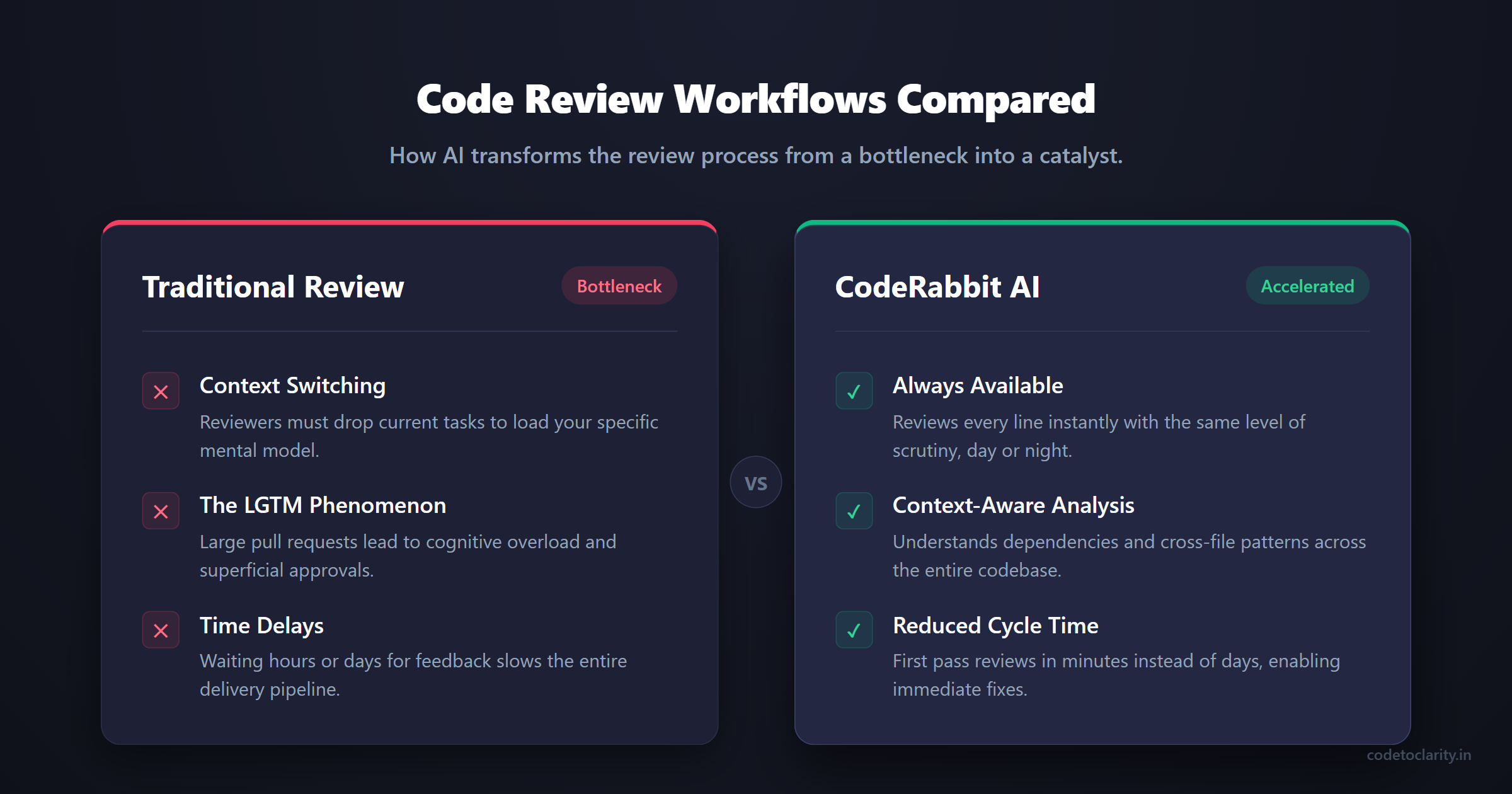
- Context Switching: When a developer stops what they are doing to review your code, they have to drop their current mental model, load your specific context into their brain, and try to understand what you were trying to achieve. This is mentally exhausting and significantly reduces their own productivity.
- The "LGTM" Phenomenon: If a Pull Request is too large, human reviewers experience severe cognitive overload. For example, if a pull request touches 50 files and over a thousand lines of code, a reviewer is unlikely to read every line. They scan the code, check if it compiles, and hit "Looks Good To Me" without actually verifying the complex logic beneath the surface.
- Inconsistency: Reviewer A might care deeply about SOLID principles and architectural boundaries, while Reviewer B only cares about variable naming conventions and whitespace formatting. The feedback you get depends entirely on who happens to be doing the reviewing on that particular day.
- Time Delays: Waiting for a review can block a developer for hours or even days. This dead time slows down the entire delivery pipeline, frustrating engineers and delaying time-to-market.
This is exactly where an automated, context-aware AI steps in. It does not complain about context switching, it reviews every single line with the exact same level of scrutiny, and it provides actionable feedback in a matter of seconds.
What is CodeRabbit and How Does It Actually Work?
CodeRabbit is an advanced AI code reviewer that lives inside your version control system, such as GitHub or GitLab. But it is fundamentally different from simply copying and pasting your code snippet into a standard language model interface.
When you open a pull request, CodeRabbit does not just look at the specific lines that changed. As any experienced developer knows, you cannot accurately review a change without understanding the surrounding code and the broader architecture. CodeRabbit actually clones your repository into a highly secure, sandboxed environment. It builds a comprehensive awareness of your entire codebase, understanding the intricate web of dependencies, the file structure, and the cross-file patterns that define your application.
This means if you change a method signature in a core interface, CodeRabbit knows that you also need to update the downstream classes that implement that interface. It knows this even if those implementing files are not explicitly included in your immediate pull request diff.
The Signal-First Approach
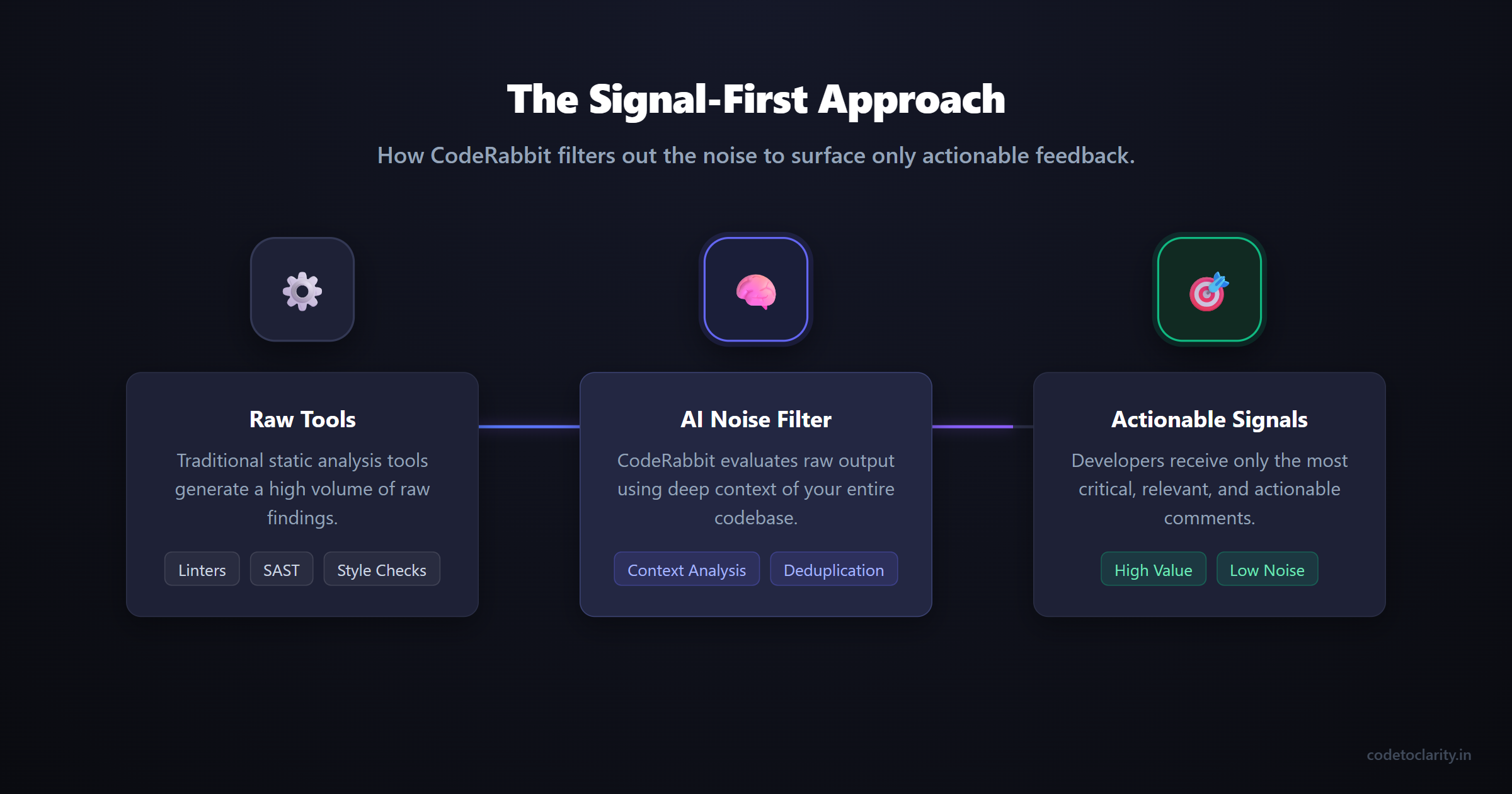
One of the biggest complaints developers have about automated linters and static analysis tools is the sheer volume of noise they generate. Nobody wants an AI leaving 50 separate comments on a pull request about missing trailing commas or incorrect indentation.
CodeRabbit employs what they call a signal-first approach. It integrates seamlessly with over 40 traditional linters and Static Application Security Testing tools. However, it does not just dump the raw output on you. Instead, it runs all those initial findings through an AI model to intelligently filter out the noise. It only surfaces the most relevant, actionable, and critical findings to the developer.
This means when CodeRabbit leaves a comment on your code, it is usually worth paying close attention to.
The ROI of Automated Code Reviews
Before we get into the technical setup, let us talk about the return on investment. Why should your company care about automating this process?
First, there is a massive reduction in cycle time. If a pull request normally takes 24 hours to get a first pass review from a human, CodeRabbit reduces that to less than five minutes. This means developers can fix obvious issues immediately while the context is still fresh in their minds, rather than context-switching back to the feature a day later.
Second, it elevates the quality of human reviews. Because the AI catches the null reference exceptions, the unhandled edge cases, and the syntax inconsistencies, human reviewers do not have to waste their time on them. Human developers can elevate their focus to system design, business logic correctness, and performance implications.
Finally, it acts as a continuous educational tool. For junior developers, getting immediate, explanatory feedback on their code helps them learn best practices faster than waiting for intermittent feedback from senior peers.
Configuring CodeRabbit: Moving Beyond the Defaults
Most teams install CodeRabbit, marvel at the first few automated reviews, and then never touch the configuration settings again. That is a massive missed opportunity. To truly get the most out of this powerful tool, you need to tailor it to your project's specific conventions and team culture.
You do this by adding a .coderabbit.yaml file to the root of your repository. Let us look at some of the most powerful and practical configurations you can apply today.
1. Setting the Review Tone
Did you know you can literally tell the AI how it should speak to your team? If you have many junior developers on the team, you might want a more mentoring, encouraging tone that focuses on education. If you are a team of hardened veterans working on a tight deadline, you might prefer concise, direct, and assertive feedback.
# .coderabbit.yaml
tone_instructions: "Provide feedback in a friendly, mentoring tone. Explain the 'why' behind every suggestion, and provide short, practical code examples where appropriate. Avoid being overly pedantic about minor stylistic choices."
2. Filtering Out the Noise with Path Filters
Not every file in your repository needs to be reviewed by an advanced AI. If you are automatically generating client code from an OpenAPI specification, or if you have thousands of lines of package lock files, having an AI spend time reviewing them is a complete waste of time. It also consumes unnecessary computational resources.
# .coderabbit.yaml
path_filters:
  exclude:
    - "**/generated/**"
    - "**/*.lock"
    - "tests/snapshots/**"
    - "**/migrations/**"
3. Path-Specific Instructions
This is arguably where CodeRabbit truly shines as an architectural enforcer. You can provide completely different review instructions based on the specific files being modified. For instance, the rules you enforce for your database layer are likely vastly different from the rules you enforce for your frontend user interface components.
# .coderabbit.yaml
path_instructions:
  - path: "src/api/**"
    instructions: "Ensure all new endpoints have proper authorization checks implemented. Verify that input parameters are rigorously validated using FluentValidation before any processing occurs."
  - path: "src/tests/**"
    instructions: "Ensure all unit tests strictly follow the Arrange-Act-Assert pattern. Do not suggest mocking the database. We exclusively use in-memory databases for these particular tests."
By customizing these rules, CodeRabbit transforms from a generic code checker into an active enforcer of your specific team architecture and business rules.
Shifting Left: The CodeRabbit CLI and IDE Integration
Why should you wait until you open a Pull Request to get valuable feedback on your code? In modern DevOps practices, we talk constantly about "shifting left", which is the concept of moving testing, validation, and review as early in the development lifecycle as humanly possible.
CodeRabbit supports this beautifully with its dedicated IDE extensions and its powerful command line interface tool. You can find more information about these tools in the official CodeRabbit GitHub repository.
Imagine writing a complex piece of business logic. Before you even commit it to your local branch, you simply ask the CodeRabbit CLI to review your uncommitted changes. It provides instant feedback locally, allowing you to fix structural issues, missing null checks, or obscure edge cases before anyone else ever sees the code. It effectively saves you from the public embarrassment of a colleague pointing out an obvious bug in the team channel.
If you are already familiar with the ecosystem of AI tools, integrating a local review step will feel incredibly natural and immediately boost your confidence in the code you write.
The "Plan" Feature: Aligning Before Coding
One of the most frustrating and demoralizing experiences in software engineering is spending three days building a complex feature, only to have the reviewer say that the architecture is completely wrong.
CodeRabbit recently introduced an incredible feature called "Plan" to combat exactly this issue. Instead of jumping straight into coding based on a vague ticket, you can connect CodeRabbit to your issue tracker. You provide a text prompt or point it directly to a ticket, and CodeRabbit generates a highly structured, comprehensive coding plan.
This plan outlines exactly which files need to be modified, what new dependencies might be required, potential edge cases to consider, and the general architectural approach. The entire team can review, discuss, and approve the plan before a single line of actual code is written. This drastically reduces expensive rework and ensures total architectural alignment from day one.
The Game Changer: Model Context Protocol (MCP) Integration
This is perhaps the most advanced, exciting, and transformative capability of CodeRabbit. I am talking about its seamless integration with the Model Context Protocol.
To truly understand why this matters, let us use a real-world analogy. Imagine you hire a brilliant new senior developer. They know C# and React inside out, and their algorithmic skills are unmatched. But on their very first day, you lock them in a dark room with only the raw source code. They cannot access the issue tracker to see the business requirements, they cannot access the design tools to see the user experience designs, and they cannot access the wiki to read the crucial architectural decision records. Even though they are brilliant, their ability to contribute effectively is severely limited by their lack of broader context.
AI reviewers historically suffered from this exact problem. They only knew about the code that was in front of them.
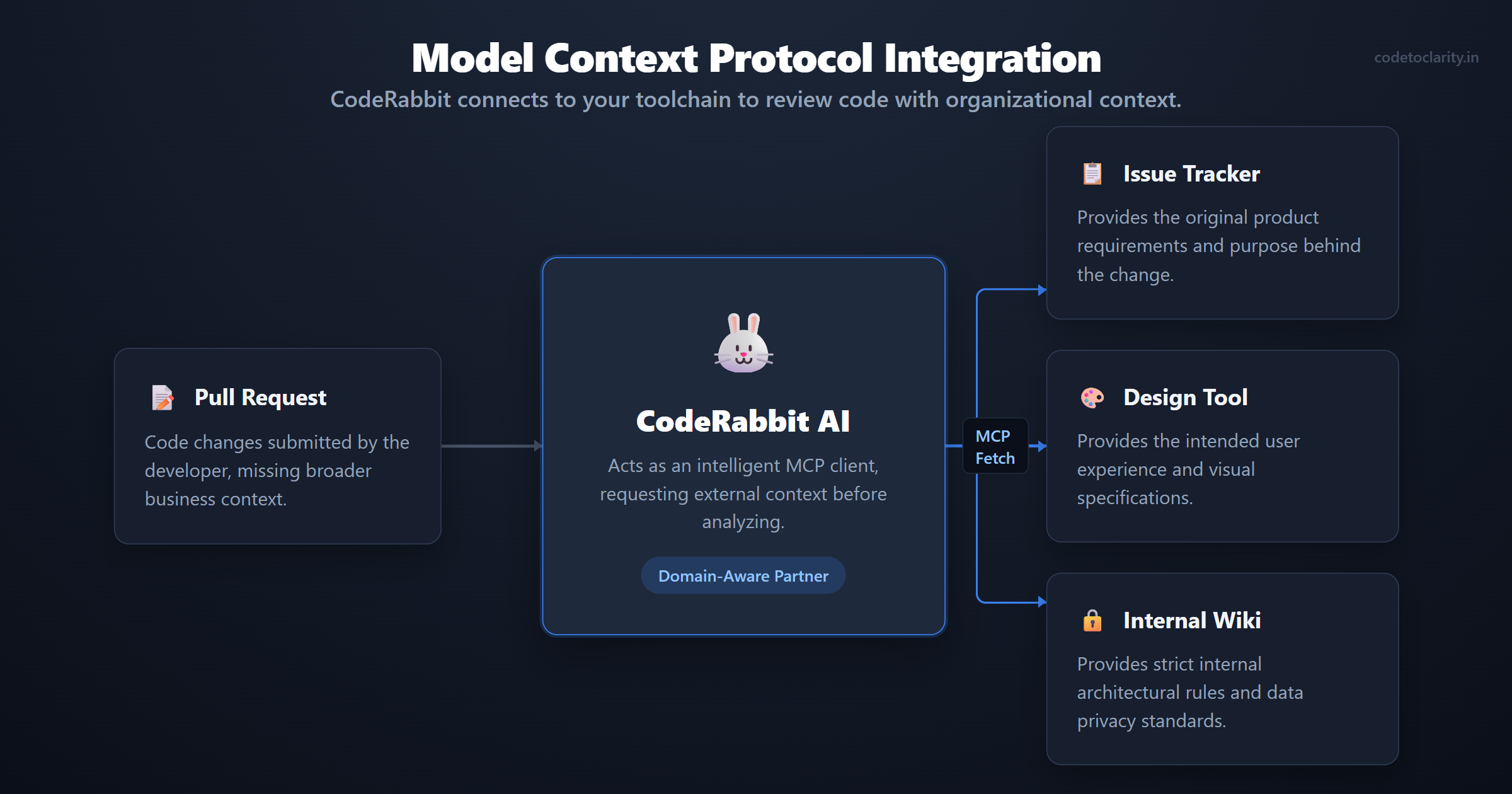
The Model Context Protocol (MCP) specification completely changes this paradigm. CodeRabbit acts as an intelligent MCP client. This means you can actively connect it to external MCP servers to ingest data from across your entire organization's toolchain.
How MCP Enhances Reviews in Practice
Let us say you are reviewing a pull request that updates a core user profile component using a custom CodeToClarity backend service.
First, CodeRabbit uses MCP to reach into your issue tracker and reads the original product ticket to understand exactly why the product manager requested this specific change.
Second, it then reaches into your design tool to verify that the new utility classes you added perfectly align with the designer's specifications.
Third, it queries your internal wiki to ensure the new API call complies with your company's strict internal data privacy standards.
When CodeRabbit leaves a comment on your code, it is no longer just saying that a function could potentially be optimized. It says something like, "According to ticket PROJ-123, this codetoclarityService profile field should be optional, but your current implementation makes it strictly required. Furthermore, based on our internal security wiki, please ensure you explicitly sanitize this input before saving it to the database."
This astonishing level of context-awareness elevates the AI from a mere syntax checker to a true, domain-aware engineering partner that understands your business rules as well as it understands your code.
Real-World Scenarios Where CodeRabbit Shines
To make this even more concrete, let us look at a few scenarios where having an AI reviewer like CodeRabbit pays massive dividends.
1. Catching Cross-File Null Reference Exceptions
A classic human error is changing the return type of a helper function from an object to potentially returning null, but forgetting to update the five different components that call that function. A human reviewer might only look at the helper file and approve the pull request. CodeRabbit's codebase awareness immediately flags the downstream components, warning you that they are now susceptible to a runtime crash because they are not handling the new null case.
2. Enforcing Architectural Boundaries
If your team uses a strict Clean Architecture, it is very easy for a junior developer to accidentally leak a database entity directly into an API controller response. CodeRabbit, especially when configured with path-specific instructions, acts as an automated gatekeeper. It instantly spots the architectural violation and politely suggests mapping the entity to a Data Transfer Object instead.
3. Security Vulnerability Detection
While it does not replace a dedicated security team, CodeRabbit excels at spotting common vulnerabilities. If you accidentally log sensitive user data, hardcode a secret, or fail to parameterize a SQL query, CodeRabbit will flag it immediately. This provides an excellent first line of defense against easily preventable security flaws.
Best Practices for Working with AI Reviewers
While tools like CodeRabbit are undeniably powerful, they are not a magical silver bullet that will fix a bad engineering culture. You still need strong, disciplined engineering practices to get the most out of them. Here are the golden rules for working effectively alongside an AI reviewer.
1. Keep Your Pull Requests Small and Focused
The larger the pull request, the more context the AI has to process simultaneously. Huge pull requests significantly increase the chance of AI hallucinations, missed logical bugs, and irrelevant comments. If your pull request touches 50 files and refactors three different features, split it up immediately. Small changes equal sharp focus. AI models perform exponentially better when reasoning over smaller, isolated, and cohesive chunks of logic.
2. Talk Directly to the Bot
CodeRabbit is an agentic tool. This means you can have a natural conversation with it directly in the comment threads. If it suggests a refactor you do not agree with, simply reply to the comment and ask why exactly it is suggesting that pattern. Alternatively, you can ask it to provide a concrete code example of how that refactor would look. If you realize the AI is missing crucial historical context, you can tell it that in this specific CodeToClarity module, you intentionally do not use standard patterns due to legacy performance constraints. The AI actively learns and adapts to the context of the conversation.
3. Use Your Critical Thinking
CodeRabbit is incredibly fast, but it is not infallible. It is designed to act as a rigorous first-pass reviewer. It will effectively catch all the low-hanging fruit, such as missing null checks, poor variable names, unhandled exceptions, and stylistic inconsistencies.
However, once the AI gives the green light, human reviewers should step in to focus on what humans do best. We evaluate the overall system architecture, assess the intricate business logic, and determine if the code truly solves the actual problem of the end user. Do not blindly accept every AI suggestion without understanding the implications. You are still the engineer, and you are still ultimately accountable for the code that goes into production. If you are looking for more details on advanced .NET implementations to inform your own reviews, checking out the Microsoft Docs is always a good idea to supplement your understanding.
Final Thoughts
The frustrating era of waiting days for a code review just to fix a minor typo is finally coming to an end. Tools like CodeRabbit are fundamentally transforming code reviews from a tedious, adversarial chore into a continuous, collaborative, and fast-paced engineering activity.
By actively leveraging features like the sandboxed codebase analysis, custom YAML configurations, and the incredible context provided by the Model Context Protocol, you can drastically elevate the code quality of your team while simultaneously reducing the amount of time spent reviewing.
Remember, the ultimate goal of AI in software development is not to replace the human developer. The goal is to entirely remove the friction, automate the mundane, and free you up to do what you actually do best. We are here to solve complex, interesting problems and build amazing software.
Give it a try on your next project, configure your path rules, and connect it to your internal tools. Your human teammates will thank you when they no longer have to point out missing semicolons, and you will wonder how you ever managed to ship code without an automated teammate watching your back.

Kishan Kumar
Software Engineer / Tech Blogger
A passionate software engineer with experience in building scalable web applications and sharing knowledge through technical writing. Dedicated to continuous learning and community contribution.