
Stop Using Generic Prompts: How Specialized AI Agents Are Redefining Developer Workflows
Learn how to build a virtual team of specialized AI agents. Move beyond generic prompts and supercharge tools like Claude Code and Cursor with custom personas.
Have you ever pasted a massive block of code into an AI tool, typed something like "fix the bugs and make it better," and watched as the AI completely destroyed your carefully planned architecture? If you have been writing code for any length of time over the last couple of years, you have probably experienced this exact frustration.
We often treat artificial intelligence like a magic box. We assume that because large language models are trained on billions of lines of code, they automatically know exactly what we want. But the truth is much simpler. When you give an AI a generic prompt, you get a generic result. If you ask it to act like a generic developer, it will write code like a junior developer who is trying to guess what you want.
This approach is no longer sustainable. The software development ecosystem is moving incredibly fast. We are shifting away from using AI as a glorified autocomplete and moving toward treating AI as a team of specialized, autonomous agents. Instead of having one general purpose assistant, imagine having a dedicated senior frontend engineer, a meticulous security auditor, and a brilliant database architect living directly inside your terminal or code editor.
In this guide, we are going to explore exactly how you can stop relying on generic prompts and start building a virtual team of specialized AI agents to drastically improve your coding workflow. We will look at practical tools, open source community projects, and the mindset shift required to manage an AI agency.
The Problem with the "Act as a Developer" Prompt
Let us start by looking at a very common mistake. Almost every developer who starts using AI tools begins with a prompt that looks something like this.
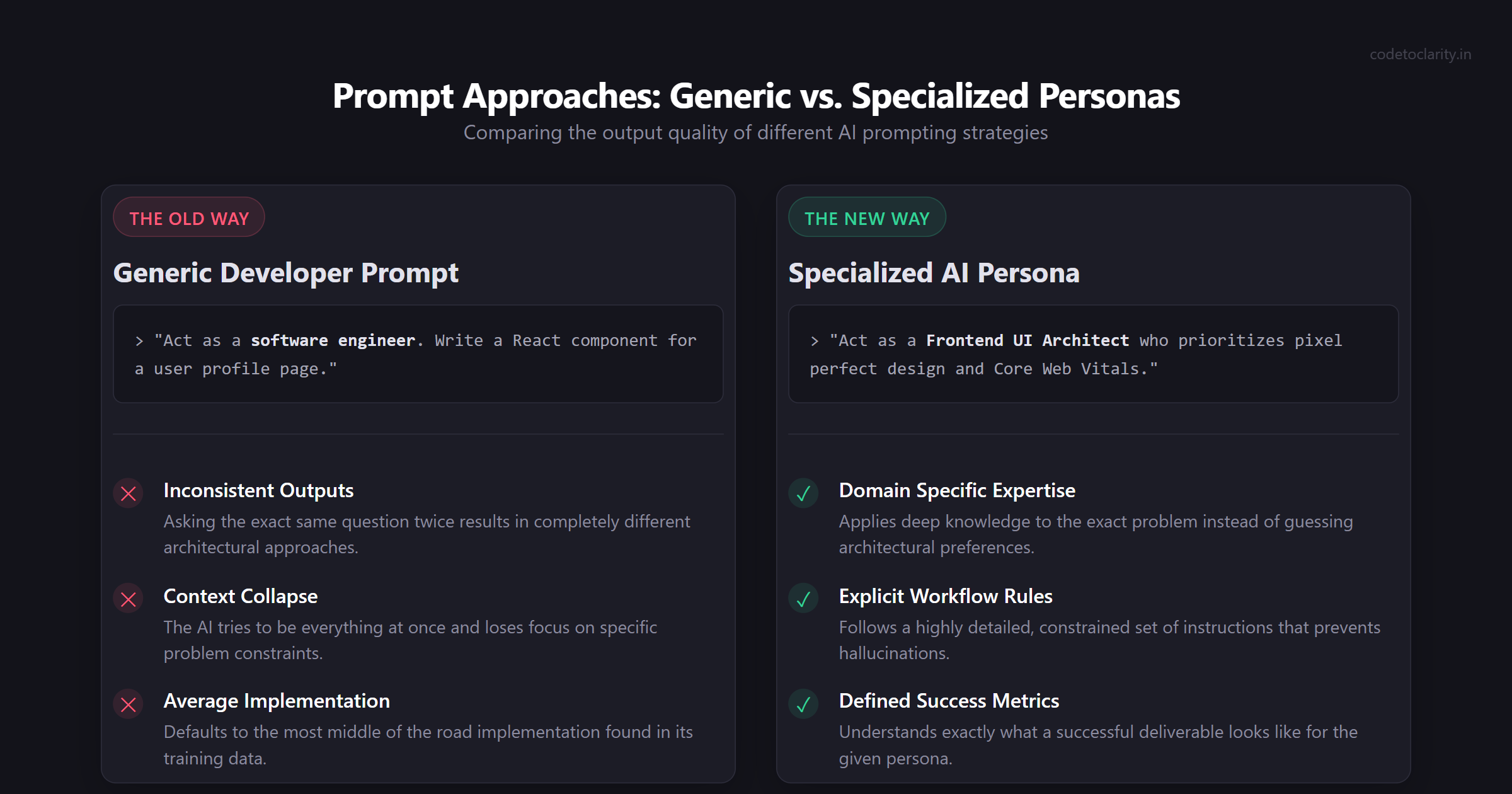
"Act as a senior software engineer. Write a React component for a user profile page."
On the surface, this seems like a reasonable request. You are telling the AI what role to play and what you want it to build. The problem is that "senior software engineer" is an incredibly broad category. Does this engineer prioritize accessibility? Are they obsessed with performance optimization? Do they prefer Tailwind CSS or styled components?
Because you have not specified any of these details, the AI model has to guess. It defaults to the most average, middle of the road implementation it can find in its training data. The resulting code will probably run, but it will lack the polish, security, and architectural integrity that you actually need for a production application.
Generic prompts suffer from a few massive drawbacks. First, they lead to inconsistent outputs. If you ask the exact same generic question twice, you might get two completely different architectural approaches. Second, generic prompts cause context collapse. When an AI tries to be everything at once, it loses focus on the specific constraints of the problem. Finally, generic prompts create more work for you. You end up spending more time reviewing and fixing the AI generated code than you would have spent just writing it yourself.
If you are dealing with a large legacy application and you need help refactoring, a generic prompt is a recipe for disaster. If you want to dive deeper into how autonomous tools handle big repositories, you might want to read our guide on Claude Code for large codebases.
Enter the Specialized AI Persona
The solution to the generic prompt problem is to use specialized AI personas. A specialized persona is a highly detailed, constrained set of instructions that forces the AI to adopt a very specific role, complete with a unique personality, explicit workflow rules, and defined success metrics.
Think about how a real software agency operates. If you hire an agency to build a mobile application, they do not assign one person to do the database design, the UI mockups, the security audit, and the marketing copy. They assign a team of specialists.
You can replicate this exact structure using AI. Instead of a single assistant, you can define a "Frontend UI Architect" whose sole focus is pixel perfect design and Core Web Vitals. You can define a "PostgreSQL Optimizer" who only cares about index strategies and query execution plans.
When you narrow the focus of the AI, something magical happens. The quality of the output skyrockets. The AI stops trying to guess your architectural preferences and starts applying deep, domain specific expertise to the exact problem at hand.
Creating a persona involves more than just adding a few adjectives to your prompt. A true specialized agent needs a defined identity. It needs a core mission. It needs critical rules that it must never break. It also needs examples of what a successful deliverable looks like.
Let us look at a practical example. Imagine you are building a new feature for your application, maybe a secure billing module. You could use a tool like Cursor or Claude Code to bring in your specialized agents. If you are curious about how these agent tools integrate deeply into your system, check out our tutorial on how to supercharge your AI assistant with .NET Agent Skills.
The Shift from Copilots to Autonomous Agents
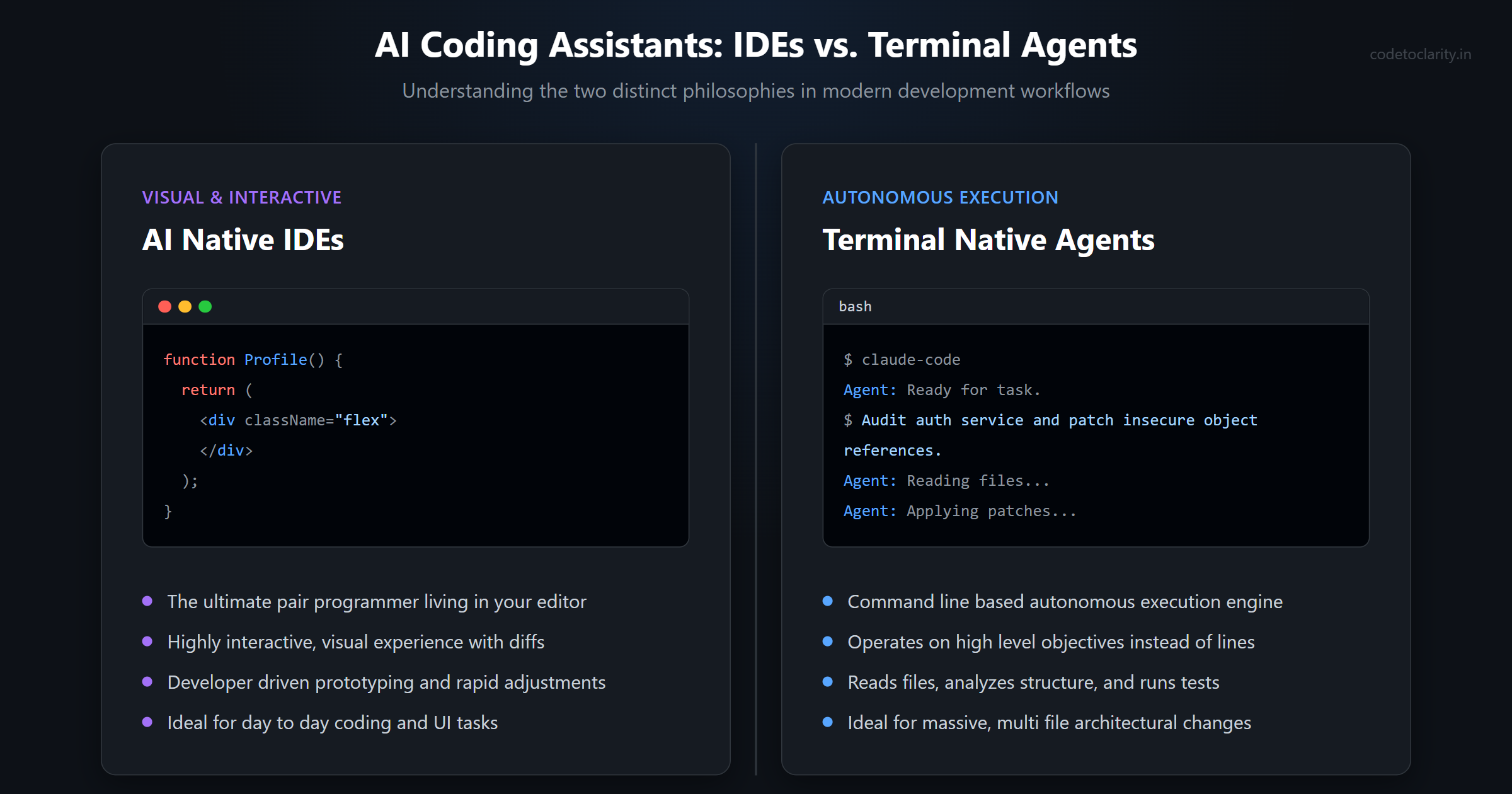
To fully leverage specialized personas, you need to understand the tools available to you. The landscape of AI coding assistants is dividing into two distinct philosophies. On one side, we have AI native Integrated Development Environments. On the other side, we have terminal native autonomous agents.
AI Native IDEs
Tools in this category are designed to act as your ultimate pair programmer. They live directly inside your editor and provide a highly interactive, visual experience. The most popular example in this space is Cursor, which is built on top of the familiar Visual Studio Code architecture.
When you use a tool like this, you are typically driving the development process. You highlight a block of code, press a shortcut, and ask your specialized frontend agent to refactor a component. The AI generates the code, shows you a visual diff, and waits for your approval. This workflow is incredible for rapid prototyping, user interface adjustments, and day to day coding tasks where you want immediate feedback.
Terminal Native Agents
Terminal native agents represent a slightly different philosophy. Instead of living in your editor, these tools live in your command line. They are designed for autonomous execution. The standout tool in this category is Claude Code.
With a terminal native agent, you do not just highlight code and ask for a fix. You give the agent a high level objective and let it figure out the steps. For example, you might tell your specialized security agent to "audit the authentication service for vulnerabilities and write a patch for any insecure direct object references."
The agent will autonomously read your codebase, navigate through your directory structure, analyze the files, write the necessary patches, and even run your test suite to ensure nothing broke. This approach is incredibly powerful for complex refactoring, infrastructure management, and tasks that span multiple files.
Choosing between these two approaches depends entirely on the task at hand. Many modern developers use both. They use an AI native IDE for their daily coding flow and drop into the terminal when they need an autonomous agent to handle a massive, multi file architectural change. If you are interested in exploring other autonomous setups, we previously wrote about how to build a life admin AI agent with OpenClaw.
The Agency: An Open Source Roster of Specialists
Building these specialized personas from scratch takes a lot of time. You have to write the system prompts, define the rules, and test the outputs. Thankfully, the open source community has stepped up to solve this problem.
One of the most exciting projects in this space is called "Agency Agents," created by Michael Sitarzewski. You can find the repository over on GitHub. This project is essentially a massive, open source roster of meticulously crafted AI agent personalities.
The creators of this project realized that developers were wasting countless hours writing the same generic prompts over and over again. To fix this, they built a library of over one hundred and forty specialized agents. These are not just simple prompt templates. Each agent in the repository has a deep identity, specific workflows, and measurable success metrics.
The project is divided into distinct divisions, just like a real company. There is an Engineering Division, a Design Division, a Security Division, a Product Division, and even divisions for marketing and sales.
What makes this project so powerful is its compatibility. The agents are defined using simple markdown files. This means you can easily install them into almost any modern AI tool, including Claude Code, Cursor, Aider, and Windsurf. The project even provides a native desktop application for macOS, Windows, and Linux that allows you to browse the roster and install your chosen specialists with a single click.
Instead of writing a prompt from scratch, you can simply pull the "Frontend Developer" persona from the repository and drop it into your configuration folder. The next time you open your terminal, you can type "activate the frontend developer mode" and instantly have access to an agent that prioritizes accessibility, semantic HTML, and modern performance metrics.
Building Your Virtual Engineering Team
Let us take a closer look at how you might actually use these specialized agents in a real world project. Imagine you are tasked with building a new customer dashboard for a software as a service platform. If you were working alone with a generic AI, you would have to context switch constantly between database design, API routing, and user interface styling.
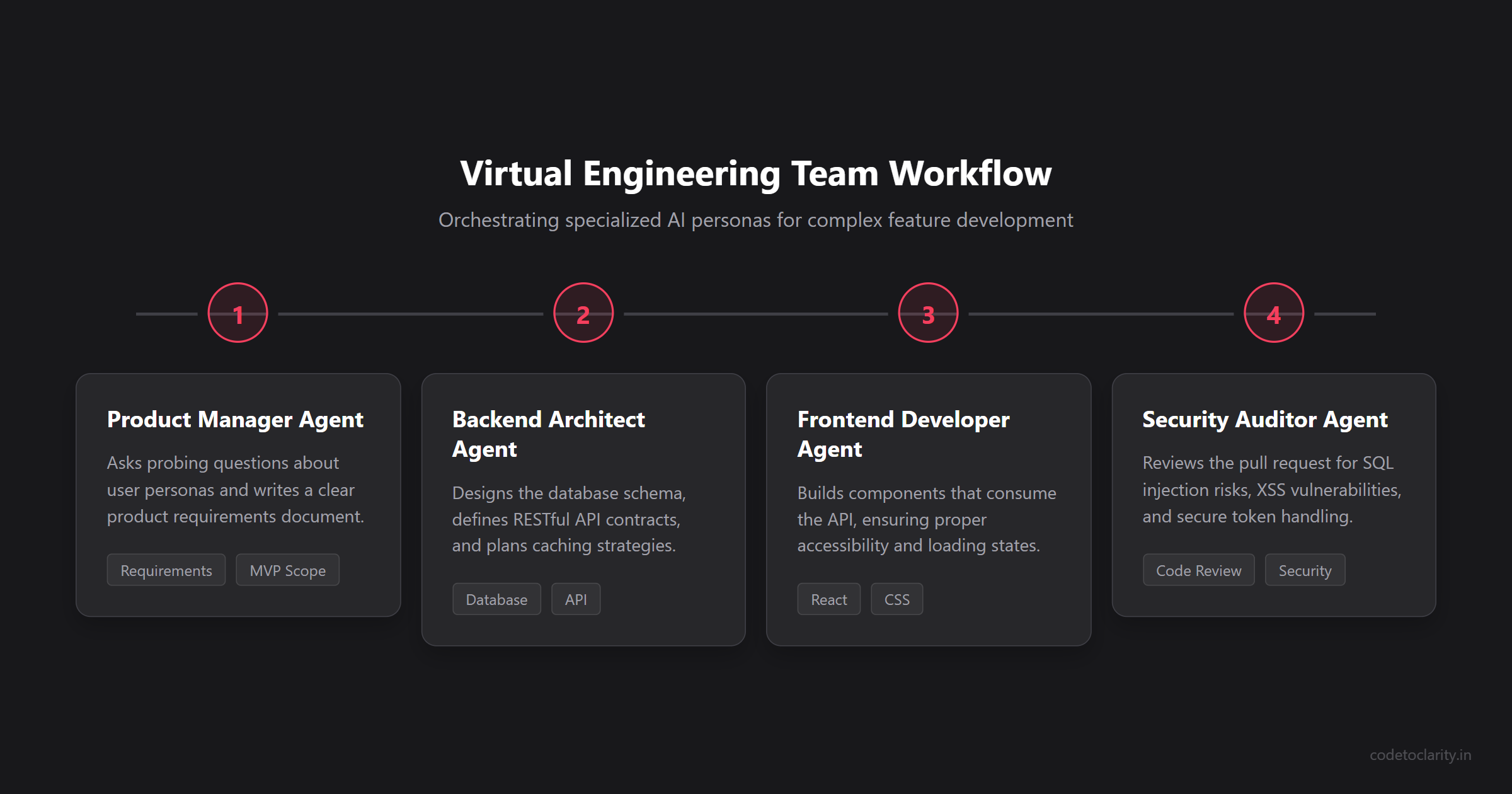
With a virtual team of specialists, the workflow looks entirely different.
Step 1: The Product Manager Agent
Before you write a single line of code, you bring in the Product Manager persona. You provide this agent with a rough outline of what the customer dashboard needs to do.
Because this agent is specialized in product management, it does not try to write code. Instead, it asks you probing questions about your user personas. It helps you prioritize features for the minimum viable product. It writes a clear, structured product requirements document that defines exactly what needs to be built.
Step 2: The Backend Architect Agent
Once the requirements are clear, you activate the Backend Architect persona. You feed the product requirements document to this agent and ask it to design the database schema and the API endpoints.
This specialist knows that performance and scalability are critical. It designs a normalized relational database schema. It defines clear RESTful API contracts. It might even suggest caching strategies using Redis to ensure the dashboard loads instantly for your users.
Here is an example of a simple service class that your backend architect might generate. Notice how clean and focused the implementation is.
public class CodeToClarityDashboardService
{
    private readonly IUserRepository _userRepository;
    private readonly IMetricsCache _metricsCache;

    public CodeToClarityDashboardService(IUserRepository userRepository, IMetricsCache metricsCache)
    {
        _userRepository = userRepository;
        _metricsCache = metricsCache;
    }

    public async Task<DashboardViewModel> GetUserDashboardAsync(Guid userId)
    {
        var user = await _userRepository.GetByIdAsync(userId);
        if (user == null)
        {
            throw new NotFoundException($"User {userId} not found.");
        }

        var metrics = await _metricsCache.GetOrSetAsync(
            $"dashboard_metrics_{userId}",
            async () => await FetchExpensiveMetricsAsync(userId),
            TimeSpan.FromMinutes(15)
        );

        return new DashboardViewModel
        {
            UserName = user.FullName,
            KeyMetrics = metrics
        };
    }

    private async Task<UserMetrics> FetchExpensiveMetricsAsync(Guid userId)
    {
        // Complex aggregation logic goes here
        await Task.Delay(100);
        return new UserMetrics();
    }
}
Step 3: The Frontend Developer Agent
With the API designed, you switch to the Frontend Developer persona. You ask this agent to build the React components that will consume the API.
Because this agent is obsessed with the user interface, it does not just write functional code. It ensures that every button has proper aria attributes. It implements loading skeletons to improve the perceived performance while the data is fetching. It organizes the CSS cleanly so that the design system remains consistent.
Step 4: The Security Auditor Agent
Finally, before you deploy the code, you bring in the Security Auditor persona. You ask it to review the pull request. This agent ignores the design and the product requirements. Its only job is to find vulnerabilities.
It scans the backend code for SQL injection risks. It checks the frontend code for cross site scripting vulnerabilities. It ensures that your authentication tokens are being handled securely. By having a dedicated security specialist review the code, you drastically reduce the risk of a breach in production. If you want to see how AI can handle automated pull request reviews at scale, read our complete guide on automating code reviews with CodeRabbit.
Best Practices for Managing AI Specialists
Working with specialized AI agents requires a slightly different mindset than working with a standard chat interface. You are no longer just asking questions. You are managing a team. To get the best results, you need to follow a few core principles.
Narrow the Context Window
One of the biggest mistakes developers make is giving the AI too much irrelevant information. If you are asking your frontend specialist to fix a CSS grid layout, it does not need to see your database configuration files.
Always narrow the context window to exactly what the agent needs to know. Use tools like .cursorignore or .gitignore to prevent the AI from reading build artifacts or irrelevant directories. The tighter the context, the more focused and accurate the agent's response will be.
Define Clear Success Metrics
When you assign a task to a specialized agent, you must define exactly what success looks like. Do not just say "build a login form." Say "build a login form that handles validation errors gracefully, uses our existing design system tokens, and includes a loading state on the submit button."
By providing clear success metrics, you give the agent a concrete target to hit. This reduces the back and forth iteration and ensures you get usable code on the first attempt.
Review and Audit Everything
This is perhaps the most important rule. Specialized AI agents are incredibly powerful, but they are not infallible. They can and will make mistakes. They will occasionally hallucinate APIs that do not exist or suggest architectural patterns that do not fit your specific environment.
You must always review the code generated by an AI. Treat the AI as an incredibly fast, highly capable junior developer. You are the senior engineer. You are the architect. You are ultimately responsible for the code that goes into production. Read every line, understand every logical branch, and run your automated test suite before merging anything.
For a deeper understanding of how AI tools are changing the way we structure and secure our applications, I highly recommend reading through the official Microsoft Developer Documentation on AI. They offer incredible insights into building robust, AI integrated systems.
The Future of Software Engineering
We are standing at the edge of a massive paradigm shift in software development. The days of struggling through generic, unhelpful AI prompts are coming to an end. By embracing specialized AI personas, we can build applications faster, with higher quality, and with significantly less frustration.
Whether you use a terminal native tool like Claude Code or an AI native editor like Cursor, the key to success is specialization. Stop asking your AI to act like a generic developer. Start building your own virtual agency of highly skilled, obsessively focused experts.
The open source community is already providing the blueprints. Projects like Agency Agents show us what is possible when we combine the raw intelligence of large language models with the structure and discipline of specialized workflows.
Your job as a developer is no longer just writing code. Your job is now orchestration. You are the conductor of a digital symphony. It is time to start treating your AI tools with the respect and specificity they deserve. When you do, the results will absolutely transform your workflow.

Kishan Kumar
Software Engineer / Tech Blogger
A passionate software engineer with experience in building scalable web applications and sharing knowledge through technical writing. Dedicated to continuous learning and community contribution.