
Building a Local AI Companion: Why OpenHuman is Changing the Game
Discover how local AI agents like OpenHuman are solving the AI amnesia problem. Learn about Memory Trees, proactive background fetching, token compression, and why developers are moving toward stateful, desktop-first AI architectures.
Have you ever felt like you are stuck in a time loop when talking to your favorite artificial intelligence assistant? Every single day, you open a new browser tab and start a new chat. Every single day, you have to remind the AI about your specific project requirements, your exact database schema, and the fact that your team strictly prefers vanilla CSS over utility classes.
It is exhausting. We are essentially working with brilliant virtual interns who suffer from severe short-term memory loss.
This phenomenon is what developers commonly call AI statelessness. The underlying language models themselves are incredibly smart. However, the standard interface we use to interact with them forgets absolutely everything the moment you close the application. While you can use system prompts or custom instructions to provide some background, these are static solutions. They do not grow with you. They do not automatically know that you just spent three hours debugging a CORS issue in your Next.js application, or that your engineering lead just approved a completely new architecture design in your company chat.
We have reached a plateau with these reactive, chat-first artificial intelligence tools. The next frontier in software development is not just about creating a smarter language model. It is about building an agent that actually remembers. We need an agent that sits locally on your machine, quietly observes your daily workflow, and automatically builds a comprehensive, evolving understanding of your digital life.
This brings us to a fascinating shift in how we build AI tools. Today, we are going to dive deep into the architecture of persistent local agents, using an open-source project called OpenHuman as our primary case study.
The Evolution of the Desktop AI Agent
For the past several years, the software industry has been aggressively moving away from native desktop applications. Everything moved into the browser. However, the rise of advanced artificial intelligence agents is completely reversing this trend.
You simply cannot build a powerful, background-running, local-storage-accessing AI agent inside a highly restricted browser sandbox. The web browser is intentionally locked down for security reasons, making it impossible for a web app to freely read your local files or manage long-running background tasks efficiently.
This is where native desktop architecture becomes essential. OpenHuman is an open-source desktop AI agent developed by TinyHumans AI. Unlike cloud-based tools that rely entirely on a corporate server to store your context, OpenHuman is designed to live directly on your laptop. It serves as a personal super-intelligence that maintains a persistent context of your day-to-day operations.
But what makes it truly fascinating for developers is how it is built under the hood. It is primarily written in the Rust programming language for maximum performance and memory safety. The user interface is built with TypeScript and React. Instead of bundling a massive, resource-heavy Chromium instance like Electron applications do, the developers chose to package it using the Tauri framework. Tauri relies on the underlying operating system's native webview. This results in a significantly smaller application footprint and much better overall system performance.
If you are looking to understand how modern, local-first applications are architected, exploring projects built with Rust and Tauri is a fantastic starting point.
Why Vector Databases Are Not Always the Answer
Before we look at how OpenHuman solves the memory problem, we need to talk about how most modern AI applications currently handle data retrieval. The industry standard approach right now relies heavily on Vector Databases.
When you build a standard Retrieval-Augmented Generation application, you take a piece of text and convert it into a long array of numbers known as an embedding. You then store that array in a Vector Database. When a user asks a question, the system generates an embedding for the question and mathematically searches the database for the closest matching numbers.
Vector retrieval is incredibly powerful for finding semantically similar text. However, it has a massive flaw when dealing with personal workflows. Searching a Vector Database is a lot like searching through a giant, disorganized bucket of sticky notes. It completely lacks structure. It does not natively understand the chronological order of your workflow. It cannot easily grasp the hierarchical relationship between a broad project requirement document and a specific, localized GitHub commit.
When an AI needs to navigate the complex narrative of your daily tasks, simple semantic similarity is not enough. You need structured, readable memory.
The Magic of the Memory Tree
OpenHuman tackles this structural problem by implementing what they call a Memory Tree. This is a brilliant architectural decision that departs from the standard black-box vector approach.
Instead of just tossing embeddings into a void, the Memory Tree is a deterministic pipeline. Here is exactly how it functions. First, it ingests raw data from your connected tools. Second, it normalizes that chaotic data into a clean, standardized Markdown format. Third, it splits the Markdown into manageable chunks. Finally, it categorizes these chunks into highly specific trees. For example, it might build a source tree dedicated to a specific email thread, and a broader global tree that summarizes your entire day.
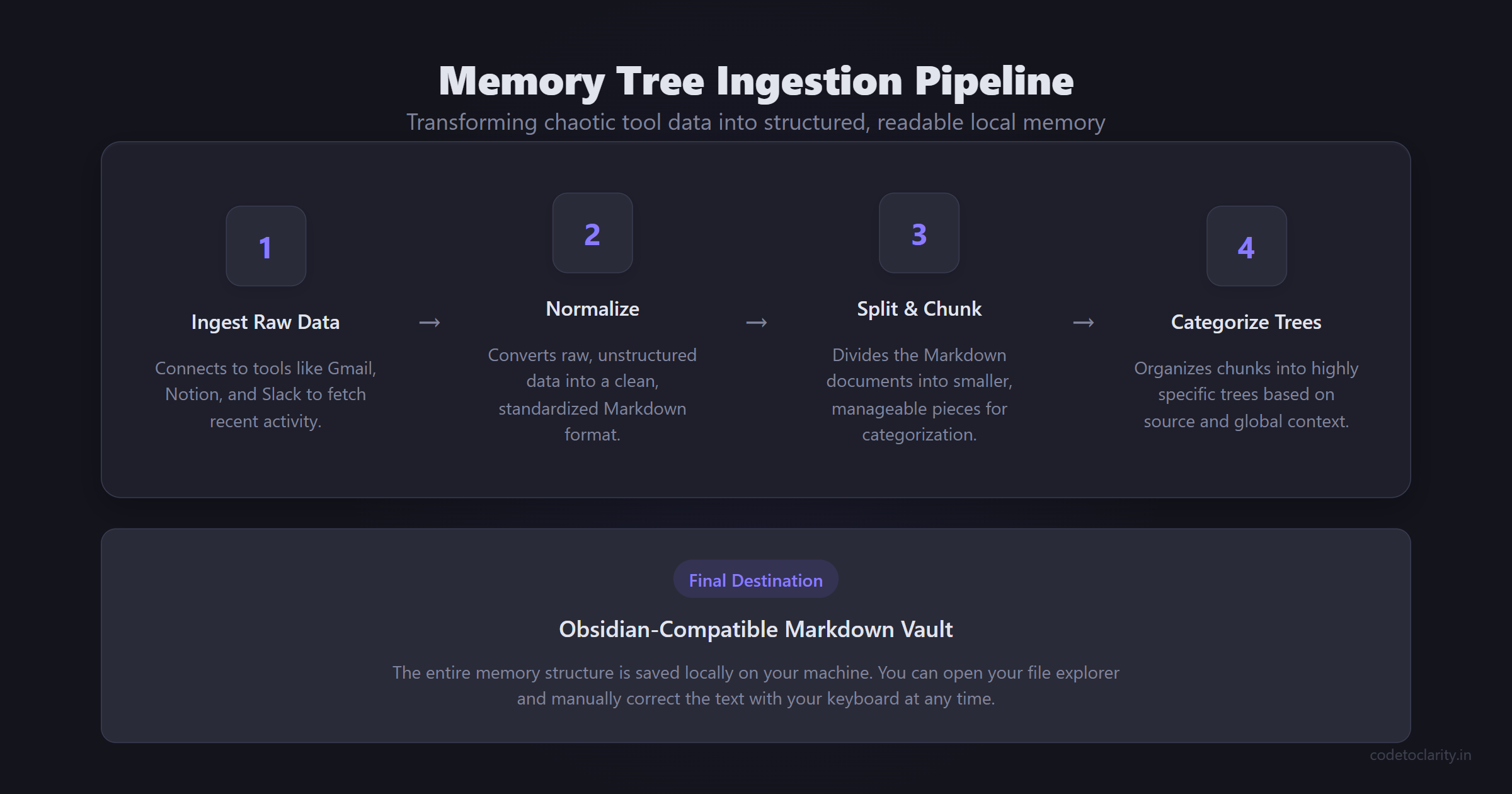
The absolute best part of this architecture is where this data is stored. This entire memory structure is saved locally on your machine as an Obsidian-compatible Markdown vault.
Think about the implications of that for a second. If the AI hallucinates a detail or remembers a project requirement incorrectly, you do not have to spend hours fighting with complex prompt engineering to fix the underlying behavior. You simply open your local file explorer, find the specific Markdown file, and manually correct the text with your keyboard. The next time the agent retrieves that memory, it will have the accurate, human-verified information. This approach perfectly blends the scalable power of automated AI ingestion with the ultimate reliability of human oversight.
Proactive versus Reactive: The Auto-Fetch Loop
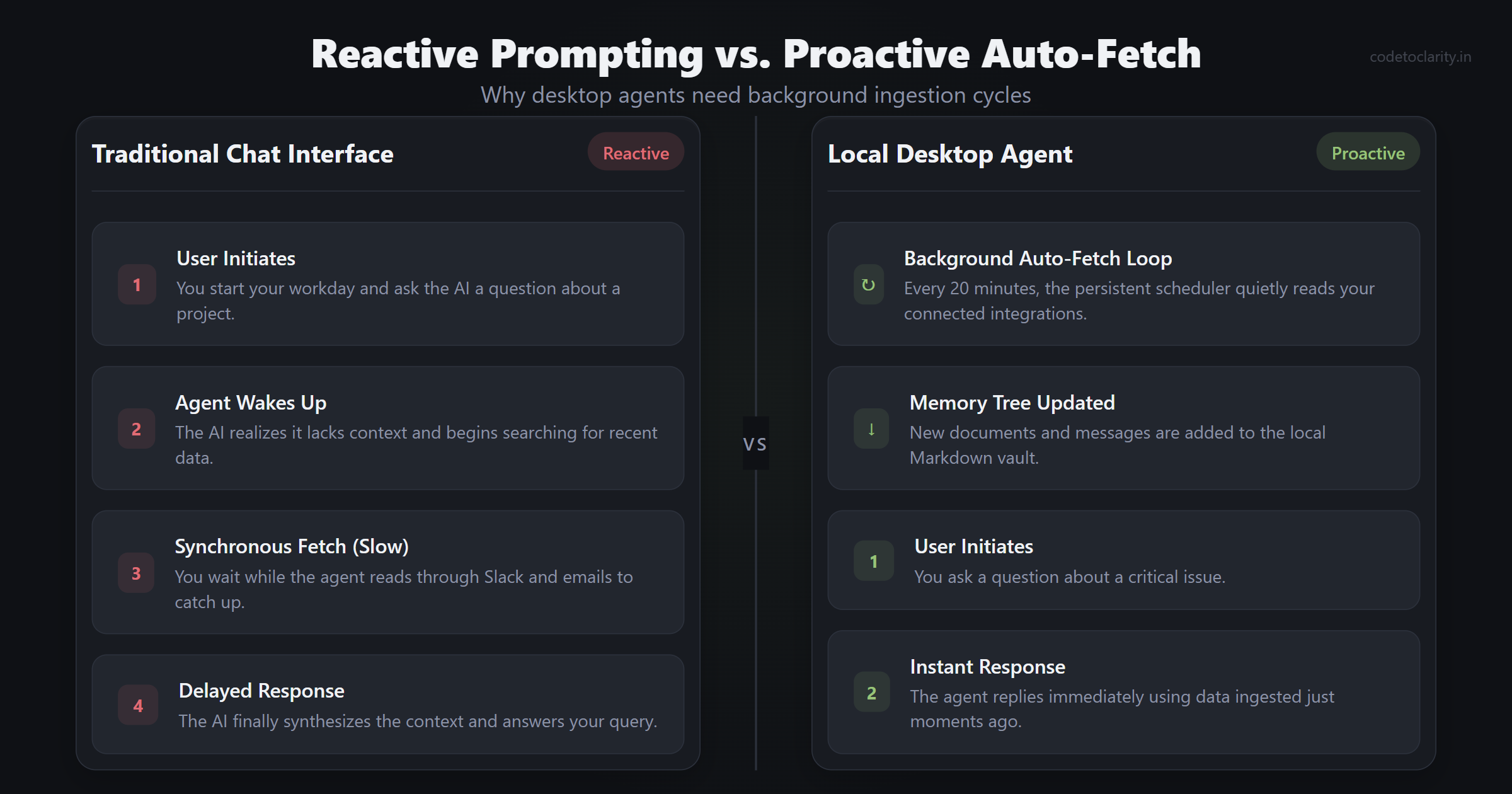
Most artificial intelligence tools sit around idly waiting for you to type a prompt. They are entirely reactive. An effective desktop agent needs to be proactive.
Under the hood, OpenHuman runs a persistent background scheduler. This scheduler triggers an auto-fetch loop at regular intervals, typically every twenty minutes. During this automated loop, the agent quietly walks through your connected integrations. It checks your Gmail inbox, scans your Notion workspace, and reads your active Slack channels. It looks for new messages, updated documents, and recent conversations. It then pipes all of this new information through its canonicalization process to update your local Memory Tree.
Imagine starting your workday with this system in place. Instead of spending your first hour frantically reading through Slack channels and emails to catch up, your local agent has already read and synthesized everything. You can simply ask what the most critical issues are, and the agent instantly gives you a summary based on data it ingested just moments ago.
Let us look at how you might write a simple C# background service to mimic this kind of periodic data ingestion in your own enterprise applications. We can utilize the robust BackgroundService class provided by ASP.NET Core.
using System;
using System.Threading;
using System.Threading.Tasks;
using Microsoft.Extensions.Hosting;
using Microsoft.Extensions.Logging;

namespace CodeToClarity.BackgroundServices
{
    public class codetoclarityService : BackgroundService
    {
        private readonly ILogger<codetoclarityService> _logger;
        private readonly TimeSpan _syncInterval = TimeSpan.FromMinutes(20);

        public codetoclarityService(ILogger<codetoclarityService> logger)
        {
            _logger = logger;
        }

        protected override async Task ExecuteAsync(CancellationToken stoppingToken)
        {
            _logger.LogInformation("The CodeToClarity auto-fetch service is now starting.");

            while (!stoppingToken.IsCancellationRequested)
            {
                _logger.LogInformation("Running memory ingestion cycle at: {time}", DateTimeOffset.Now);

                await FetchAndProcessExternalDataAsync();

                _logger.LogInformation("Cycle complete. Sleeping for twenty minutes.");
                await Task.Delay(_syncInterval, stoppingToken);
            }
        }

        private async Task FetchAndProcessExternalDataAsync()
        {
            // In a real production application, you would connect to OAuth providers here.
            // You would fetch new messages, convert them to Markdown, and update your local database.
            await Task.Delay(1500);
            _logger.LogInformation("Successfully updated the local Memory Tree with new data.");
        }
    }
}
This specific pattern is completely foundational for building proactive software. By running heavy ingestion tasks entirely outside of the user's immediate request cycle, you create applications that feel incredibly fast and almost magical to the end user.
Saving API Costs with Token Compression
If you have ever integrated OpenAI or Anthropic APIs into a commercial application, you know firsthand that token costs can add up at an alarming rate. A single raw HTML page from a basic web fetch operation can easily consume tens of thousands of tokens. The vast majority of those tokens are completely useless to the language model. The model does not need to read nested division tags, inline CSS classes, or complex tracking scripts to understand the context of an article.
To solve this problem, developers are increasingly turning to token compression techniques. OpenHuman utilizes a dedicated token compression layer named TokenJuice. Before any fetched data is sent to a language model, this layer intercepts the payload and aggressively strips out the noise. It converts raw, messy HTML into semantic Markdown. It shortens long URLs. It removes unnecessary boilerplate code.
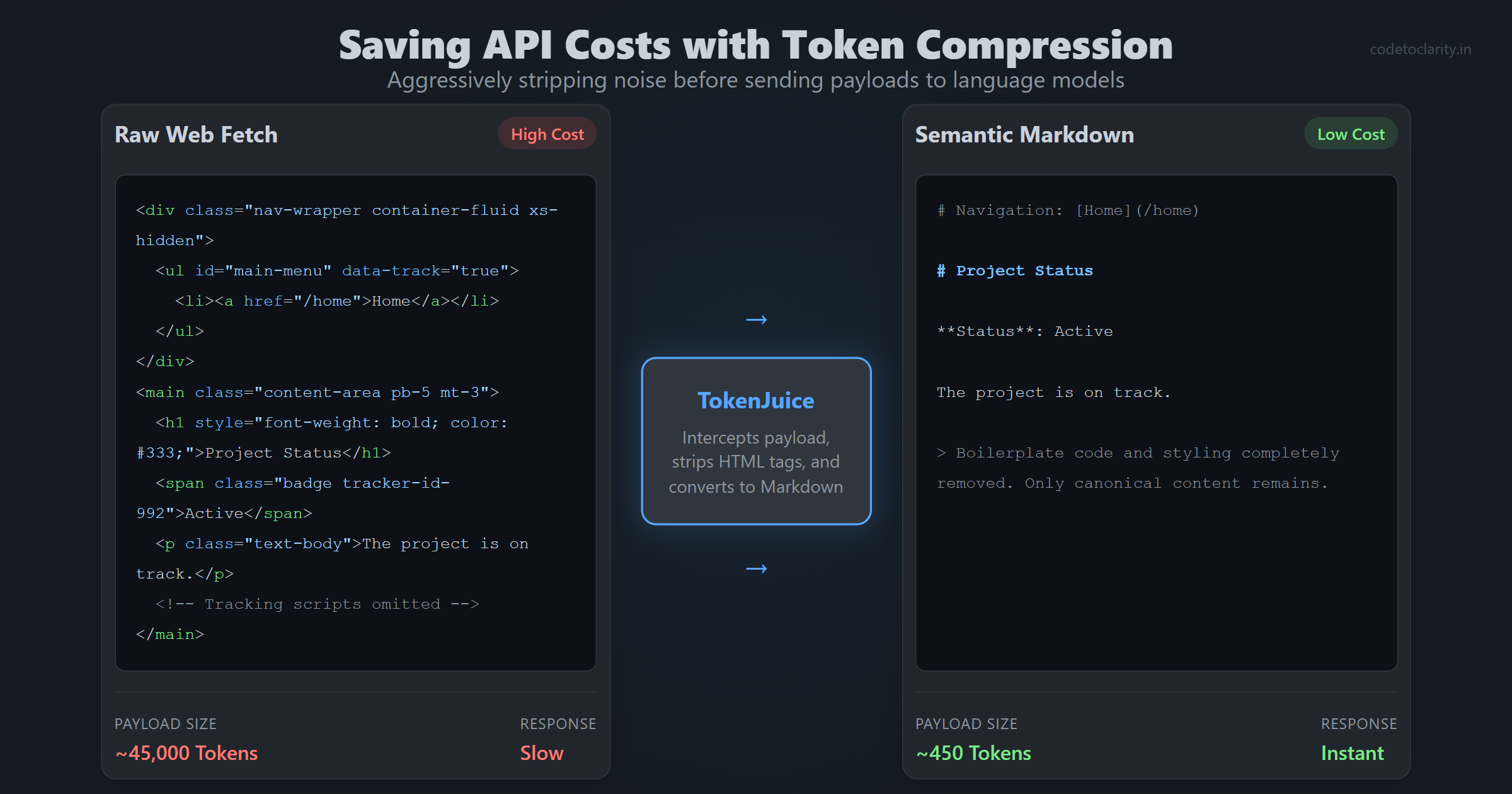
This compression layer sits securely in the primary tool execution path. Implementing a feature like this can reduce the size of the payload by an enormous margin. This translates directly into significantly faster response times and drastically lower API bills for the user.
You can actually implement similar logic in your own .NET or Node.js projects right now. Before sending user-provided content or scraped web data to an AI model, you should always parse it down to the bare essentials. Tools like HtmlAgilityPack in C# are excellent for extracting just the raw text and semantic headings before passing the final prompt along to the API.
Taking Control with Local Artificial Intelligence Models
One of the biggest concerns developers have with connecting their private Slack channels and personal emails to a third-party agent is data privacy. Sending corporate secrets or private team discussions to a cloud provider is often a massive compliance violation.
The solution is to run the artificial intelligence models locally. Modern desktop agents allow you to opt into a completely local mode. By adjusting a configuration setting, you can instruct the application to use locally hosted models for all sensitive workloads. For example, you can use a small, lightweight embedding model to generate your vector embeddings. You can also run a highly quantized, locally hosted model to build your Memory Tree summaries.
When you do this, the models run entirely on your own CPU or GPU. Your private data never actually leaves your laptop.
This represents a profound shift in software engineering. We are moving away from a world where integrating AI meant making a mandatory HTTP request to an external server. We are entering a world where powerful AI models are shipped directly alongside your application as local dependencies. If you are interested in exploring local model integration in your own .NET projects, I highly recommend reading through Microsoft's Semantic Kernel documentation. Semantic Kernel provides an incredible abstraction layer that makes integrating both cloud-based and local language models into your C# applications virtually effortless.
Deep Integrations and Extensible Tooling
An AI agent is only as useful as the exact tools it is permitted to access. A brilliant digital brain without any hands cannot actually interact with the outside world.
To be effective, an agent must leverage a robust integration toolkit to connect with various services using standard OAuth flows. Deep, native auto-ingestion usually focuses on primary platforms like email clients, documentation workspaces, and team chat applications. These are the specific areas where most developers and knowledge workers spend their days.
Beyond just reading incoming data, a proper agent comes with batteries-included native tools. It needs the ability to perform live web searches, execute customized web-scraping jobs, and utilize a full coder toolset to interact with your local file system or examine your local Git repositories.
When you are building your own internal tools, the concept of a centralized tool registry is vital. Instead of hardcoding every possible integration into your main application loop, a robust application uses a decoupled plugin architecture.
Here is a conceptual example of how you might register new agent tools in a highly scalable way using C# interfaces.
using System;
using System.Collections.Generic;
using System.Threading.Tasks;

namespace CodeToClarity.Integrations
{
    public interface IAgentTool
    {
        string ToolName { get; }
        Task ExecuteAsync(string arguments);
    }

    public class CodeToClarityGitHubTool : IAgentTool
    {
        public string ToolName => "GitHubPullRequestReviewer";

        public async Task ExecuteAsync(string arguments)
        {
            Console.WriteLine($"Fetching pull request details for: {arguments}");
            // API calls to GitHub would happen here.
            await Task.CompletedTask;
        }
    }

    public class CodeToClarityToolRegistry
    {
        private readonly List<IAgentTool> _tools;

        public CodeToClarityToolRegistry()
        {
            _tools = new List<IAgentTool>
            {
                new CodeToClarityGitHubTool()
            };
        }

        public void RegisterTool(IAgentTool newTool)
        {
            _tools.Add(newTool);
            Console.WriteLine($"Successfully registered tool: {newTool.ToolName}");
        }
    }
}
By strictly decoupling the individual tools from the core execution loop, you make the agent infinitely extensible. You can add new capabilities in the future without ever having to touch the core routing logic.
The Virtual Mascot in the Meeting Room
One of the most unique and slightly futuristic concepts being explored right now is the virtual meeting mascot.
Imagine a desktop application that does more than just sit quietly in your system tray. Imagine a digital mascot that can actually join your Google Meet or Zoom calls as a real, visible participant. Using an embedded webview, the agent appears as an active tile in the meeting grid. It uses local speech-to-text models to listen to the ongoing conversation. It identifies who is currently speaking and streams that transcribed data live directly into your Memory Tree.
If you ask the agent a complex question in the middle of a meeting, it can use text-to-speech functionality to reply aloud. It pipes its generated voice directly into the call's outbound audio stream, allowing everyone in the meeting to hear the answer.
While this might sound like a gimmick at first glance, think about the highly practical business applications. You essentially have an automated project manager that not only records the meeting but actively understands the context. It can instantly search your private corporate documentation for a referenced feature specification and provide the exact answer live on the call, saving the entire team from having to hunt down the document themselves.
Conclusion and What This Means for Developers
We are currently standing at the edge of a major architectural paradigm shift. Projects focused on local memory and proactive behavior prove that artificial intelligence does not have to be a stateless chat window that forgets who you are every time you restart your computer.
By leveraging local memory trees, periodic background ingestion services, aggressive token compression, and locally hosted language models, we can build personal companions that genuinely understand our workflows. These tools protect our privacy while saving us countless hours of repetitive data gathering and context setting.
As software developers, this is an open invitation. The source code for many of these innovative projects is freely available on GitHub. I strongly encourage you to download them. Read through the Rust codebases to see how they handle memory safety. Explore how they structure their React components for desktop environments. See exactly how they manage long-running background state.
More importantly, start thinking about how you can incorporate these stateful, proactive patterns into your own enterprise applications and personal side projects. The era of amnesiac artificial intelligence is rapidly coming to an end. It is time for us to start building software that actually remembers.

Kishan Kumar
Software Engineer / Tech Blogger
A passionate software engineer with experience in building scalable web applications and sharing knowledge through technical writing. Dedicated to continuous learning and community contribution.