Claude Code for Large Codebases: A Practical Guide to Autonomous Coding Tasks
Master Claude Code for large codebases: learn how agentic AI handles autonomous coding tasks, multi-file refactors, and CI workflows with practical setup tips and best practices.
If you've worked on a codebase that's grown from a side project into something much bigger and messier, you know the feeling. You open a file you haven't touched in months, and instead of writing new code, you spend the next forty minutes just trying to figure out what the existing code is doing. Sound familiar?
This is where AI coding tools are starting to genuinely change things. Not in a "just generate boilerplate" kind of way, but in a deeper, more useful way. Claude Code is one of the tools at the center of this shift, and it operates differently from the AI code autocomplete you might already be used to.
This post walks you through what Claude Code actually is, how it handles large codebases and autonomous tasks, how to get the most out of it, and where to use it wisely. No hype, just the practical picture.
What Makes Claude Code Different From Other AI Coding Tools
Before anything else, it helps to understand why Claude Code is in a different category than tools like GitHub Copilot.
Most AI coding assistants work at the file level. They see what is in your current editor tab, maybe a bit of surrounding context, and they suggest the next line or function. That is useful for autocomplete, but it falls apart quickly on complex, multi-file work.
Claude Code is an agentic coding system that reads your codebase, makes changes across files, runs tests, and delivers committed code. The word "agentic" is important here. An agentic system does not just respond to a single prompt and wait. It reads a codebase, plans a sequence of actions, executes them using real development tools, evaluates the result, and adjusts its approach.
Think of it like the difference between asking a colleague for advice and actually handing them your laptop and letting them work. One is passive, the other is active execution.
Claude Code maps and explains entire codebases in a few seconds, using agentic search to understand project structure and dependencies without you having to manually select context files.
That last part matters a lot. With most tools, you have to carefully feed context manually. With Claude Code, it goes and figures out what it needs on its own.
What "Autonomous Coding Tasks" Actually Means
The phrase sounds impressive, but what does it mean in practice?
An autonomous coding task is one where you describe what you want to happen, and the tool figures out the steps, executes them, verifies the result, and fixes anything that did not work, all without you babysitting every move.
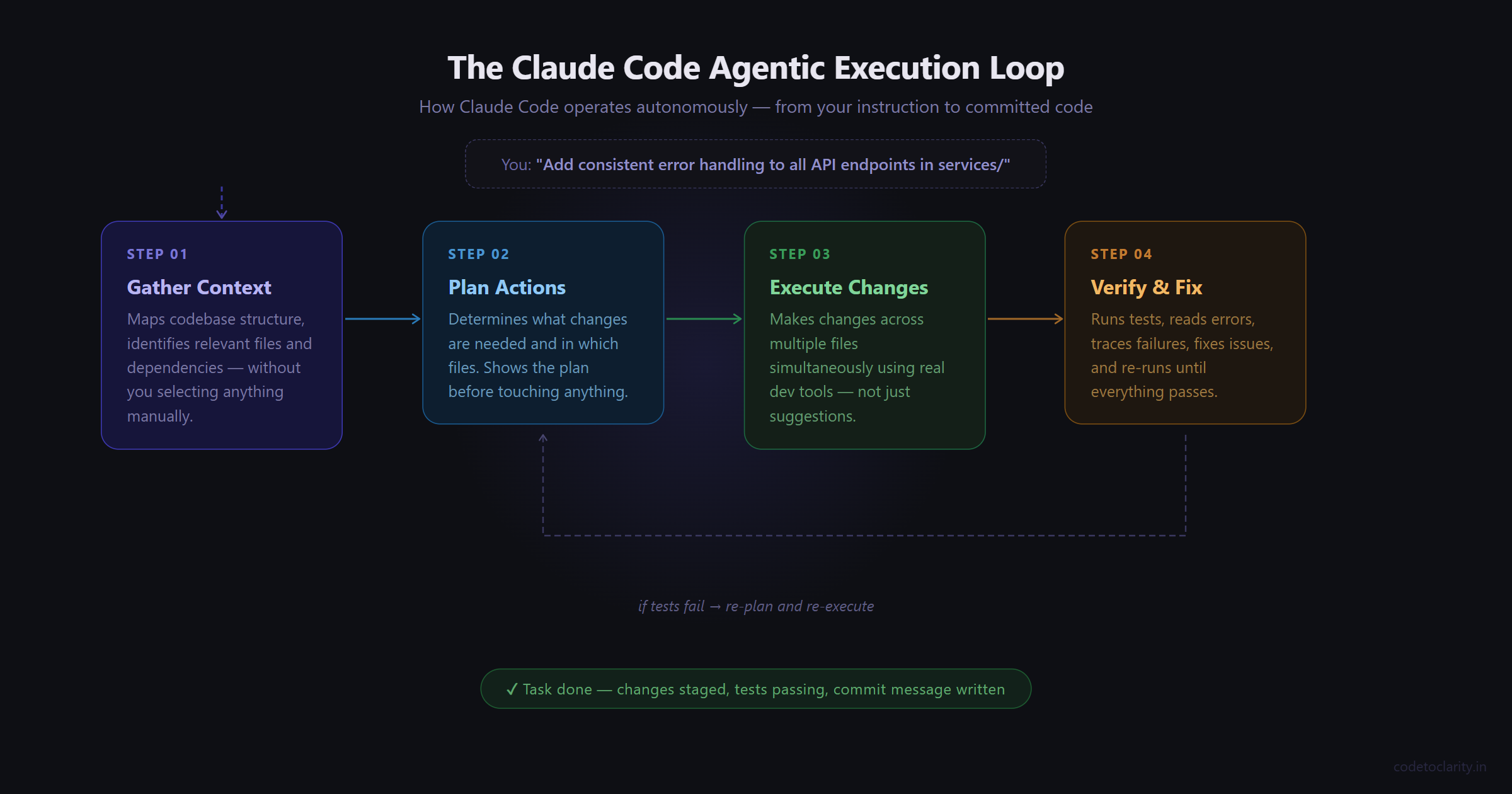
In Claude Code, Claude often operates in a specific feedback loop: gather context, take action, verify work, repeat.
Here is a real example. Imagine you have a Node.js backend service and you want consistent error handling added across all your API endpoint handlers. Without an agentic tool, you would open each file one by one, read the handler, add a try-catch, decide how to structure the error response, and repeat this maybe twenty or thirty times. It is boring, repetitive, and easy to miss one.
With Claude Code, you describe the goal: "Add consistent error handling with retry logic to all API endpoint handlers in the services/ directory." Claude Code reads the project structure, identifies the relevant files, and applies changes across both Python and TypeScript services.
That is the essence of it. You define the outcome. Claude handles the execution loop.
Setting Up Claude Code in Your Project
Getting started is fairly straightforward. Claude Code lives in your terminal and connects to your development environment directly.
It is an agentic coding tool that lives in your terminal, understands your codebase, and helps you code faster by executing routine tasks, explaining complex code, and handling git workflows, all through natural language commands.
Once you have it installed, navigate to your project directory and run claude. From there, you are talking to something that has access to your entire repo.
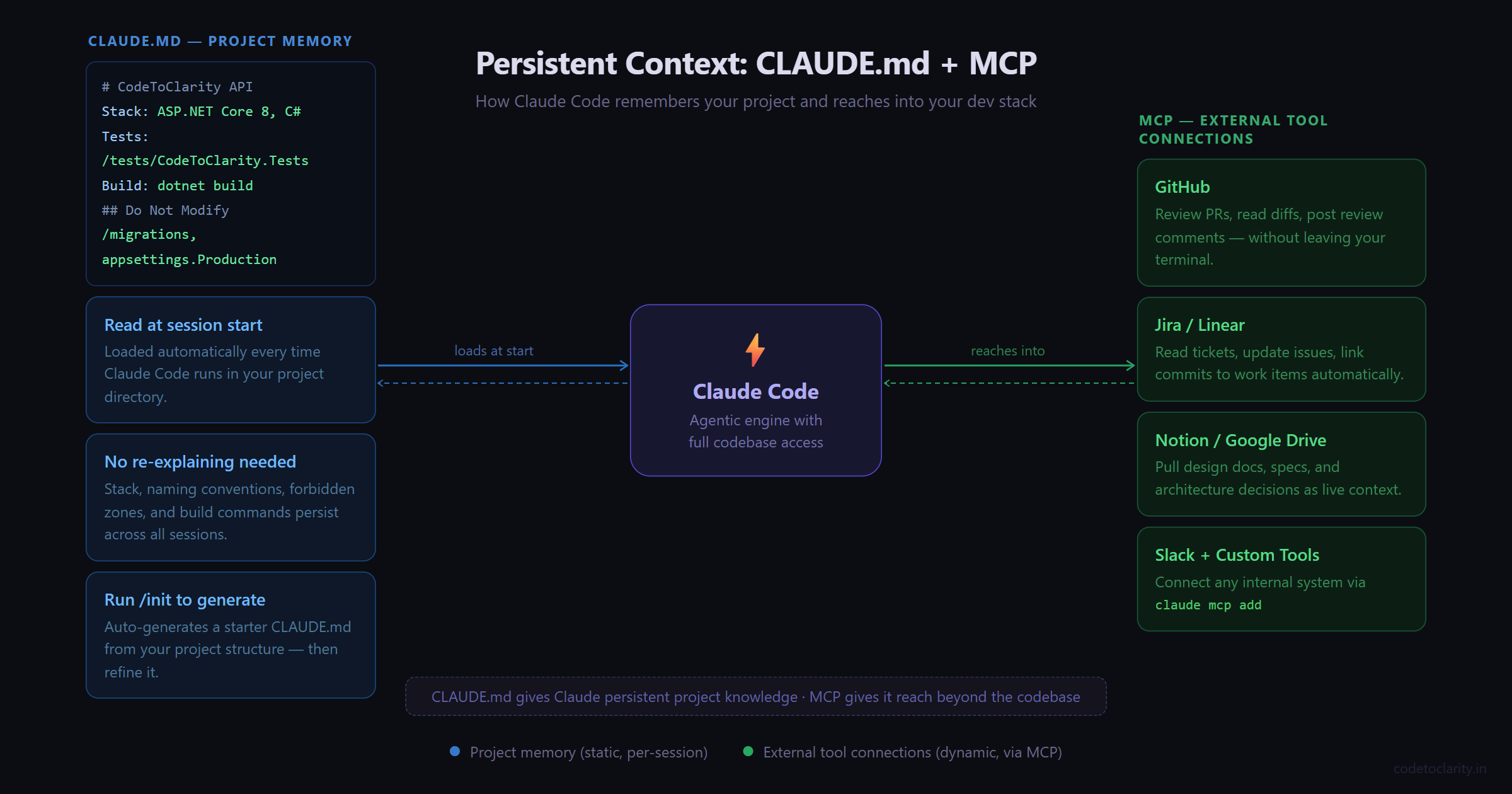
The single most valuable thing you can do during setup is create a CLAUDE.md file in your project root. CLAUDE.md is a special file that Claude reads at the start of every conversation. Include Bash commands, code style, and workflow rules. This gives Claude persistent context it cannot infer from code alone.
Think of CLAUDE.md as the briefing document you would give a new engineer joining your project. What stack are you on? What naming conventions do you follow? Are there folders that should not be touched? Any quirks in the build process?
You do not need to format it a specific way. Keep it short and practical. Here is an example of what a CLAUDE.md might look like for a .NET Web API project:
# CodeToClarity API

## Stack
- ASP.NET Core 8, C#, SQL Server, Entity Framework Core

## Code Style
- Use async/await throughout, no blocking calls
- Service layer handles all business logic, controllers stay thin
- Prefix interfaces with I (ICodeToClarityService)
- Unit tests go in /tests/CodeToClarity.Tests

## Do Not Modify
- /migrations folder (run EF migrations manually)
- appsettings.Production.json

## Commands
- Build: dotnet build
- Test: dotnet test
- Run: dotnet run --project src/CodeToClarity.Api
That is it. Now every Claude Code session starts with that context in place, and you do not have to re-explain your project conventions every time.
Running Your First Autonomous Task
Once your environment is ready, start small. Give Claude Code a focused task and watch how it approaches it before handing it something larger.
Here is a practical starting point. Say you have a service class in your project that has grown to 400 lines and does way too many things. You want it broken up into smaller, focused services.
Refactor the CodeToClarityOrderService class.
It currently handles order creation, payment processing,
and email notifications all in one class.
Split these into three separate services with clear interfaces.
What happens next is where it gets interesting. Claude Code will read the class, look at how it is used elsewhere in the codebase, identify dependencies, and then plan the refactor before touching anything. It will typically show you its plan before making changes, which gives you a chance to redirect if something looks off.
After the refactor, it can run your tests to verify nothing broke. If tests fail, it reads the error, traces back to what caused it, fixes the issue, and re-runs. When tests fail, Claude Code reads the errors, fixes the code, and runs the suite again until everything passes.
The loop keeps going until the job is done or it hits something it needs your input on.
Writing Prompts That Actually Work
The quality of your instructions matters a lot. This is not about writing "better prompts" in some mystical AI sense. It is just about being specific in the same way you would be specific with a junior developer.
Compare these two prompts:
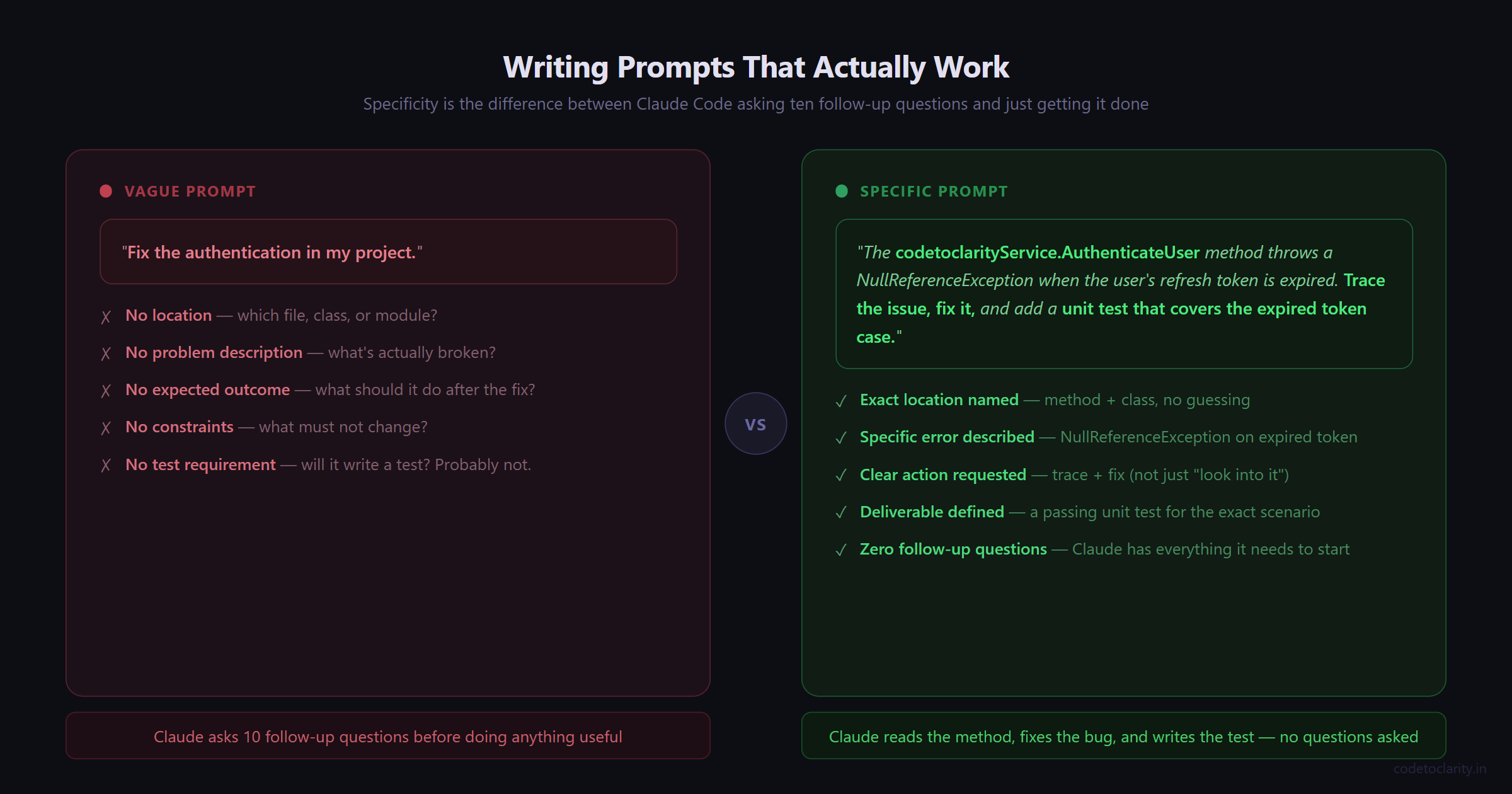
Vague: "Fix the authentication in my project."
Specific: "The codetoclarityService.AuthenticateUser method throws a NullReferenceException when the user's refresh token is expired. Trace the issue, fix it, and add a unit test that covers the expired token case."
The second prompt tells Claude Code what the problem is, where to look, what to fix, and what to produce. It has everything it needs to get started without asking you ten follow-up questions.
A few patterns that consistently get better results:
- Scope it clearly. Name the file, folder, or module you want affected.
- Define the outcome. What should the code do after the change?
- Mention constraints. "Do not change the public API surface" or "preserve backward compatibility" prevents unpleasant surprises.
- Ask for tests. If you say "and write unit tests for the changed code," it will do it. If you do not say it, it might not.
Using CLAUDE.md and MCP for Persistent Context
As your usage grows, two features make Claude Code dramatically more powerful: CLAUDE.md and MCP integrations.
You already know what CLAUDE.md does. Now, MCP (Model Context Protocol) is worth understanding too. The Model Context Protocol is an open standard for connecting AI tools to external data sources. With MCP, Claude Code can read your design docs in Google Drive, update tickets in Jira, pull data from Slack, or use your own custom tooling.
In plain terms: MCP is how you connect Claude Code to the rest of your dev stack. Instead of switching between your terminal, your issue tracker, and GitHub manually, Claude Code can reach into those systems on your behalf.
For example, with a GitHub MCP server connected, you could say: "Review the latest pull request in my repository, analyze the code changes, and post a review comment." Claude Code fetches the PR, reads the diff, and posts its analysis. The whole thing happens inside your workflow without you context-switching.
Run claude mcp add to connect external tools like Notion, Figma, or your database.
Start with one or two MCP servers. Connect GitHub first since that covers pull request review, issue reading, and commit workflows. Add more as you find specific needs.
Reviewing AI-Generated Changes: The Non-Negotiable Step
Here is something worth saying clearly. Even with a tool this capable, you should always review changes before they hit your main branch.
This is not a knock on Claude Code. It is just common sense, the same way you review changes from a human developer before merging them. The developer sets the objective and retains control over what gets committed, but the execution loop runs independently.
Claude Code does ask for permission before modifying files or running commands by default, which keeps you in the loop at each step. But once you start approving things in auto mode, it is easy to let large changes go through without careful review.
What to look for when reviewing AI-generated code:
- Does the logic actually match what you asked for?
- Are there any edge cases that the implementation does not handle?
- Did any existing tests break? Did the new tests actually cover meaningful scenarios?
- Are there any security-sensitive areas that were touched (authentication, file access, database queries)?
The good news is that Claude Code works directly with git, so it stages changes, writes commit messages, creates branches, and opens pull requests. You can review a clean pull request the same way you would review one from a human developer.
Real-World Use Cases That Save Hours
Here are some tasks where Claude Code tends to earn its keep in real projects:
Migrating deprecated patterns. Updating dozens of files from one API version to another, replacing old promise chains with async/await, swapping a deprecated library for its modern replacement. These are tasks that are tedious and error-prone by hand. Claude Code can handle them systematically across your entire codebase.
Writing test coverage. Point it at a service or module and say "write unit tests for the public methods in this class using xUnit" (or Jest, or whatever you use). It reads the implementation, understands what the methods should do, and writes tests that actually reflect the code's behavior.
Onboarding to unfamiliar code. You just inherited a module that no one has touched in two years. Ask Claude Code to walk you through what it does, map out its dependencies, and explain any non-obvious design decisions. This alone can save hours of archaeology.
Documentation generation. Ask it to generate XML doc comments for a C# API or JSDoc for a JavaScript module. It reads the implementation and writes documentation that is actually accurate, not generic filler.
Handling Large Codebases: What to Keep in Mind
The bigger your codebase, the more some specific habits matter.
Keep tasks focused. Even though Claude Code can handle multi-file changes, resist the temptation to ask for massive sweeping changes in one go. "Refactor the entire backend" is going to produce something you cannot meaningfully review. "Refactor the payment service to remove the coupling between charge processing and email notifications" is tractable.
Use version control aggressively. Commit your current state before handing Claude Code a large task. That gives you a clean rollback point if something goes sideways. Agent-based workflows shift the model from AI that suggests code to AI that executes tasks. When the AI is actually executing changes, having a good git history matters more, not less.
Run your full test suite after autonomous tasks. Not just the tests for the files that were modified. Unexpected interactions across modules are the sneaky failure mode here.
Best Practices Summary
Here are the habits that consistently make Claude Code more effective in large projects:
- Start every project with a well-written
CLAUDE.mdthat covers your stack, conventions, forbidden zones, and build commands. - Run
/initto generate a starter CLAUDE.md automatically from your project structure, then refine it. - Give specific, scoped prompts. Name the module, describe the expected output, mention constraints.
- Always review changes in a pull request before merging to a shared branch.
- Start with medium-complexity tasks (not trivial, not massive) to build trust in how Claude Code handles your specific codebase.
- Use custom slash commands for workflows you repeat often. Store them in
.claude/commands/and check them into git. - Use hooks for actions that must happen every time without exception, like running a linter after every file edit.
A Note on Expectations
Claude Code is genuinely impressive, but it is not magic and the best results still come from people who understand their own systems. After months of daily Claude Code usage, the core lesson has not changed: your domain expertise is the bottleneck, not the tool.
That is a healthy framing. Claude Code extends what you can do, but your judgment about architecture, product tradeoffs, and what actually needs to be built is still the thing driving outcomes. Engineers at companies using Claude Code at scale are not being replaced by it. They are spending less time on the repetitive execution work and more time on the decisions that actually require their expertise.
Deep knowledge of systems and architecture that was previously held by a few engineers becomes accessible to the whole team with Claude Code.
That is probably the most valuable thing it does.

Kishan Kumar
Software Engineer / Tech Blogger
A passionate software engineer with experience in building scalable web applications and sharing knowledge through technical writing. Dedicated to continuous learning and community contribution.