
Adapter Pattern in ASP.NET Core: Real-World Examples for Beginners
Learn how to use the Adapter Pattern in .NET to cleanly integrate third-party APIs, swap providers without touching business logic, and write more testable code. Real examples included.
Picture this: you're building a .NET application, and everything is going smoothly. Then your project manager walks in and says, "We're adding Stripe for payments, Twilio for SMS, and maybe switching email providers next quarter."
Suddenly, your clean codebase starts to look like spaghetti. Different SDKs. Different method signatures. Different ways to handle errors. Different response objects. And deep in your OrderService, you're writing code that's 30% business logic and 70% "translate this provider's quirks into something usable."
Sound familiar?
This is one of the most common and most painful problems in real-world .NET development. And the Adapter Pattern exists precisely to solve it.
In this article, you'll get a proper understanding of what the Adapter Pattern is, how it works in .NET, and how to apply it to real scenarios like multi-provider integrations. By the end, you'll have a clean mental model and working code you can actually use.
What Even Is an "Adapter"?
Before jumping into code, let's make sure the concept clicks.
Think about when you travel internationally. Your laptop charger has a specific plug shape that works in your home country. But the wall socket in another country has a completely different shape. You don't buy a new laptop. You don't rewire the hotel. You use a travel adapter, a small device that sits between your plug and the foreign socket, translating one shape into another.
The Adapter Pattern in software does exactly this.
Your application has a specific interface it expects. An external service (third-party SDK, legacy system, cloud provider) has a different interface. The Adapter sits between them and translates, so neither side needs to change.
In formal terms, from the Gang of Four Design Patterns, the Adapter is a structural pattern that converts the interface of one class into another interface that the client expects. But honestly, the travel plug analogy is more useful in day-to-day code reviews.
The Problem Without an Adapter
Let's say you're building a notification service for CodeToClarity, a platform that sends alerts to users when new articles go live. Initially, you use SendGrid for email.
Without the Adapter Pattern, your code might look like this directly inside a service:
public class ArticlePublishedHandler
{
    private readonly SendGridClient _sendGridClient;

    public ArticlePublishedHandler(SendGridClient sendGridClient)
    {
        _sendGridClient = sendGridClient;
    }

    public async Task NotifySubscribers(string userEmail, string articleTitle)
    {
        var message = new SendGridMessage
        {
            From = new EmailAddress("hello@codetoclarity.in"),
            Subject = $"New Article: {articleTitle}",
            PlainTextContent = $"Check out the new article: {articleTitle}"
        };

        message.AddTo(new EmailAddress(userEmail));
        await _sendGridClient.SendEmailAsync(message);
    }
}
This works. Until it doesn't.
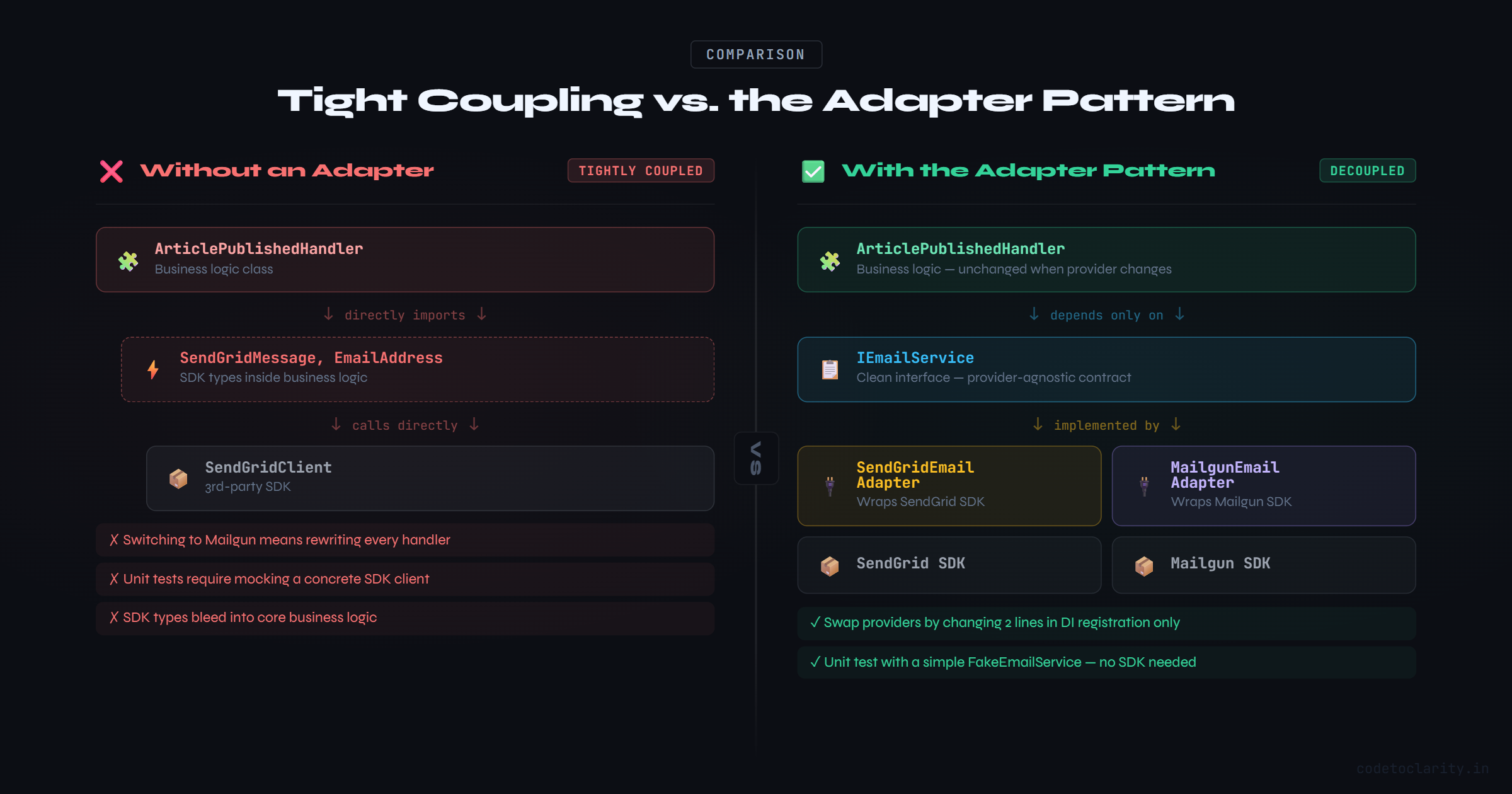
Six months later, your team decides to move to Mailgun because it's cheaper. Now you have to go through every class that references SendGridClient, SendGridMessage, and EmailAddress and rewrite them. If you have ten services doing this, that's ten places to update, test, and potentially break.
And if you want to write unit tests for ArticlePublishedHandler? You're stuck mocking a concrete SDK client, which is painful and fragile.
This is what tight coupling looks like in practice.
The Anatomy of the Adapter Pattern
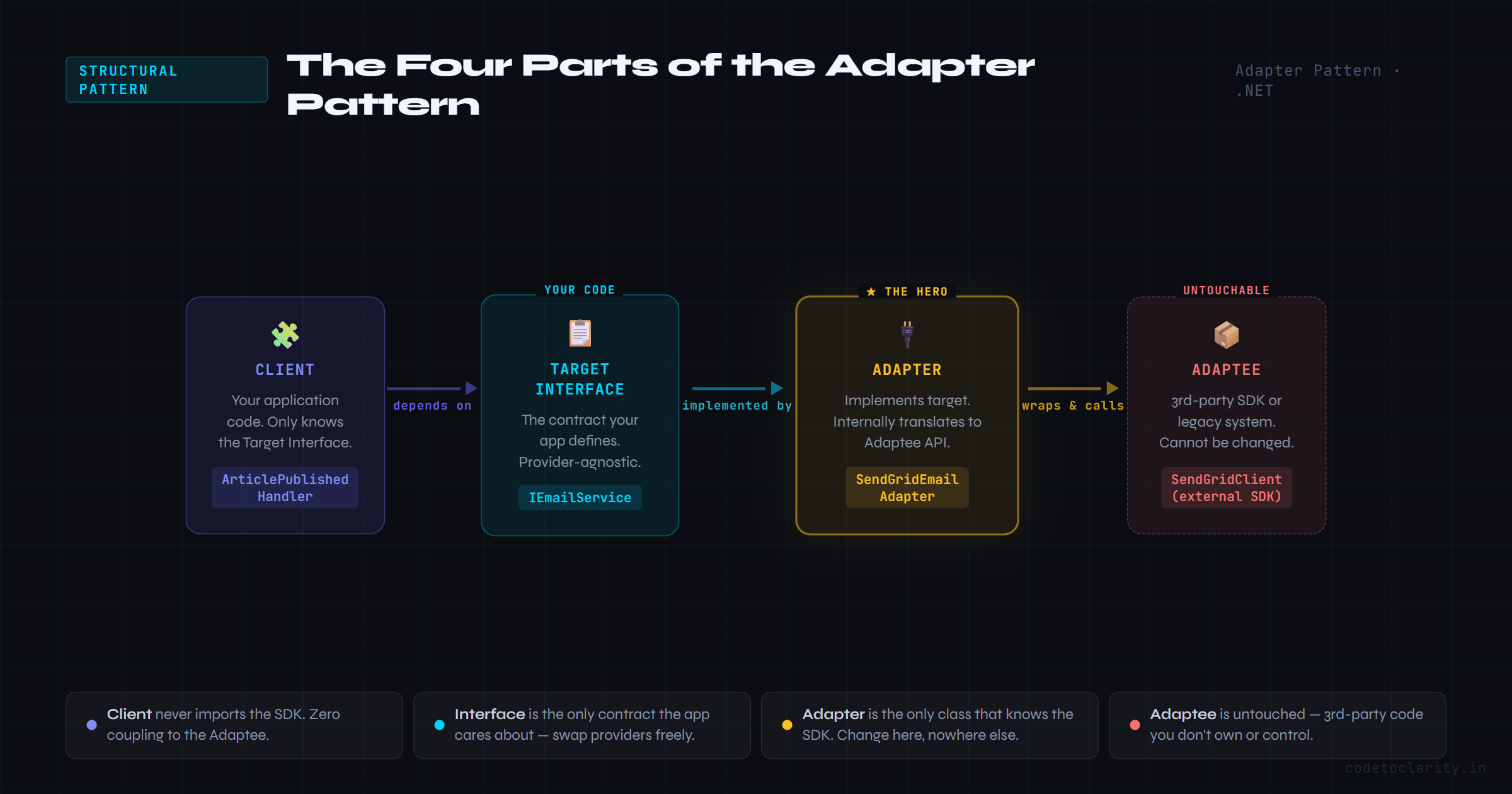
Before writing the solution, let's understand the four moving parts:
Target Interface: The interface your application code depends on. This is the "expected plug shape" your app understands.
Adaptee: The external class or service with a different interface. This is the foreign wall socket you cannot change.
Adapter: The class that implements the Target Interface and internally calls the Adaptee. This is your travel adapter.
Client: Your application code that uses the Target Interface, completely unaware of the Adaptee.
Simple structure. Powerful results.
Building the Adapter: Email Notification Example
Let's fix the CodeToClarity notification system properly.
Step 1: Define the Target Interface
Start with the contract your application will always depend on, regardless of which email provider you use:
public interface IEmailService
{
    Task SendEmailAsync(string toEmail, string subject, string body);
}
Clean, simple, and provider-agnostic. Your application will only ever know about IEmailService.
Step 2: Create the SendGrid Adapter
Now wrap the actual SendGrid SDK inside an adapter that fulfills this contract:
public class SendGridEmailAdapter : IEmailService
{
    private readonly SendGridClient _client;
    private readonly string _fromEmail;

    public SendGridEmailAdapter(SendGridClient client, string fromEmail)
    {
        _client = client;
        _fromEmail = fromEmail;
    }

    public async Task SendEmailAsync(string toEmail, string subject, string body)
    {
        var message = new SendGridMessage
        {
            From = new EmailAddress(_fromEmail),
            Subject = subject,
            PlainTextContent = body
        };

        message.AddTo(new EmailAddress(toEmail));

        var response = await _client.SendEmailAsync(message);

        if (!response.IsSuccessStatusCode)
        {
            throw new Exception($"SendGrid failed with status: {response.StatusCode}");
        }
    }
}
All the SendGrid-specific details live here and nowhere else.
Step 3: Update the Consumer
Now your ArticlePublishedHandler becomes beautifully clean:
public class ArticlePublishedHandler
{
    private readonly IEmailService _emailService;

    public ArticlePublishedHandler(IEmailService emailService)
    {
        _emailService = emailService;
    }

    public async Task NotifySubscribers(string userEmail, string articleTitle)
    {
        await _emailService.SendEmailAsync(
            toEmail: userEmail,
            subject: $"New Article on CodeToClarity: {articleTitle}",
            body: $"Hey there! A new article just went live: '{articleTitle}'. Head over to codetoclarity.in to read it."
        );
    }
}
ArticlePublishedHandler doesn't know or care whether you're using SendGrid, Mailgun, or a homemade SMTP relay. It just calls SendEmailAsync and moves on.
Switching Providers Without Changing Business Logic
Here's where the payoff really shows up. Let's say you do switch to Mailgun. You create a new adapter:
public class MailgunEmailAdapter : IEmailService
{
    private readonly IMailgunClient _mailgunClient;
    private readonly string _domain;

    public MailgunEmailAdapter(IMailgunClient mailgunClient, string domain)
    {
        _mailgunClient = mailgunClient;
        _domain = domain;
    }

    public async Task SendEmailAsync(string toEmail, string subject, string body)
    {
        await _mailgunClient.SendMessageAsync(_domain, new MessageBuilder()
            .SetFromAddress("hello@codetoclarity.in")
            .AddToRecipient(toEmail)
            .SetSubject(subject)
            .SetTextBody(body)
            .GetMessage());
    }
}
That's all. You write one new class, swap the DI registration, and your ArticlePublishedHandler keeps working without a single line change. That's the whole point.
Wiring It Up with Dependency Injection
.NET's built-in DI container makes registering adapters straightforward. In your Program.cs or a service registration extension:
var sendGridApiKey = builder.Configuration["SendGrid:ApiKey"];
var sendGridClient = new SendGridClient(sendGridApiKey);

builder.Services.AddSingleton(sendGridClient);
builder.Services.AddTransient<IEmailService, SendGridEmailAdapter>();

builder.Services.AddTransient<ArticlePublishedHandler>();
When you want to switch to Mailgun, you change two lines in the DI setup. Nothing else touches.
For teams that need to support multiple providers simultaneously (like A/B testing email deliverability), a factory approach works well. If you want to go a step further and resolve specific implementations by name, .NET 8 introduced Keyed Services for exactly this. I've covered that in detail in my guide to Keyed Services in .NET 8 if you want to dig deeper.
A More Complex Scenario: Multi-Provider Notifications
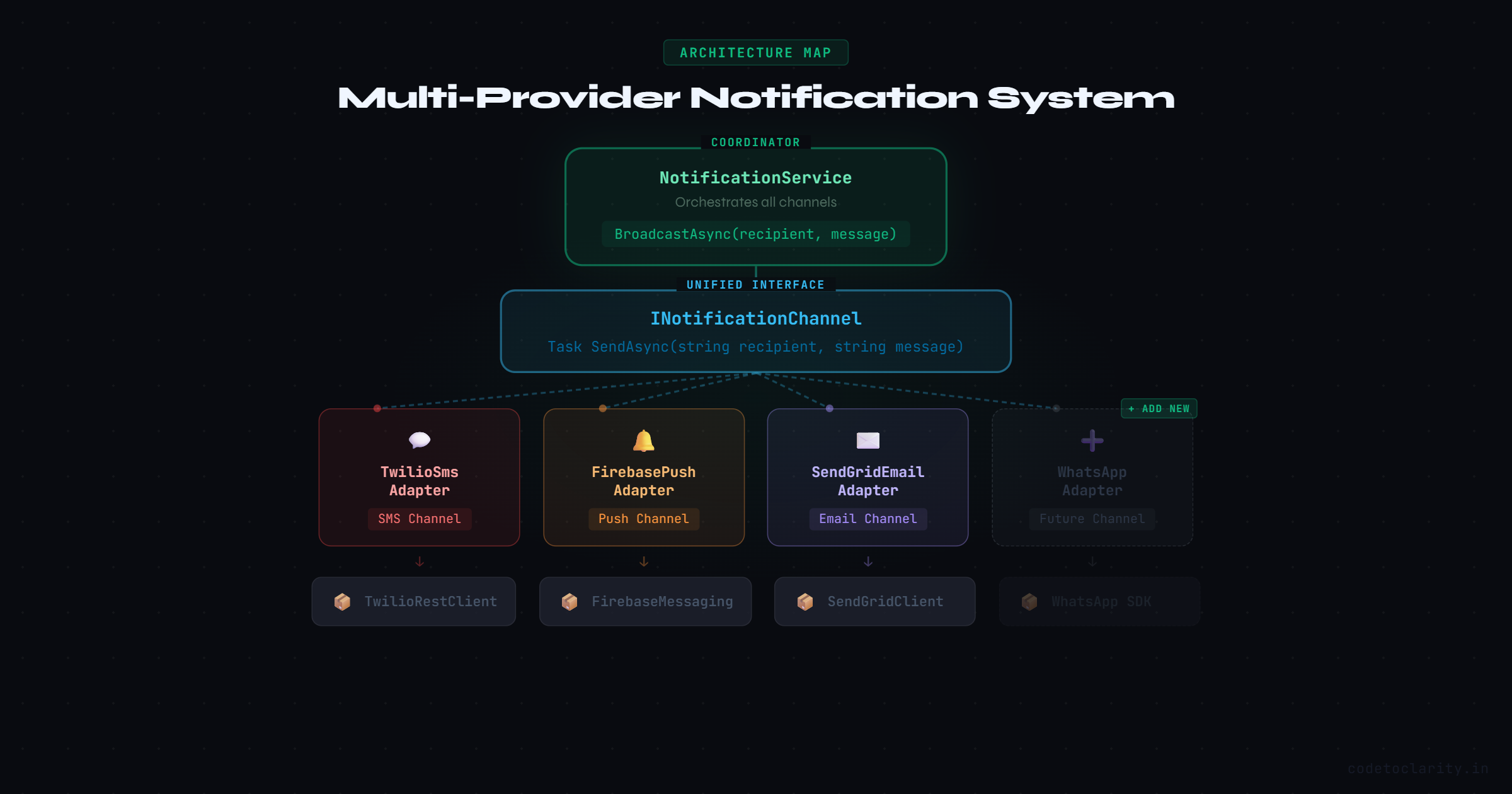
Let's go further. The CodeToClarity platform now wants to notify users via email, SMS, and push notifications. Each channel has a completely different SDK.
Define a unified interface:
public interface INotificationChannel
{
    Task SendAsync(string recipient, string message);
}
Create adapters for each provider:
public class TwilioSmsAdapter : INotificationChannel
{
    private readonly TwilioRestClient _twilioClient;
    private readonly string _fromNumber;

    public TwilioSmsAdapter(TwilioRestClient twilioClient, string fromNumber)
    {
        _twilioClient = twilioClient;
        _fromNumber = fromNumber;
    }

    public async Task SendAsync(string recipient, string message)
    {
        await MessageResource.CreateAsync(
            body: message,
            from: new Twilio.Types.PhoneNumber(_fromNumber),
            to: new Twilio.Types.PhoneNumber(recipient),
            client: _twilioClient
        );
    }
}
public class FirebasePushAdapter : INotificationChannel
{
    private readonly FirebaseMessaging _messaging;

    public FirebasePushAdapter(FirebaseMessaging messaging)
    {
        _messaging = messaging;
    }

    public async Task SendAsync(string recipient, string message)
    {
        var pushMessage = new Message
        {
            Token = recipient,
            Notification = new Notification { Body = message }
        };

        await _messaging.SendAsync(pushMessage);
    }
}
Use them through a common coordinator:
public class KishanKumarNotificationService
{
    private readonly IEnumerable<INotificationChannel> _channels;

    public KishanKumarNotificationService(IEnumerable<INotificationChannel> channels)
    {
        _channels = channels;
    }

    public async Task BroadcastAsync(string recipient, string message)
    {
        var tasks = _channels.Select(channel => channel.SendAsync(recipient, message));
        await Task.WhenAll(tasks);
    }
}
Your coordinator doesn't know about Twilio, Firebase, or anything else. It just knows about INotificationChannel. Adding a new channel later (say, WhatsApp) means creating one new adapter class and registering it. Zero changes to business logic.
Object Adapter vs Class Adapter
You'll sometimes hear these two terms, so let's clear them up quickly.
The Object Adapter (what we've been building) uses composition. Your adapter holds a reference to the adaptee and calls its methods. This is the preferred approach in C# because it's flexible and doesn't create tight inheritance hierarchies.
The Class Adapter uses inheritance. Your adapter extends the adaptee class directly. This is possible in C# when the adaptee is not sealed, but it's generally less recommended because you're inheriting all the adaptee's baggage and you can only adapt one class at a time.
In practice, stick with Object Adapters. They're easier to test, easier to swap, and they align well with composition-over-inheritance principles.
The Testing Benefit You Can't Ignore
One of the quieter wins of the Adapter Pattern is how much easier it makes unit testing.
Because your business logic depends only on IEmailService or INotificationChannel, you can create a mock implementation in your tests:
public class FakeEmailService : IEmailService
{
    public List<(string To, string Subject, string Body)> SentEmails = new();

    public Task SendEmailAsync(string toEmail, string subject, string body)
    {
        SentEmails.Add((toEmail, subject, body));
        return Task.CompletedTask;
    }
}
Now you can test ArticlePublishedHandler without touching the network, without needing a SendGrid API key, and without worrying about rate limits. Fast, isolated, reliable tests.
For teams using Moq or NSubstitute, mocking an interface like IEmailService is trivial. Libraries like Moq make this even cleaner with just a few lines.
When to Reach for the Adapter Pattern
Use it when:
- You're integrating a third-party SDK and don't want its types leaking into your core logic
- You're working with legacy code that you can't modify but need to use
- You want to support multiple providers of the same capability (email, storage, payments)
- You need your code to be testable without hitting real external services
- You anticipate switching vendors in the future
When to skip it:
- The external API is already perfectly aligned with what your app needs (rare, but it happens)
- It's a one-off throwaway script where architecture doesn't matter
- You're adding abstraction purely for abstraction's sake, with no real variation on the horizon
The pattern solves a specific problem. It's not something you sprinkle everywhere by default. But when integrations get messy, it's one of the clearest solutions available.
Quick Summary
The Adapter Pattern gives you a clean boundary between your application and the outside world. Your business logic speaks a language it defines. The adapter translates that language into whatever the external service understands.
The result is a codebase where you can swap providers, write real unit tests, and onboard new team members without them needing to learn six different SDKs just to understand the notification flow.
If you're building .NET applications that talk to any external service (and you almost certainly are), this pattern is worth having firmly in your toolkit. Check out the official .NET design patterns guidance to see how structural patterns like this one fit into broader architectural thinking.

Kishan Kumar
Software Engineer / Tech Blogger
A passionate software engineer with experience in building scalable web applications and sharing knowledge through technical writing. Dedicated to continuous learning and community contribution.