
The Facade Pattern in .NET: Simplifying Complex Code
Master the Facade design pattern in C# and .NET. Learn how to simplify complex subsystem orchestration, write cleaner controllers, and improve code testability.
Have you ever opened a C# controller in a large project and felt an immediate sense of dread? You look at the constructor and see ten different services injected just to get one job done. The code looks like a tangled bowl of spaghetti. Every time you need to execute a core business workflow, you find yourself manually orchestrating a sequence of calls across multiple systems. You are constantly keeping track of what needs to happen and in what exact order.
If you miss a single step, the entire process breaks down. For example, if you skip one line of code, you might charge a user but fail to grant them access to their digital purchase. This is a common pain point for developers, especially as applications grow in size and complexity. But this is not an unavoidable fact of software engineering. It is simply a missing abstraction, and the Facade design pattern is the perfect tool to fix it.
In this comprehensive guide, we are going to dive incredibly deep into the Facade pattern. We will look at why complex subsystems get out of hand, how this pattern simplifies your code, and how to implement it cleanly using ASP.NET Core Dependency Injection. We will also cover advanced use cases, dependency lifetimes, unit testing strategies, and how this structural pattern compares to behavioral messaging patterns.
The Problem: Exposing Subsystem Complexity to Clients
To truly understand the value of the Facade pattern, we need to inspect a real-world scenario where its absence causes massive headaches. Let us imagine we are building a registration and onboarding flow for our educational platform, CodeToClarity.
When a new user signs up, the application cannot just insert a single record into a SQL database and call it a day. A professional onboarding workflow usually involves multiple distinct steps spanning entirely different domains. We need to create the user identity, provision an isolated workspace for them, add their email to our newsletter marketing list, grant them starting credits in the billing system, and finally send them a welcoming email.
Here is what that looks like when a developer places all that orchestration directly inside an API controller:
[ApiController]
[Route("api/users")]
public class UsersController : ControllerBase
{
    private readonly IIdentityService _identityService;
    private readonly IWorkspaceService _workspaceService;
    private readonly ICRMService _crmService;
    private readonly IBillingService _billingService;
    private readonly IEmailService _emailService;

    public UsersController(
        IIdentityService identityService,
        IWorkspaceService workspaceService,
        ICRMService crmService,
        IBillingService billingService,
        IEmailService emailService)
    {
        _identityService = identityService;
        _workspaceService = workspaceService;
        _crmService = crmService;
        _billingService = billingService;
        _emailService = emailService;
    }

    [HttpPost("register")]
    public async Task<IActionResult> RegisterUser([FromBody] RegisterRequest request)
    {
        // Step 1: Create the identity
        var identityResult = await _identityService.CreateUserAsync(request.Email, request.Password);
        if (!identityResult.IsSuccess)
        {
            return BadRequest("Could not create user account.");
        }

        // Step 2: Provision a default workspace
        var workspace = await _workspaceService.ProvisionAsync(identityResult.UserId);

        // Step 3: Add to CRM for marketing
        await _crmService.SubscribeToNewsletterAsync(request.Email);

        // Step 4: Grant starting promotional credits
        await _billingService.GrantCreditsAsync(identityResult.UserId, 50);

        // Step 5: Send the welcome email
        await _emailService.SendWelcomeEmailAsync(request.Email, workspace.Url);

        return Ok(new { UserId = identityResult.UserId, WorkspaceUrl = workspace.Url });
    }
}
This code works, but it places a massive burden on the controller. The controller is supposed to handle HTTP requests and return HTTP responses. It should not act as an omniscient micro-manager for five different business domains.
Every time another part of our application needs to register a user, we will have to duplicate this exact sequence. If an administrator creates a user manually from an admin panel, or if a background job processes bulk signups, we have to inject those same five services over again. We have to remember the exact order of operations. If we forget to grant the promotional credits in one of those places, we create subtle and frustrating bugs that confuse our users.
The Solution: Enter the Facade Pattern
The Facade design pattern is a structural design pattern that provides a simplified, high-level interface to a complex system of classes. The word "facade" literally means the front face of a building. When you look at the facade of a beautiful historical building, you do not see the intricate plumbing, the electrical wiring, or the structural support beams. You just see a clean, unified, and aesthetically pleasing presentation.
Think about dining at a nice restaurant. You never walk back into the kitchen to speak directly with the head chef. You do not coordinate with the individual who chops the vegetables, nor do you talk to the person who washes the dishes. Instead, you talk to your waiter. The waiter acts as a facade. You place one simple order, and the waiter handles the complex orchestration of communicating with the kitchen staff, the bartender, and the host.
In software, a facade takes a messy subsystem of services and wraps them in a single, well-defined class. It does not hide the underlying subsystem from developers who might genuinely need access to a specific part. It simply gives you a convenient central checkpoint for common, complex operations.
Implementing the Facade Pattern in .NET
Let us refactor our messy onboarding process. We will create a single layer that handles the entire workflow. First, we define an interface. Creating an interface ensures we can easily swap implementations and write isolated unit tests later on.
public interface IUserOnboardingFacade
{
    Task<OnboardingResult> RegisterAndOnboardUserAsync(RegisterRequest request);
}
Now we create the implementation. The new CodeToClarityOnboardingFacade class will take on the burden of the dependencies and the orchestration logic.
public class CodeToClarityOnboardingFacade : IUserOnboardingFacade
{
    private readonly IIdentityService _identityService;
    private readonly IWorkspaceService _workspaceService;
    private readonly ICRMService _crmService;
    private readonly IBillingService _billingService;
    private readonly IEmailService _emailService;
    private readonly ILogger<CodeToClarityOnboardingFacade> _logger;

    public CodeToClarityOnboardingFacade(
        IIdentityService identityService,
        IWorkspaceService workspaceService,
        ICRMService crmService,
        IBillingService billingService,
        IEmailService emailService,
        ILogger<CodeToClarityOnboardingFacade> logger)
    {
        _identityService = identityService;
        _workspaceService = workspaceService;
        _crmService = crmService;
        _billingService = billingService;
        _emailService = emailService;
        _logger = logger;
    }

    public async Task<OnboardingResult> RegisterAndOnboardUserAsync(RegisterRequest request)
    {
        try
        {
            var identityResult = await _identityService.CreateUserAsync(request.Email, request.Password);
            if (!identityResult.IsSuccess)
            {
                return OnboardingResult.Failure("Could not create user account.");
            }

            var workspace = await _workspaceService.ProvisionAsync(identityResult.UserId);

            await _crmService.SubscribeToNewsletterAsync(request.Email);
            await _billingService.GrantCreditsAsync(identityResult.UserId, 50);
            await _emailService.SendWelcomeEmailAsync(request.Email, workspace.Url);

            return OnboardingResult.Success(identityResult.UserId, workspace.Url);
        }
        catch (Exception ex)
        {
            _logger.LogError(ex, "An error occurred during onboarding for user {Email}", request.Email);
            return OnboardingResult.Failure("An unexpected error occurred during registration.");
        }
    }
}
Once we have our facade built, we can look at the consumer code. The controller becomes beautifully simple.
[ApiController]
[Route("api/users")]
public class UsersController : ControllerBase
{
    private readonly IUserOnboardingFacade _onboardingFacade;

    public UsersController(IUserOnboardingFacade onboardingFacade)
    {
        _onboardingFacade = onboardingFacade;
    }

    [HttpPost("register")]
    public async Task<IActionResult> RegisterUser([FromBody] RegisterRequest request)
    {
        var result = await _onboardingFacade.RegisterAndOnboardUserAsync(request);

        if (!result.IsSuccess)
        {
            return BadRequest(result.ErrorMessage);
        }

        return Ok(new { UserId = result.UserId, WorkspaceUrl = result.WorkspaceUrl });
    }
}
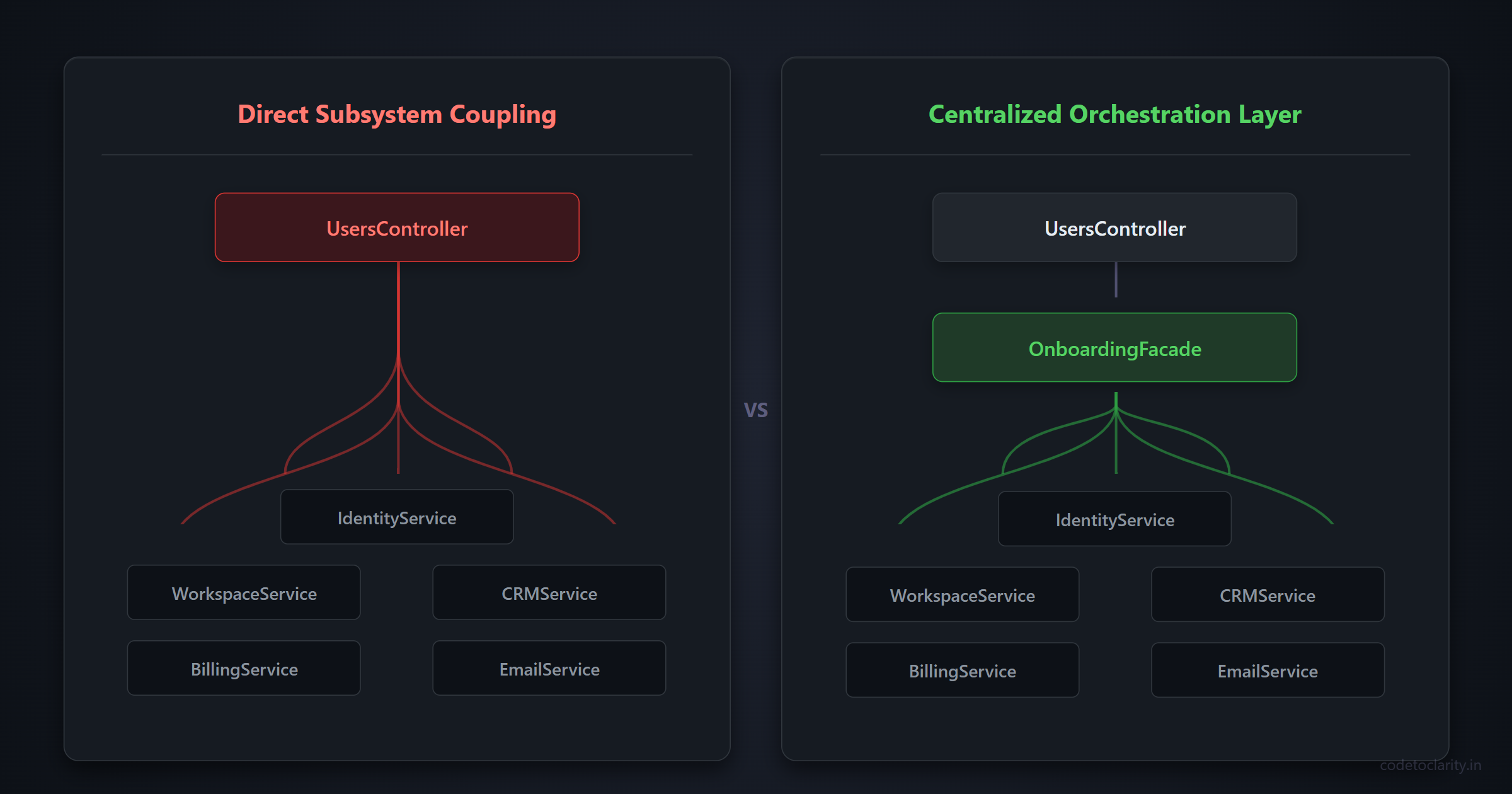
This is a massive improvement. The controller now does exactly what an API endpoint is supposed to do. It receives the request payload, delegates the heavy lifting to our dedicated facade layer, and returns an appropriate HTTP response based on the result. It no longer knows or cares about billing systems, CRM tools, or sending emails.
Registering the Facade with Dependency Injection
One critical architectural choice is determining how to register the facade in the built-in Microsoft Dependency Injection container. Should it be a Transient, Scoped, or Singleton service?
In almost all web applications built with ASP.NET Core, an orchestration facade should be registered with a scoped lifetime. Scoped services are created once per HTTP request. Because our facade relies on things like database repositories or identity services that track state per request, the facade must share that same lifecycle boundary.
You configure this in your Program.cs file like so:
// Register underlying subsystems
builder.Services.AddScoped<IIdentityService, IdentityService>();
builder.Services.AddScoped<IWorkspaceService, WorkspaceService>();
// ... register other services

// Register the Facade layer
builder.Services.AddScoped<IUserOnboardingFacade, CodeToClarityOnboardingFacade>();
For more detailed information on service lifetimes, you can reference the official Dependency Injection in ASP.NET Core documentation. Choosing the wrong lifetime can lead to memory leaks or data concurrency bugs, so scoped is generally your safest default for business orchestration classes.
A Game Changer for Unit Testing
At first glance, you might think we just moved code from one file to another without solving fundamental complexity. However, the architectural benefits are immense, particularly when it comes to automated testing.
Testing the original controller was an absolute nightmare. To write a proper unit test for the controller earlier, you had to mock five separate services, configure all of their return values, and verify they were called in the exact right sequence. This leads to brittle tests that break every time you add a new feature to the workflow.
With the facade pattern in place, testing the controller is trivial.
[Fact]
public async Task RegisterUser_ReturnsOk_WhenOnboardingSucceeds()
{
    // Arrange
    var mockFacade = new Mock<IUserOnboardingFacade>();
    mockFacade.Setup(f => f.RegisterAndOnboardUserAsync(It.IsAny<RegisterRequest>()))
              .ReturnsAsync(OnboardingResult.Success("user-123", "https://app.codetoclarity.in/ws"));

    var controller = new UsersController(mockFacade.Object);
    var request = new RegisterRequest { Email = "test@example.com", Password = "Password123!" };

    // Act
    var result = await controller.RegisterUser(request);

    // Assert
    var okResult = Assert.IsType<OkObjectResult>(result);
    Assert.NotNull(okResult.Value);
}
You only mock the single IUserOnboardingFacade interface and verify how the controller shapes the HTTP response. You can then write targeted tests for the facade itself to ensure the core business logic is sound. We achieve true separation of concerns.
Facade vs Mediator: What is the Difference?
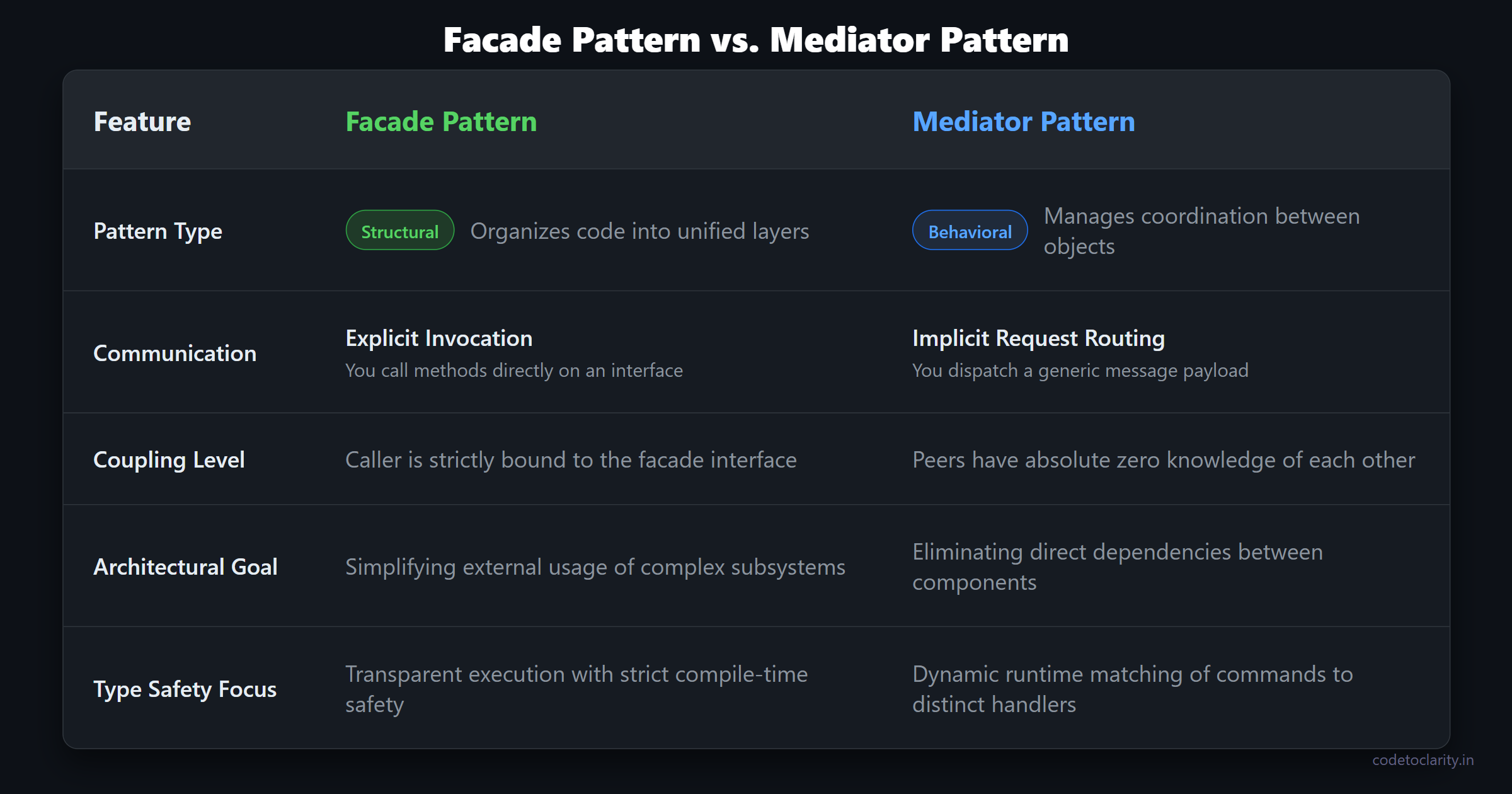
If you work in the .NET ecosystem, you have likely encountered the MediatR library. A common question developers ask is whether the Facade pattern is identical to the Mediator pattern. While they both reduce constructor injection bloat in controllers, their intents are vastly different.
The Mediator pattern is a behavioral pattern. It focuses on how objects communicate. With MediatR, you send a generic request object into a pipeline, and the system dynamically routes it to one specific handler. The sender has no idea who is handling the request.
The Facade pattern is a structural pattern. It provides a highly visible, explicitly crafted shortcut to a subsystem. When you call an interface method on a facade, you know exactly what is happening under the hood. There is no magic routing layer involved. Facades are best utilized when you want explicit code navigation and strict compile-time types, rather than the heavily decoupled messaging architecture of a mediator.
Advanced Strategies: Wrapping Complex Third-Party SDKs
The facade pattern extends far beyond simple domain orchestration. Let us look at an advanced technique that developers use in large-scale enterprise systems: taming third-party libraries.
When you integrate with external systems like cloud storage providers or payment gateways, their official libraries can be overwhelming. They often require massive configuration objects, specific connection strings, and deep knowledge of their internal mechanics.
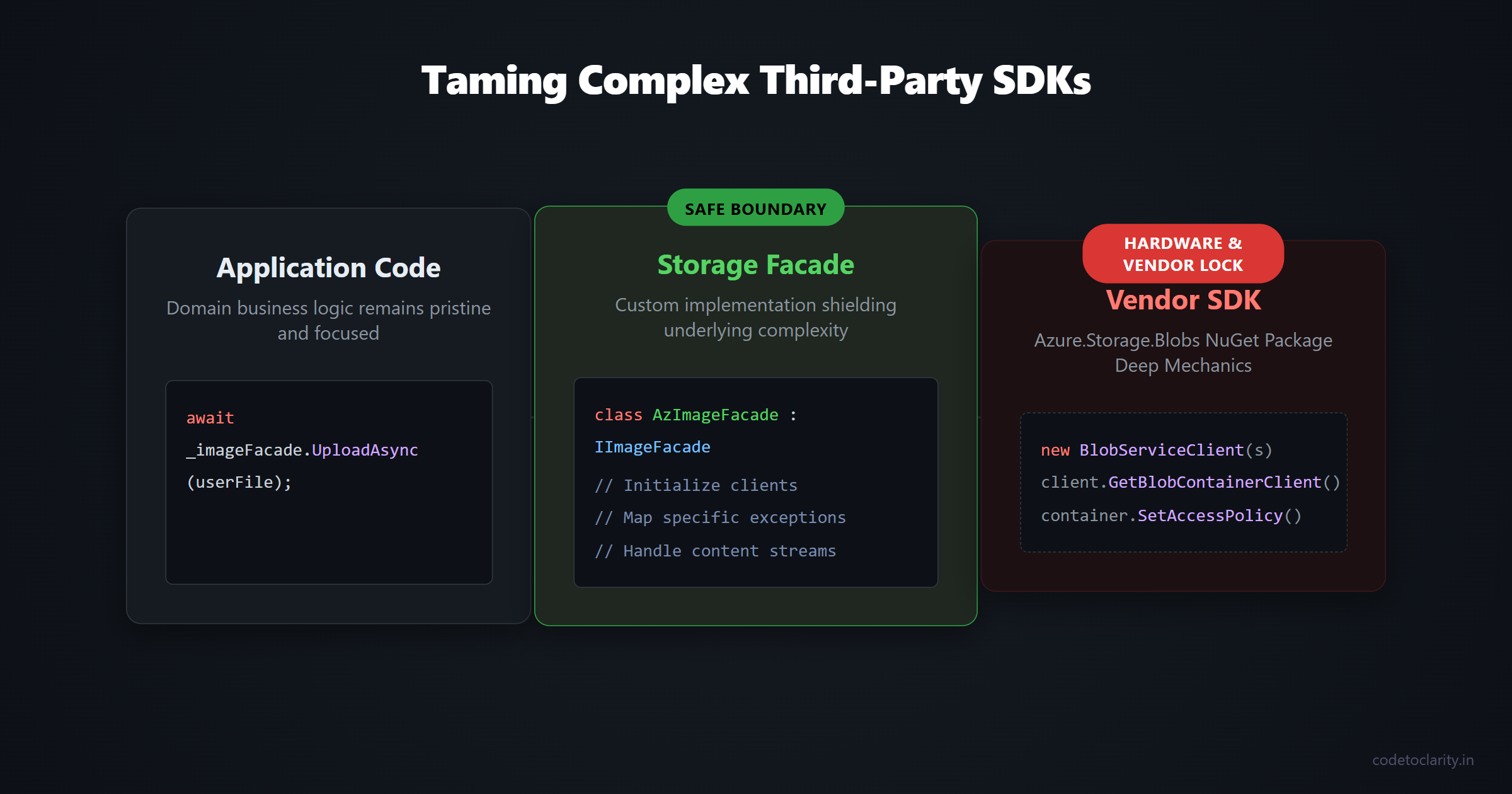
Imagine you need to upload user avatars to Azure Blob Storage. You could inject the official BlobServiceClient directly into your application services. However, this tightly couples your entire codebase to an external vendor's specific SDK. If they release a breaking change in their Azure.Storage.Blobs NuGet package, you will have to hunt down and fix every single file that uses their library.
Instead, you can create a custom IImageStorageFacade. You can implement an AzureImageStorageFacade that encapsulates all the messy details of creating containers, setting up access policies, checking existence, and parsing content types. The rest of your application just calls a simple UploadImageAsync method. If your company decides to migrate to Amazon S3 next year, you only need to create a new class implementing the interface. The rest of your application remains completely untouched.
Advanced Strategies: Handling Cross-Cutting Concerns
Facades are also the ideal place to manage database transactions. If your application relies on Entity Framework Core, you often need to ensure that multiple database operations either fully succeed together or completely roll back to avoid orphaned data.
Instead of cluttering your API endpoints or queue consumers with transaction scoping logic, you can place it cleanly inside the facade. The facade opens the transaction, coordinates the various services to perform their database inserts, and commits the transaction upon success. If any service throws an exception along the way, the facade easily catches the exception and rolls back the changes. This guarantees that your application state remains perfectly consistent without leaking structural database logic up to the presentation layer.
When Should You Avoid the Facade Pattern?
Like any design pattern, the facade is a specific tool. Using a hammer to turn a screw will only lead to frustration, and the same principle applies in software development. You should be cautious of a few common mistakes.
First, beware of generating a "God Class." This occurs when a facade becomes a dumping ground for absolutely all functionality in your application. An AppFacade or a SystemFacade that handles onboarding, messaging, billing calculations, and financial reporting is an architectural disaster. A facade should have a clear, specific focus. If your facade starts to grow out of control, break it down into smaller, cohesive facades like UserOnboardingFacade or ReportingFacade.
Second, do not create a facade if it provides no actual value. If you have a single subsystem service with extremely straightforward methods, wrapping it in a facade that simply passes the exact same calls through is pure redundancy. A facade is meant to simplify complex interactions. If the underlying interaction is already simple, adding a layer of abstraction will only slow development down and confuse your teammates.
Lastly, remember that a facade is not meant to be an impenetrable wall. According to core Software Engineering Design Patterns, the underlying subsystem should remain accessible if necessary. The facade provides a convenient pathway for the most common operations. If a specific background job desperately needs to bypass the facade and call the underlying IWorkspaceService directly for a highly customized migration task, it is perfectly acceptable to do so. The facade exists as an optional convenience, not a strict architectural prison.
Summary
The Facade design pattern is one of the most practical and immediate ways to clean up a messy, confusing codebase. By introducing a single coordinating layer, you rapidly remove duplicated orchestration logic, drastically simplify your controllers, and make your application remarkably easier to unit test.
Embrace dependency injection in .NET to safely supply your facades with the specialized components they need. Remember to keep them highly focused on specific business workflows or complex external integrations. As you apply this structural pattern throughout your application, you will find that new features become drastically easier to build and long-term maintenance becomes a delight rather than a cumbersome chore. Keep your controllers lean, delegate the heavy lifting to your facades, and watch your code quality soar to new heights.

Kishan Kumar
Software Engineer / Tech Blogger
A passionate software engineer with experience in building scalable web applications and sharing knowledge through technical writing. Dedicated to continuous learning and community contribution.