
The Strategy Pattern in C#: Clean Up Your If-Else Chains for Good
Learn the Strategy Pattern in C# through a real-world notification system. Discover how to eliminate messy if-else chains, wire strategies with ASP.NET Core DI, and write code that's actually easy to extend.
Let me paint you a picture. You're three months into a project. The checkout flow works. Payments work. Everyone's happy. Then your product manager walks over and says, "Hey, we need to add UPI support. Oh, and crypto. And maybe Buy Now Pay Later next month."
You open the ProcessPayment method. You see the if (method == "credit_card") block. The else if (method == "paypal") below it. You stare at the screen. You slowly close your laptop.
Sound familiar?
If you've been writing C# for any length of time, you've run into this kind of situation. What starts as clean, readable conditional logic gradually turns into something that takes 20 minutes to understand and 10 minutes to feel guilty about touching. The Strategy Pattern exists precisely to save you from this fate. And the good news? Once it clicks, it's one of the most satisfying refactors you'll ever do.
What Exactly Is the Strategy Pattern?
The Strategy Pattern is a behavioral design pattern. That adjective, behavioral, matters. It's not about how you create objects (that's creational patterns), and it's not about how objects are structured (that's structural patterns). It's about how objects communicate and share responsibility.
The core idea: take a behavior that could be done in multiple ways, pull each "way" out into its own class, give all those classes a common interface, and let the calling code pick which one to use at runtime.
That's it. Really.
You're essentially saying, "I don't want this class to care how something gets done. I just want it to trust that it will get done, and let something else decide the approach."
This maps directly to two of the SOLID principles you've probably heard about. First, the Open/Closed Principle: your code should be open for extension but closed for modification. With the Strategy Pattern, adding a new behavior means adding a new class, not cracking open existing, working code. Second, the Single Responsibility Principle: each strategy class does exactly one thing, and does it well.
If you want to get into the academic roots, the Gang of Four formally defined this in Design Patterns: Elements of Reusable Object-Oriented Software as: "Define a family of algorithms, encapsulate each one, and make them interchangeable."
The Problem It's Solving (In Plain English)
Before jumping into code, it helps to really feel the problem the pattern solves. Consider a notification system. Your app needs to send notifications, but the channel depends on the user's preference: some want email, some want SMS, some want a push notification on their phone.
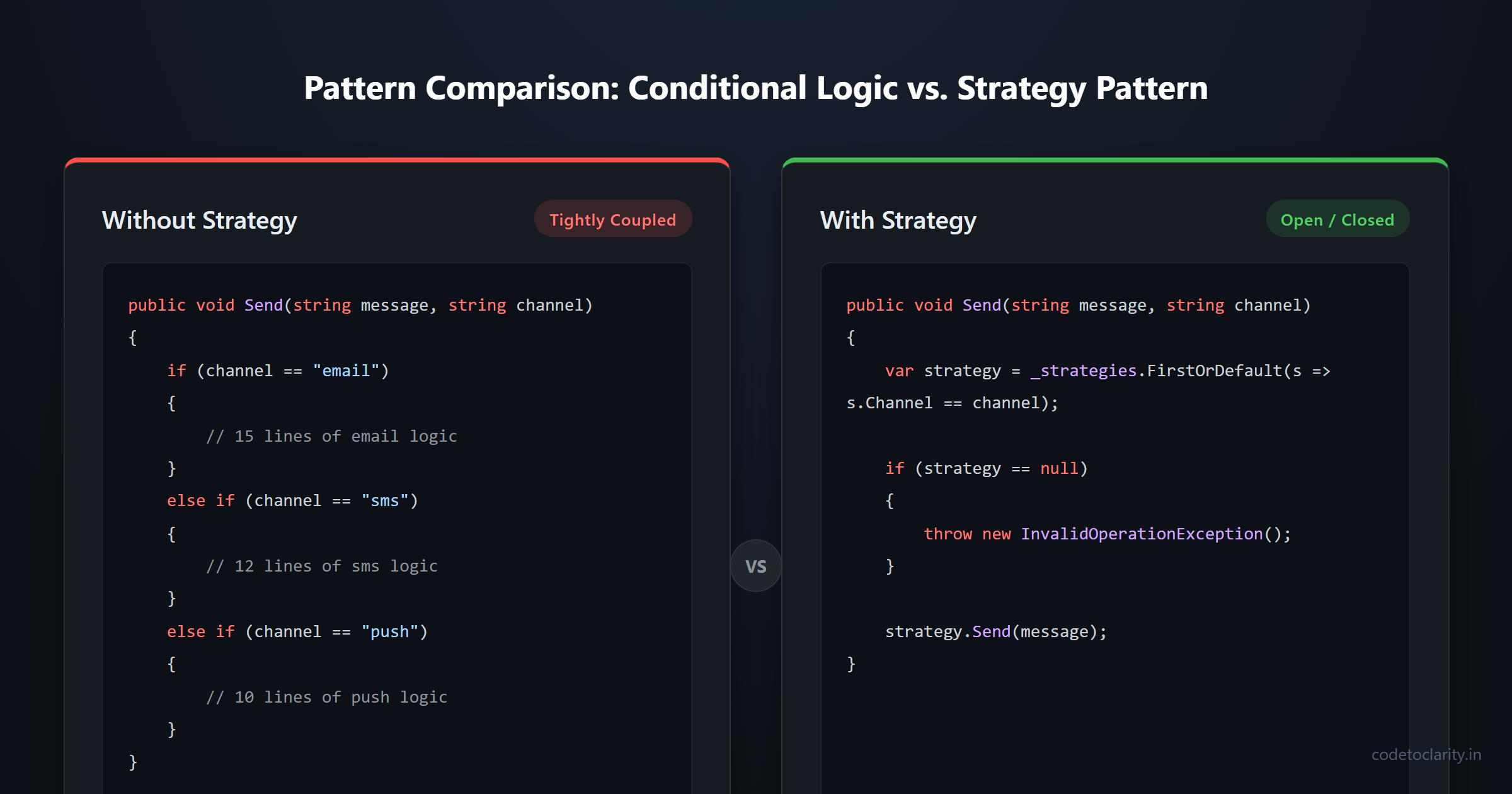
Without the Strategy Pattern, you might write something like this:
public void SendNotification(string message, string channel)
{
    if (channel == "email")
    {
        // 15 lines of email logic
    }
    else if (channel == "sms")
    {
        // 12 lines of SMS logic
    }
    else if (channel == "push")
    {
        // 10 lines of push notification logic
    }
    // ... and so on
}
This works. Until it doesn't. Every new channel means touching this method. Every bug fix in the email logic risks breaking the SMS logic (they're in the same method, after all). Testing is a nightmare because you can't test each notification type in isolation. New team members read this and immediately feel the urge to quit.
The Strategy Pattern gives you a clean exit from this trap.
The Three Moving Parts
Every implementation of the Strategy Pattern involves the same three components. Once you know what to look for, you'll spot them everywhere.
The Strategy Interface is the contract. It declares what a strategy must be able to do, without saying anything about how. All concrete strategies will implement this interface.
Concrete Strategies are the actual implementations. Each one is a separate class that represents one specific way of doing the task. They're interchangeable precisely because they all honor the same interface.
The Context is the class that needs the behavior. Instead of implementing the behavior itself, it holds a reference to a strategy and delegates the work to it.
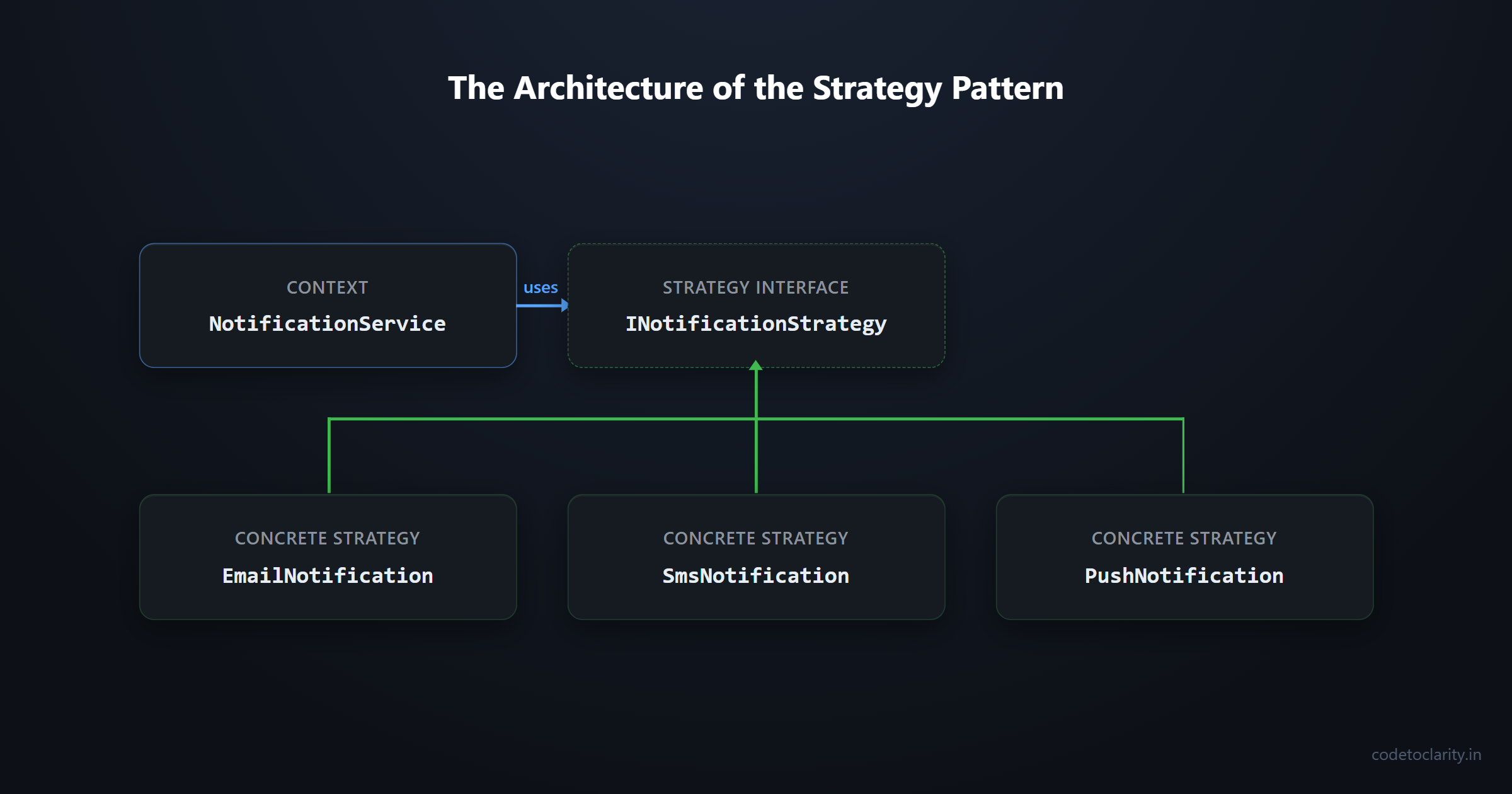
Here's a diagram to make the relationship visual before we dive into code:
INotificationStrategy (interface)
    |
    |--- EmailNotification (concrete strategy)
    |--- SmsNotification (concrete strategy)
    |--- PushNotification (concrete strategy)

NotificationService (context)
    |
    `--- uses --> INotificationStrategy
Clean separation. The context doesn't care which strategy it's holding. It just calls the method.
Building It in C#: A Notification System
Let's build the notification system from scratch. This is the kind of thing you'd genuinely encounter in a real product.
Step 1: Define the Strategy Interface
public interface INotificationStrategy
{
    string Channel { get; }
    void Send(string recipient, string message);
}
Notice the Channel property. That's intentional: it'll help us select the right strategy programmatically in a moment.
Step 2: Write the Concrete Strategies
public class EmailNotification : INotificationStrategy
{
    public string Channel => "email";

    public void Send(string recipient, string message)
    {
        // In a real app, you'd use something like MailKit or SMTP here
        Console.WriteLine($"[EMAIL] Sending to {recipient}: {message}");
    }
}

public class SmsNotification : INotificationStrategy
{
    public string Channel => "sms";

    public void Send(string recipient, string message)
    {
        Console.WriteLine($"[SMS] Sending to {recipient}: {message}");
    }
}

public class PushNotification : INotificationStrategy
{
    public string Channel => "push";

    public void Send(string recipient, string message)
    {
        Console.WriteLine($"[PUSH] Sending to {recipient}: {message}");
    }
}
Each class is focused and small. You can open, read, and understand any one of them in about 10 seconds. More importantly, you can test them in complete isolation.
Step 3: Create the Context
public class CodeToClarityNotificationService
{
    private readonly IEnumerable<INotificationStrategy> _strategies;

    public CodeToClarityNotificationService(IEnumerable<INotificationStrategy> strategies)
    {
        _strategies = strategies;
    }

    public void Notify(string recipient, string message, string channel)
    {
        var strategy = _strategies.FirstOrDefault(s => s.Channel == channel);

        if (strategy == null)
        {
            throw new InvalidOperationException($"No notification strategy found for channel: {channel}");
        }

        strategy.Send(recipient, message);
    }
}
This context uses constructor injection, which leads nicely into the next section.
Step 4: Wire It Up with ASP.NET Core's Built-In DI
Here's where modern C# development really shines. You don't have to manually construct your strategies. ASP.NET Core's dependency injection container handles that for you.
In your Program.cs (or Startup.cs if you're on an older version):
builder.Services.AddTransient<INotificationStrategy, EmailNotification>();
builder.Services.AddTransient<INotificationStrategy, SmsNotification>();
builder.Services.AddTransient<INotificationStrategy, PushNotification>();

builder.Services.AddScoped<CodeToClarityNotificationService>();
When CodeToClarityNotificationService gets resolved, ASP.NET Core automatically injects all registered INotificationStrategy implementations as an IEnumerable<INotificationStrategy>. No manual instantiation. No factory boilerplate. It just works.
You can read more about how ASP.NET Core's DI system handles multiple registrations in the official dependency injection documentation on Microsoft Learn.
Step 5: Use It in a Controller
[ApiController]
[Route("api/[controller]")]
public class NotificationsController : ControllerBase
{
    private readonly CodeToClarityNotificationService _notificationService;

    public NotificationsController(CodeToClarityNotificationService notificationService)
    {
        _notificationService = notificationService;
    }

    [HttpPost]
    public IActionResult Send([FromBody] NotificationRequest request)
    {
        _notificationService.Notify(request.Recipient, request.Message, request.Channel);
        return Ok("Notification sent.");
    }
}
Now think about what happens when a new notification channel comes along, like WhatsApp for example. You create a WhatsAppNotification class, register it in DI, and you're done. The controller doesn't change. The context doesn't change. The interface doesn't change. You just add.
That's the Open/Closed Principle doing exactly what it's supposed to do.
A Quick Note on .NET 8 and Keyed Services
If you're on .NET 8, there's an even more elegant approach available through Keyed Services. Instead of the Channel property approach above, you can register each strategy with a key directly in the DI container:
builder.Services.AddKeyedTransient<INotificationStrategy, EmailNotification>("email");
builder.Services.AddKeyedTransient<INotificationStrategy, SmsNotification>("sms");
builder.Services.AddKeyedTransient<INotificationStrategy, PushNotification>("push");
Then resolve them by key in your service:
public class CodeToClarityNotificationService
{
    private readonly IServiceProvider _serviceProvider;

    public CodeToClarityNotificationService(IServiceProvider serviceProvider)
    {
        _serviceProvider = serviceProvider;
    }

    public void Notify(string recipient, string message, string channel)
    {
        var strategy = _serviceProvider.GetKeyedService<INotificationStrategy>(channel);

        if (strategy == null)
            throw new InvalidOperationException($"Unknown channel: {channel}");

        strategy.Send(recipient, message);
    }
}
This is cleaner and avoids the LINQ lookup entirely. If you're building a greenfield app on .NET 8+, this is the approach worth reaching for. You can check out the full details of keyed services in the ASP.NET Core DI documentation.
When Should You Actually Use This Pattern?
The Strategy Pattern is not always the right tool. Here's a useful mental checklist.
Reach for it when:
- You have a single task that can be done in more than two or three different ways
- You're already writing (or about to write) a growing
switchorif-elseblock to handle the variation - You expect new variations to be added in the future
- You want to write unit tests for each behavior in isolation
- You're building something that multiple clients or user types interact with differently
Skip it when:
- There are only two options and they're unlikely to change
- The logic difference is so minor that a simple ternary or two-line condition is perfectly readable
- Introducing three new classes would be more confusing than the ten lines they replace
Good pattern usage is knowing when not to use a pattern. Don't reach for Strategy just to feel like you're writing "real software." Context matters.
Where You'll Spot This in the Wild
You might be surprised how many places this pattern already shows up in frameworks and tools you use every day.
ASP.NET Core's authentication middleware is a great example. When you call AddAuthentication and then add JWT, Cookie, or OAuth schemes, you're effectively registering different authentication strategies. The framework selects the right one based on the incoming request.
Entity Framework Core uses it for database providers. Whether you're targeting SQL Server, PostgreSQL, or SQLite, EF Core switches behavior through provider-specific strategy implementations. If you want to peek at how this is structured internally, the Entity Framework Core repository on GitHub is genuinely educational browsing.
LINQ's IComparer<T> is another subtle example. When you call .OrderBy() with a custom comparer, you're providing a sorting strategy. The sort algorithm itself stays the same; only the comparison logic changes.
The Common Pitfalls to Watch Out For
Don't overdo it. The Strategy Pattern introduces additional classes. In a small, focused codebase, those extra files can actually make the code harder to navigate, not easier. Use judgment.
Be careful with state. Strategies should ideally be stateless. If a strategy needs to hold state between calls, that design choice deserves careful thought. Stateful strategies can lead to subtle bugs, especially in multi-threaded or DI-managed environments.
Keep the interface lean. If your strategy interface has five methods and most concrete strategies only implement three of them meaningfully, that's a sign you might need to rethink your abstraction.
Don't couple your context to concrete strategies. If CodeToClarityNotificationService has a using statement for EmailNotification anywhere, something's gone wrong. The context should only ever know about the interface.
Wrapping Up
The Strategy Pattern is one of those things that, once you understand it, you start seeing opportunities to use it everywhere. And honestly, that's a good instinct to develop, especially when you find yourself staring at a method that keeps growing every time requirements change.
The pattern teaches a useful way of thinking: separate the what from the how. Let your core logic focus on orchestration and let the strategies focus on execution. The result is code that's easier to read, easier to test, and much easier for a future teammate (or future you) to extend without fear.
Start small. Find one place in your current project where a growing if-else chain is becoming a problem. Extract each branch into a strategy class. Register them with DI. Watch the context class get noticeably calmer. That's the Strategy Pattern working exactly as intended.

Kishan Kumar
Software Engineer / Tech Blogger
A passionate software engineer with experience in building scalable web applications and sharing knowledge through technical writing. Dedicated to continuous learning and community contribution.