
A Beginner's Guide to CQRS and MediatR in .NET 10
Learn how to use CQRS and MediatR in .NET 10 to build scalable, clean architectures. Step-by-step beginner guide with real-world examples, commands, queries, and minimal APIs.
Have you ever looked at a Controller or a Minimal API endpoint in your .NET project and thought, "Wow, this is doing way too much"? You might have validation logic, database calls, email sending, logging, and complex mapping all stuffed into a single method. It works perfectly fine when the project is just starting out, but as your application grows, it rapidly becomes a nightmare to maintain.
What if I told you there is a much cleaner, more scalable way to organize your application? A structural pattern that cleanly separates how you read data from how you write data, making your codebase highly maintainable, easier to test, and incredibly scalable under heavy load.
In this comprehensive guide, we are going to dive deep into CQRS (Command Query Responsibility Segregation) and MediatR, a powerful library that makes implementing this pattern in .NET 10 an absolute breeze.
We will start by exploring the core concepts, break down a relatable real-world analogy, and then build a practical, fully functional implementation from scratch using .NET 10 Minimal APIs. Let's get started!
What on Earth is CQRS?
Let's break down the acronym: Command Query Responsibility Segregation.
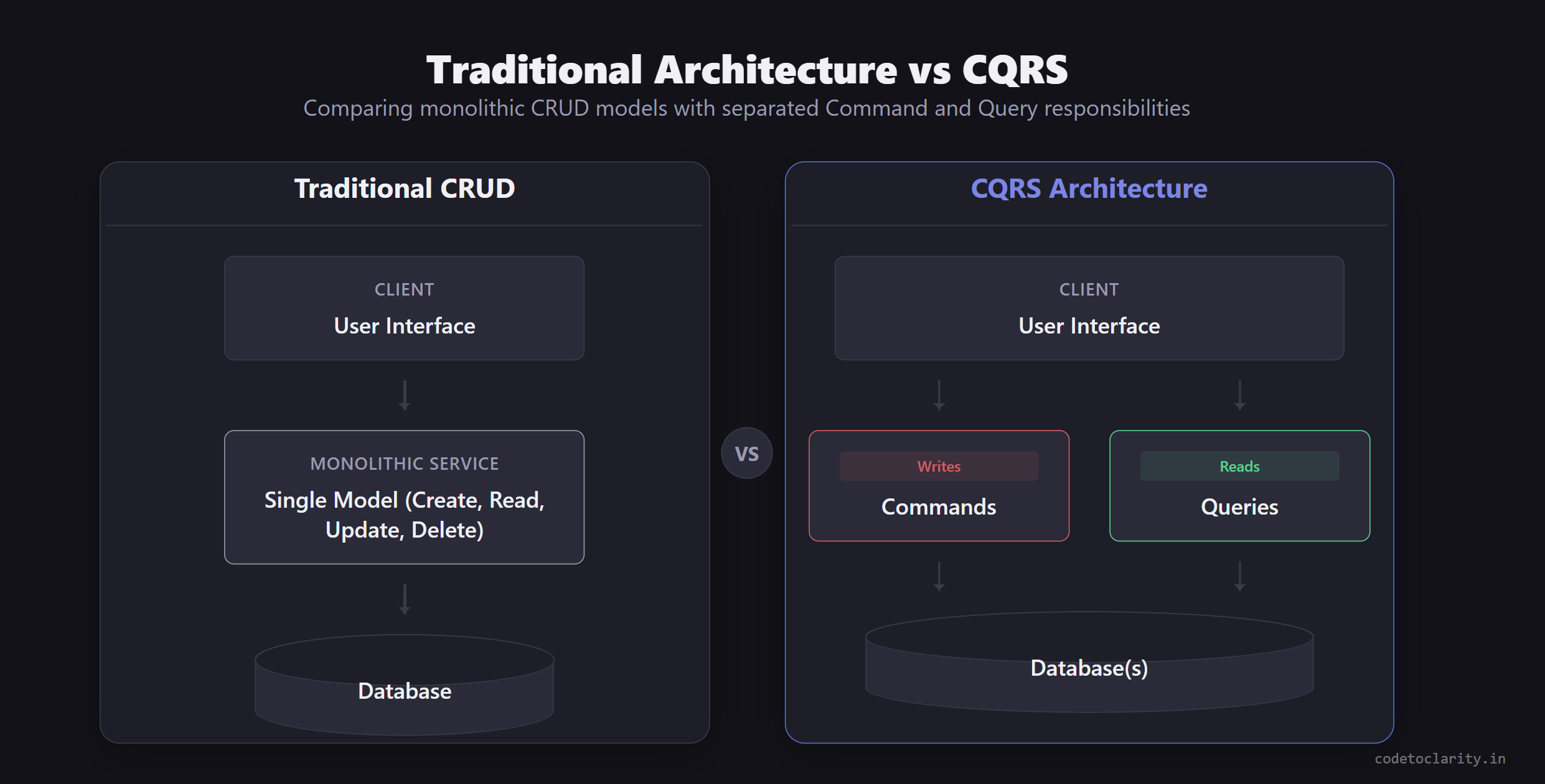
At its core, CQRS is a software architectural pattern that states you should completely separate the operations that read data from the operations that update (or write) data.
Instead of having a single monolithic service or repository that handles everything (Create, Read, Update, Delete, known as CRUD), you split these responsibilities into two distinct, isolated models:
- Commands: These are operations that change the state of your system. They create, update, or delete data. Commands are actions. They do not return data to the user (other than maybe a newly generated ID or a simple success status). You are "commanding" the system to do something.
- Queries: These are operations that strictly read data. They never change the state of the system. You can run a query a million times, and your database will remain completely unaffected. You are "querying" the system for information.
The Real-World Restaurant Analogy
To make this crystal clear, imagine you are visiting a busy fast-food restaurant.
When you walk in, you don't walk straight into the kitchen, grab a chef, place your order, and then wait there while they cook it. That would be chaotic, inefficient, and impossible to scale.
Instead, the restaurant uses a system that perfectly mirrors CQRS:
There is a Command side: The cashier at the register. You give them your order, they process your payment, and they pass an order ticket back to the kitchen. The state of the restaurant has changed. They have your money, and they now owe you a burger.
There is also a completely separate Query side: The digital display board hanging above the counter that shows "Orders Ready for Pickup." You look at the board to get information about your order status. Looking at the board doesn't cook a burger, it doesn't process a payment, and it doesn't change any state in the restaurant. It strictly reads data.
Because these two responsibilities are segregated, the restaurant can scale them independently based on bottlenecks. If there's a huge line out the door to order, they can add more cashiers to scale the write side. If everyone is confused about whose food is ready, they can add more display screens to scale the read side.
Why Use CQRS? The Good and the Bad
Before we jump headfirst into the code, it is absolutely critical to understand why we use CQRS, and just as importantly, when not to use it. No architectural pattern is a silver bullet.
The Benefits of CQRS
- Independent Scaling: Just like our restaurant analogy, in most modern web applications, the number of times you read data far outnumbers the times you write it. CQRS allows you to scale your read database (or introduce caching layers) independently from your write database.
- Optimized Data Models: Have you ever created a single massive
UserDTOand ended up adding 15 different properties that are only used in specific update scenarios, but are leftnullduring reads? With CQRS, your commands and queries have their own dedicated, tailored models. A read model only contains exactly what the client needs to see, while a write model only contains what is required to execute the transaction. - Enhanced Security: It becomes much easier to restrict access at a granular level. You can allow certain user roles to execute queries (reads), while strictly restricting commands (writes) to administrators or authorized services.
- Clean, Maintainable Code: Your handlers become tiny, highly focused, single-purpose classes. This perfectly aligns with the SOLID principles, specifically the Single Responsibility Principle. If a bug occurs in the creation logic, you know exactly which file to open without wading through thousands of lines of code.
The Downsides of CQRS
- Added Code Complexity: For a simple application, CQRS introduces a noticeable amount of boilerplate code and files. A single traditional CRUD controller might be split into 4 or 5 different classes and records.
- Steep Learning Curve: It takes time and mental effort for developers who are accustomed to traditional layered, single-model architectures to adjust to this separated mindset.
When NOT to Use CQRS
Do not use CQRS if you are building a simple application where the read and write models are completely identical. If your application is essentially a basic spreadsheet interface over a database doing simple CRUD operations, sticking to a traditional Service or Repository pattern is perfectly fine. CQRS shines brightest when your business logic gets complex, your read and write scaling needs differ, and your data models start to diverge.
If you are curious to dive deeper into the advanced architectural theory behind this, I highly recommend checking out the official CQRS Pattern on Microsoft Docs.
The Mediator Pattern and MediatR
We know what CQRS is conceptually, but how do we implement it cleanly in .NET without writing a massive, tangled mess of custom routing logic? Enter the Mediator Pattern.
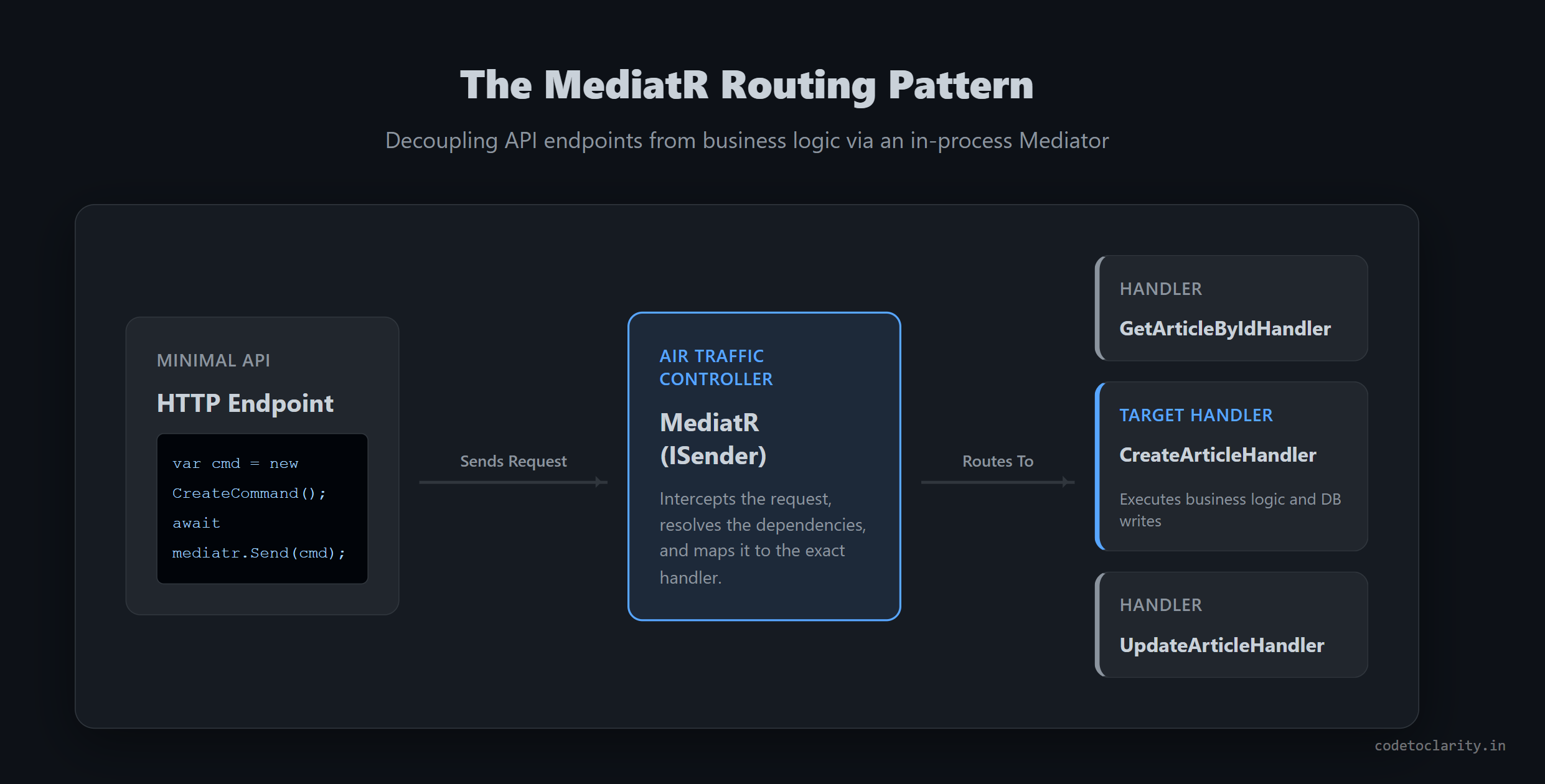
Imagine a busy international airport. Hundreds of airplanes are taking off and landing. The airplanes do not talk directly to each other to decide who lands first. If they did, communication would break down instantly. Instead, they all talk to a central, highly coordinated Air Traffic Controller (The Mediator). The controller receives the requests from the pilots and safely decides which runway each plane should use.
In software engineering, the Mediator pattern does the exact same thing. Instead of your API endpoints directly calling specific services, repositories, or business logic classes, your endpoints send a message (a Command or a Query) to a central Mediator. The Mediator then finds the correct "Handler" for that specific message and executes it.
Introducing MediatR
MediatR is a brilliant open-source library created by Jimmy Bogard that implements the Mediator pattern specifically for .NET. It acts as our in-process Air Traffic Controller.
When an HTTP request hits our .NET Web API, we create a Command or Query object and hand it directly to MediatR. MediatR magically routes that object to the specific handler class we built to process that request. This completely decouples our web endpoints from our business logic.
Structuring Your Project: Vertical Slice Architecture
Before we write code, let's talk about where files go. Traditional apps use layered architecture (grouping all Controllers together, all Services together). When using CQRS and MediatR, it is highly recommended to use Vertical Slice Architecture.
Instead of grouping files by their technical type, you group them by their feature.
For example, a folder structure for a "Blog Posts" feature would look like this:
/Features
    /BlogPosts
        /Queries
            /GetPostById
                GetPostByIdQuery.cs
                GetPostByIdHandler.cs
        /Commands
            /CreatePost
                CreatePostCommand.cs
                CreatePostHandler.cs
This means everything related to creating a blog post is located in one single folder. You don't have to jump across three different projects to understand how a feature works.
Setting up MediatR in .NET 10
Let's get our hands dirty and build a .NET 10 Web API using Minimal APIs. We will build a system to manage a blog's article library.
Step 1: Install the Required Packages
Create a new ASP.NET Core Web API project. Open your terminal and install the required MediatR NuGet Package, along with Entity Framework Core for our database setup.
dotnet add package MediatR
dotnet add package Microsoft.EntityFrameworkCore.InMemory
Note: We are using the InMemory database for simplicity and demonstration purposes in this tutorial, but in a real-world production application, you would use a robust provider like SQL Server, PostgreSQL, or MySQL.
Step 2: Register Dependencies
Open your Program.cs file. We need to tell the ASP.NET Core Dependency Injection container about MediatR so it can automatically scan and discover our command and query handlers.
using System.Reflection;
using Microsoft.EntityFrameworkCore;

var builder = WebApplication.CreateBuilder(args);

// Register MediatR
builder.Services.AddMediatR(cfg =>
    cfg.RegisterServicesFromAssembly(Assembly.GetExecutingAssembly()));

// Register InMemory Database
builder.Services.AddDbContext<AppDbContext>(options =>
    options.UseInMemoryDatabase("CodeToClarityDb"));

var app = builder.Build();

app.Run();
By calling RegisterServicesFromAssembly and passing it our executing assembly, we are telling MediatR to scan our entire project when it starts up and register all the Command and Query handlers it finds automatically.
Building the Domain and Persistence Layer
Before we can write our commands and queries, we need a basic domain entity and a database context to persist it.
Let's create a simple, tightly encapsulated Article entity.
public class Article
{
    public Guid Id { get; init; }
    public string Title { get; private set; } = string.Empty;
    public string Content { get; private set; } = string.Empty;

    // Parameterless constructor required for EF Core materialization
    private Article() { }

    public Article(string title, string content)
    {
        Id = Guid.NewGuid();
        Title = title;
        Content = content;
    }

    // Method to safely mutate state cleanly
    public void UpdateContent(string title, string content)
    {
        Title = title;
        Content = content;
    }
}
Notice how the properties use private set. We want to strictly encapsulate the state of our entity. The only way to change an article's data from the outside is through the constructor when creating it, or the UpdateContent method when modifying it.
Next, let's create the AppDbContext:
using Microsoft.EntityFrameworkCore;

public class AppDbContext : DbContext
{
    public AppDbContext(DbContextOptions<AppDbContext> options) : base(options) { }

    public DbSet<Article> Articles { get; set; }
}
Implementing the Query Side (Reads)
Let's implement a feature to fetch an article by its unique ID.
In the world of MediatR, every operation is broken down into two distinct parts:
- The Request (The Query object holding the parameters)
- The Handler (The class that contains the logic to execute the request)
Creating the Query Record
We create a record that implements the IRequest<TResponse> interface. In this case, we want to return an ArticleDto.
// The Data Transfer Object (DTO) to return to the client
public record ArticleDto(Guid Id, string Title, string Content);

// The Query Request
public record GetArticleByIdQuery(Guid Id) : IRequest<ArticleDto?>;
It is a remarkably simple record containing only the Id we are looking for. We use C# records because they are completely immutable by default. This is perfect for representing a static request moving through a system.
Creating the Query Handler
Now we need a handler class that implements IRequestHandler<GetArticleByIdQuery, ArticleDto?>.
using MediatR;
using Microsoft.EntityFrameworkCore;

public class GetArticleByIdQueryHandler : IRequestHandler<GetArticleByIdQuery, ArticleDto?>
{
    private readonly AppDbContext _context;

    // Inject the database context via Dependency Injection
    public GetArticleByIdQueryHandler(AppDbContext context)
    {
        _context = context;
    }

    public async Task<ArticleDto?> Handle(GetArticleByIdQuery request, CancellationToken cancellationToken)
    {
        var article = await _context.Articles
            .AsNoTracking() // Optimize read performance
            .FirstOrDefaultAsync(x => x.Id == request.Id, cancellationToken);

        if (article == null) return null;

        // Map the entity to the DTO
        return new ArticleDto(article.Id, article.Title, article.Content);
    }
}
When an endpoint sends a GetArticleByIdQuery to MediatR, MediatR automatically instantiates this exact handler class, injects the AppDbContext, and executes the Handle asynchronous method. Notice we used AsNoTracking() since queries do not mutate state, giving us an instant performance boost.
Implementing the Command Side (Writes)
Now let's switch gears and handle creating a brand new article. This is a Command because it mutates the state of our database system.
Creating the Command Record
// Returns the Guid of the newly created Article upon success
public record CreateArticleCommand(string Title, string Content) : IRequest<Guid>;
Creating the Command Handler
using MediatR;

public class CreateArticleCommandHandler : IRequestHandler<CreateArticleCommand, Guid>
{
    private readonly AppDbContext _context;

    public CreateArticleCommandHandler(AppDbContext context)
    {
        _context = context;
    }

    public async Task<Guid> Handle(CreateArticleCommand request, CancellationToken cancellationToken)
    {
        // 1. Create the robust Domain Entity
        var newArticle = new Article(request.Title, request.Content);

        // 2. Add the entity to the Database context
        await _context.Articles.AddAsync(newArticle, cancellationToken);

        // 3. Save the changes to persistence
        await _context.SaveChangesAsync(cancellationToken);

        // 4. Return the newly generated ID
        return newArticle.Id;
    }
}
Look at how beautifully clean that is! This handler does exactly one thing. If a bug occurs during article creation, we know precisely where to look. It completely isolates our creation logic from our reading logic, ensuring that changes to one side will never break the other.
Tying It All Together with Minimal APIs
Now that our handlers are perfectly crafted and ready, we need to expose them to the outside world using HTTP endpoints. This is where MediatR truly shines, keeping our endpoints incredibly thin and focused solely on routing.
Open Program.cs and map your endpoints:
using MediatR;

// GET Endpoint for retrieving an article
app.MapGet("/api/articles/{id:guid}", async (Guid id, ISender mediatr) =>
{
    var query = new GetArticleByIdQuery(id);
    var result = await mediatr.Send(query);

    return result is not null ? Results.Ok(result) : Results.NotFound();
});

// POST Endpoint for creating a new article
app.MapPost("/api/articles", async (CreateArticleCommand command, ISender mediatr) =>
{
    var articleId = await mediatr.Send(command);

    return Results.Created($"/api/articles/{articleId}", new { Id = articleId });
});
Notice that we inject the ISender interface from MediatR directly into the Minimal API endpoint. ISender is a specialized, lightweight version of IMediator that is meant specifically for sending point-to-point commands and queries.
We simply pass the command or query object to mediatr.Send(). We do not care how it gets processed. We trust MediatR to find the correct handler and return the expected result. Our endpoint acts purely as a routing mechanism, just as it should.
Taking It Further: MediatR Notifications
Before we wrap up, there is one more incredibly powerful feature of MediatR you must know about: Notifications.
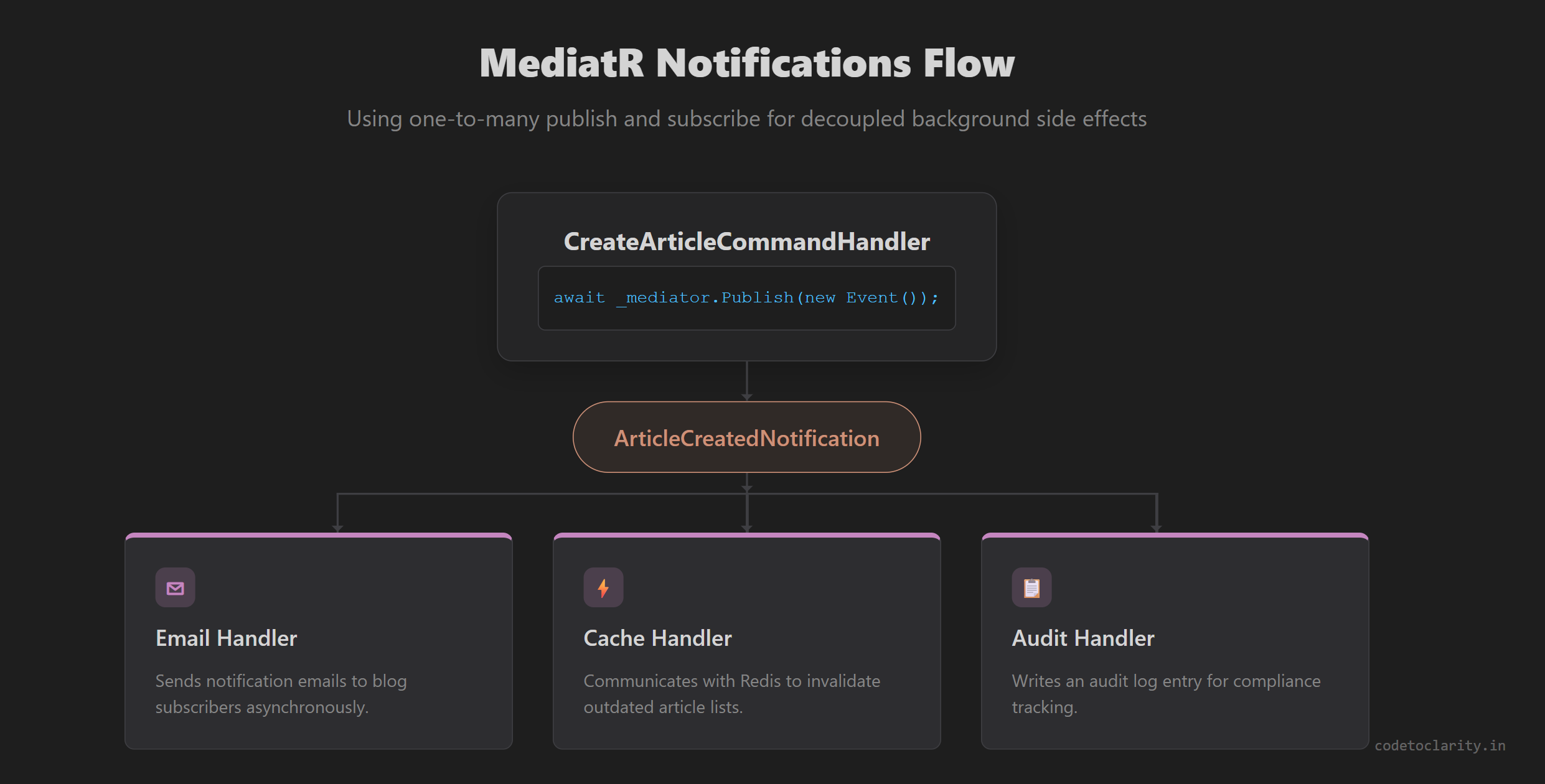
While Commands and Queries have a strict 1-to-1 relationship (one specific command goes to exactly one designated handler), Notifications have a 1-to-many relationship. You can publish a single notification event, and multiple independent handlers can react to it simultaneously in the background.
This is the perfect tool for decoupling side effects in event-driven architectures. For example, when an article is successfully created, we might want to simultaneously:
- Send an email notification to subscribers.
- Invalidate a distributed cache holding older article lists.
- Write an audit log entry.
We absolutely do not want to stuff all that unrelated logic into our CreateArticleCommandHandler. Instead, we publish a domain event.
Step 1: Create the Notification Record
using MediatR;

public record ArticleCreatedNotification(Guid ArticleId, string Title) : INotification;
Step 2: Update the Command Handler to Publish
We need to inject the full IMediator interface to gain access to the Publish method.
public class CreateArticleCommandHandler : IRequestHandler<CreateArticleCommand, Guid>
{
    private readonly AppDbContext _context;
    private readonly IMediator _mediator;

    public CreateArticleCommandHandler(AppDbContext context, IMediator mediator)
    {
        _context = context;
        _mediator = mediator;
    }

    public async Task<Guid> Handle(CreateArticleCommand request, CancellationToken cancellationToken)
    {
        var newArticle = new Article(request.Title, request.Content);

        await _context.Articles.AddAsync(newArticle, cancellationToken);
        await _context.SaveChangesAsync(cancellationToken);

        // Publish the notification event securely
        await _mediator.Publish(
            new ArticleCreatedNotification(newArticle.Id, newArticle.Title),
            cancellationToken);

        return newArticle.Id;
    }
}
Step 3: Create Decoupled Notification Handlers
Now we can create as many independent handlers as we want to react to this specific event.
public class EmailNotificationHandler : INotificationHandler<ArticleCreatedNotification>
{
    public Task Handle(ArticleCreatedNotification notification, CancellationToken cancellationToken)
    {
        // Complex logic to construct and send an email would go here
        Console.WriteLine($"Simulating email sent for Article '{notification.Title}'");
        return Task.CompletedTask;
    }
}

public class CacheInvalidationHandler : INotificationHandler<ArticleCreatedNotification>
{
    public Task Handle(ArticleCreatedNotification notification, CancellationToken cancellationToken)
    {
        // Complex logic to communicate with Redis and invalidate cache would go here
        Console.WriteLine($"Invalidating cache for Article '{notification.ArticleId}'");
        return Task.CompletedTask;
    }
}
When you create an article now, MediatR will automatically trigger both of these notification handlers seamlessly. If you want to learn more about request pipelines and how requests flow through ASP.NET Core, check out our detailed guide on Middleware in ASP.NET Core.
Conclusion
The CQRS architectural pattern, when seamlessly paired with the MediatR library, provides an incredible framework for building robust, scalable, and beautifully clean .NET 10 applications.
By deliberately separating our read operations from our write operations, we gain immense scaling flexibility. By utilizing MediatR, we cleanly decouple our API presentation endpoints from our core business logic, resulting in highly testable, manageable code where every single class has a clear, singular responsibility.
If your web project is rapidly expanding and your standard controllers are starting to feel bloated and unmanageable, giving CQRS and MediatR a try might just be the foundational structural shift your codebase desperately needs.

Kishan Kumar
Software Engineer / Tech Blogger
A passionate software engineer with experience in building scalable web applications and sharing knowledge through technical writing. Dedicated to continuous learning and community contribution.