
Clean Architecture: Master Validation in .NET 10 with MediatR Pipeline and FluentValidation
Learn how to build bulletproof APIs in .NET 10 by centralizing validation using MediatR pipeline behaviors, FluentValidation, and IExceptionHandler.
Let’s be honest for a second. We have all written that one controller or command handler that starts out clean and elegant, but over time, it mutates into an absolute monster. You know the one. It’s supposed to just create a new user or process an order, but before it can even do its actual job, there are fifty lines of if statements checking every possible edge case.
"Is the email null? Is the password long enough? Does the username contain weird characters? Is the price greater than zero?"
These guard clauses clutter your application logic. If you are building modern APIs in .NET 10 using CQRS (Command Query Responsibility Segregation), writing your validation logic inside every single command and query handler is a surefire way to end up with duplicated, hard-to-maintain code. Your handlers should be pristine, focused solely on the business action they are meant to execute.
So, how do we keep the junk out? There is a dramatically cleaner way: validate centrally inside the MediatR pipeline.
In this comprehensive guide, we are going to explore how to wire up automatic, centralized validation using the MediatR pipeline and FluentValidation in ASP.NET Core on .NET 10. We will also learn how to catch validation failures elegantly using IExceptionHandler to always return a clean, standard ProblemDetails response to your clients. By the end of this tutorial, your handlers will be completely free of validation code, allowing you to focus purely on the business logic.
Let’s dive into the mechanics of building a bulletproof pipeline.
The Problem with Validating Inside Handlers
Before we look at the solution, we must truly understand the problem. Imagine you are building a simple e-commerce API. You have a CreateProductCommand and a corresponding CreateProductCommandHandler.
If you validate inside the handler, it might look something like this:
public class CreateProductCommandHandler : IRequestHandler<CreateProductCommand, ProductDto>
{
    private readonly AppDbContext _context;

    public CreateProductCommandHandler(AppDbContext context)
    {
        _context = context;
    }

    public async Task<ProductDto> Handle(CreateProductCommand request, CancellationToken cancellationToken)
    {
        // 🚨 The ugly guard clauses
        if (string.IsNullOrWhiteSpace(request.Name))
        {
            throw new ArgumentException("Product name is required.");
        }

        if (request.Name.Length < 4)
        {
            throw new ArgumentException("Product name must be at least 4 characters.");
        }

        if (request.Price <= 0)
        {
            throw new ArgumentException("Price must be greater than zero.");
        }

        // 🟢 The actual business logic
        var product = new Product(request.Name, request.Description, request.Price);
        _context.Products.Add(product);
        await _context.SaveChangesAsync(cancellationToken);

        return new ProductDto(product.Id, product.Name, product.Price);
    }
}
At first glance, this might not seem terrible. But as your application grows, two massive problems emerge:
- It violates the Single Responsibility Principle (SRP): As we discussed in our guide on SOLID Principles in C#, a class should have only one reason to change. Your handler is now responsible for validating the request and executing the business logic. These are two distinct responsibilities. If the validation rules change, you have to modify the handler. If the database logic changes, you have to modify the handler.
- It does not scale: What happens when you have an
UpdateProductCommand? You will end up copying and pasting these exact same validation checks. If the business rule changes (e.g., product names now need to be 5 characters instead of 4), you have to hunt down every single handler that validates a product name. Miss one, and bad data slips into your database.
We need a way to say, "Before this request ever reaches my handler, ensure the data is perfectly valid."
Why Data Annotations Fall Short
You might be asking, "Why not just use built-in C# Data Annotations like [Required] and [MinLength] on the command object itself?"
Data Annotations are fine for extremely simple CRUD applications, but they fall apart quickly in enterprise scenarios for several reasons:
- They pollute your models: Your command objects should be pure data transfer structures. Adding validation logic directly onto the properties tightly couples the data shape to the validation rules.
- Complex validation is impossible: If you need to validate that
StartDateis beforeEndDate, Data Annotations become incredibly clunky and require writing custom attributes. - No Dependency Injection: What if your validation rule requires checking the database to ensure an email address is unique? Data Annotations do not natively support Dependency Injection, making asynchronous database lookups practically impossible.
This is why the .NET community heavily favors FluentValidation for robust architectures.
Enter MediatR Pipeline Behaviors
If you have ever written a web API in .NET, you are probably familiar with middleware. As I explained in my complete guide to Middleware in ASP.NET Core, middleware sits in the HTTP request pipeline. It can intercept an incoming HTTP request, do something with it (like logging or authentication), and either pass it to the next component or short-circuit the pipeline and return a response immediately.
MediatR Pipeline Behaviors are the exact same concept, but for your internal CQRS commands and queries.
When you send a command through MediatR (e.g., await _mediator.Send(command)), it does not teleport directly to the handler. Instead, it flows through a designated internal pipeline. A Pipeline Behavior is simply a class that wraps your request. It gets to look at the request before the handler runs, and it gets to look at the response after the handler finishes.
Because behaviors intercept every single request, they are the absolute perfect place for cross-cutting concerns. What is a cross-cutting concern? It is logic that spans across your entire application, such as:
- Performance logging (timing how long requests take)
- Database transactions (committing or rolling back)
- Validation
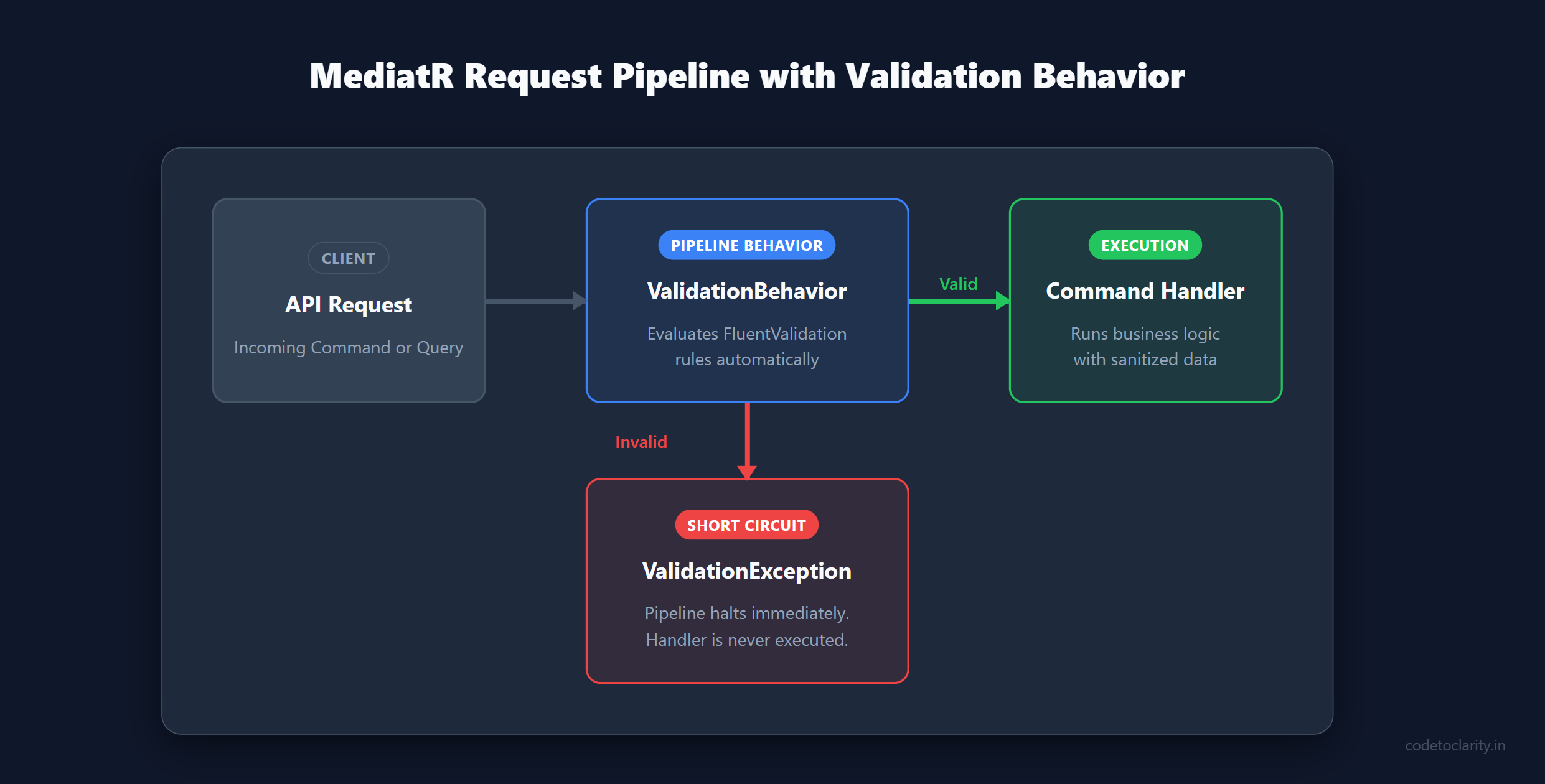
Instead of writing validation checks in 50 different handlers, we can write one single Pipeline Behavior that says: "Find the validation rules for this incoming request. Run them. If they fail, stop the pipeline and throw an error. If they pass, proceed to the handler."
Step 1: Setting up the Tools and Dependencies
To make this magic happen, we need three primary tools in our .NET 10 Web API project:
- MediatR: To handle our CQRS messaging architecture.
- FluentValidation: To write clean, expressive validation rules completely outside of our handlers. If you are new to this library, check out my deep dive on FluentValidation in ASP.NET Core.
- Dependency Injection: Built into .NET, to wire everything together seamlessly.
Let's start by installing the necessary NuGet packages. Open your terminal or Package Manager Console and run:
dotnet add package MediatR
dotnet add package FluentValidation
dotnet add package FluentValidation.DependencyInjectionExtensions
(Note: Ensure you are using the latest stable versions suitable for .NET 10. The DependencyInjectionExtensions package provides the handy extension methods we need to register all our validators at once automatically.)
A Quick Note on MediatR Licensing
It is worth mentioning that starting from version 13.0, MediatR transitioned to a dual commercial/open-source licensing model under Lucky Penny Software. Do not panic! It remains absolutely free for individuals, open-source projects, non-profits, and companies making under $5M in gross annual revenue. You just need to grab a free license key from their official site. Even if you forget the key, the library will not crash your application; it will simply output a warning log at startup.
If your company exceeds that revenue threshold, you will need a paid commercial license. However, the architectural pattern we are discussing today is universal. It works identically with source-generated alternatives like Mediator or even custom dispatchers you write yourself. For this guide, we will stick with MediatR as it is the most widely adopted standard.
Step 2: Writing Clean Validation Rules
With our packages installed, let's look at how we write validation rules using FluentValidation. The beauty of FluentValidation is that it completely separates the rules from the models.
Let's create a dedicated validator for our CreateProductCommand.
using FluentValidation;

public class CreateProductCommandValidator : AbstractValidator<CreateProductCommand>
{
    public CreateProductCommandValidator()
    {
        RuleFor(command => command.Name)
            .NotEmpty().WithMessage("Product name is required.")
            .MinimumLength(4).WithMessage("Product name must be at least 4 characters long.");

        RuleFor(command => command.Price)
            .GreaterThan(0).WithMessage("Price must be greater than zero.");

        RuleFor(command => command.Description)
            .MaximumLength(500).WithMessage("Description cannot exceed 500 characters.");
    }
}
Notice how incredibly readable this is. It reads like plain English. These rules now live in their own dedicated class file, completely isolated from your command definition and your handler logic. You can have one of these validator classes for every command or query in your system.
Advanced Validation: Injecting Services
Because validators in FluentValidation are instantiated by the Dependency Injection container, you can inject services directly into them! For example, if you need to verify that a product name is unique in the database before allowing creation, you can inject your AppDbContext (or a repository) right into the validator constructor and use a custom MustAsync rule. This is vastly superior to doing database checks manually inside your handlers.
But how does our application know about this validator? We need to register it in our Dependency Injection (DI) container. If you are rusty on DI concepts, you can brush up with my guide on Dependency Injection in ASP.NET Core.
Instead of registering fifty validators manually one by one, the FluentValidation DI package gives us a brilliant shortcut. In your Program.cs file, add this single line:
// This scans the assembly and registers every class that inherits from AbstractValidator
builder.Services.AddValidatorsFromAssembly(typeof(Program).Assembly);
Now, the DI container knows about every single validation rule in our entire project.
Step 3: Building the MediatR Validation Behavior
Now we arrive at the heart of the architecture: the ValidationBehavior. This is the pipeline behavior that will intercept every request, ask the DI container if there are any validators for that specific request type, run them, and halt execution if the rules are broken.
Create a new generic class called ValidationBehavior:
using FluentValidation;
using MediatR;

public class ValidationBehavior<TRequest, TResponse> : IPipelineBehavior<TRequest, TResponse>
    where TRequest : class
{
    private readonly IEnumerable<IValidator<TRequest>> _validators;

    // Inject all validators registered for this specific request type
    public ValidationBehavior(IEnumerable<IValidator<TRequest>> validators)
    {
        _validators = validators;
    }

    public async Task<TResponse> Handle(
        TRequest request,
        RequestHandlerDelegate<TResponse> next,
        CancellationToken cancellationToken)
    {
        // 1. If there are no validators for this request, just skip to the next step
        if (!_validators.Any())
        {
            return await next();
        }

        // 2. Prepare the validation context
        var context = new ValidationContext<TRequest>(request);

        // 3. Run all validators asynchronously
        var validationResults = await Task.WhenAll(
            _validators.Select(v => v.ValidateAsync(context, cancellationToken)));

        // 4. Collect all failures from all validators
        var failures = validationResults
            .SelectMany(result => result.Errors)
            .Where(error => error != null)
            .ToList();

        // 5. If there are any failures, throw a validation exception
        if (failures.Count > 0)
        {
            throw new ValidationException(failures);
        }

        // 6. If everything is perfectly valid, proceed to the handler
        return await next();
    }
}
Let's break down exactly what is happening here:
- The Signature: The class implements
IPipelineBehavior<TRequest, TResponse>. This makes it a highly generic interceptor that can wrap any MediatR request returning any response. - Dependency Injection: In the constructor, we inject
IEnumerable<IValidator<TRequest>>. Because we registered our validators globally earlier, the DI container will magically supply all validators that match the incomingTRequest. If we send aCreateProductCommand, it finds theCreateProductCommandValidator. - Execution: Inside the
Handlemethod, we create aValidationContext. We then loop through all our validators and execute them asynchronously. - The Short Circuit: We flatten the results using LINQ to extract all errors. If the
failureslist contains even a single error, we throw aFluentValidation.ValidationException. Crucially, because we throw an exception here,await next()is never called. The handler never runs. The bad data is stopped dead in its tracks before it can reach your business logic.
Step 4: Registering the Behavior
Creating the behavior is not enough; we have to tell MediatR to actually use it in its pipeline. We do this during the MediatR setup in Program.cs:
builder.Services.AddMediatR(cfg =>
{
    // Register handlers
    cfg.RegisterServicesFromAssembly(typeof(Program).Assembly);

    // Register our generic pipeline behavior
    cfg.AddOpenBehavior(typeof(ValidationBehavior<,>));
});
Order matters immensely here. MediatR executes pipeline behaviors in the exact order you register them, much like the layers of an onion. If you have a LoggingBehavior that logs the incoming request, you almost certainly want to register the logging behavior before the validation behavior. This ensures the request is logged before validation potentially rejects it and throws an exception.
Now, let's look back at our CreateProductCommandHandler from the beginning of the article. How does it look now?
public class CreateProductCommandHandler : IRequestHandler<CreateProductCommand, ProductDto>
{
    private readonly AppDbContext _context;

    public CreateProductCommandHandler(AppDbContext context)
    {
        _context = context;
    }

    public async Task<ProductDto> Handle(CreateProductCommand request, CancellationToken cancellationToken)
    {
        // 🎉 NO VALIDATION HERE! Pure business logic.

        var product = new Product(request.Name, request.Description, request.Price);

        _context.Products.Add(product);
        await _context.SaveChangesAsync(cancellationToken);

        return new ProductDto(product.Id, product.Name, product.Price);
    }
}
Look at how beautifully clean that is! It does exactly what it says on the tin. No if statements. No throwing ArgumentException. We can trust that by the time execution reaches the first line of the Handle method, the request object contains 100% valid, sanitized data.
Step 5: Transforming Exceptions into Elegant Responses
We have achieved clean architecture, but we have introduced a new problem. When validation fails, our pipeline throws a ValidationException. In ASP.NET Core, an unhandled exception results in an ugly HTTP 500 Internal Server Error being returned to the client.
A validation failure is a client error, not a server crash. It should return an HTTP 400 Bad Request, along with a structured list of exactly what went wrong so the client UI can display meaningful error messages.
In modern .NET applications, the absolute best way to handle this globally is using the IExceptionHandler interface. If you want the full deep-dive on global exception handling, read my guide on building Bulletproof APIs with Exception Handling in .NET 10.
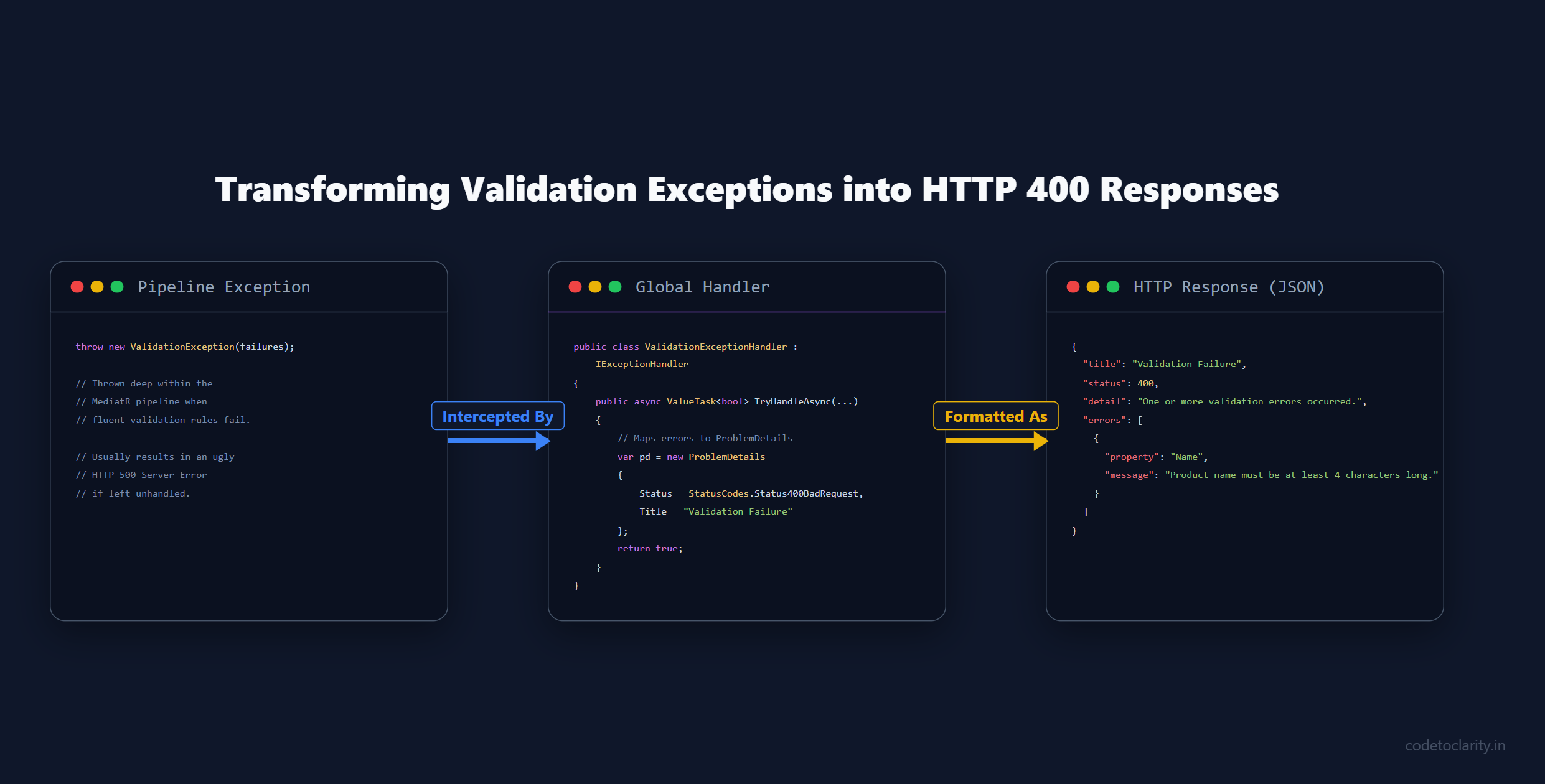
Let's create a global exception handler specifically designed to catch ValidationException and map it to a standard ProblemDetails response:
using FluentValidation;
using Microsoft.AspNetCore.Diagnostics;
using Microsoft.AspNetCore.Mvc;

public class ValidationExceptionHandler : IExceptionHandler
{
    private readonly ILogger<ValidationExceptionHandler> _logger;

    public ValidationExceptionHandler(ILogger<ValidationExceptionHandler> logger)
    {
        _logger = logger;
    }

    public async ValueTask<bool> TryHandleAsync(
        HttpContext httpContext,
        Exception exception,
        CancellationToken cancellationToken)
    {
        // If it's not a validation exception, let another handler deal with it
        if (exception is not ValidationException validationException)
        {
            return false;
        }

        _logger.LogWarning("Validation failed for request path: {Path}", httpContext.Request.Path);

        // Build a standard RFC-compliant Problem Details response
        var problemDetails = new ProblemDetails
        {
            Status = StatusCodes.Status400BadRequest,
            Title = "Validation Failure",
            Detail = "One or more validation errors occurred.",
            Instance = httpContext.Request.Path
        };

        // Extract the errors from FluentValidation and attach them to the response
        var validationErrors = validationException.Errors
            .Select(err => new { Property = err.PropertyName, Message = err.ErrorMessage })
            .ToList();

        problemDetails.Extensions.Add("errors", validationErrors);

        // Write the structured JSON response
        httpContext.Response.StatusCode = StatusCodes.Status400BadRequest;
        await httpContext.Response.WriteAsJsonAsync(problemDetails, cancellationToken);

        // Tell the framework we have successfully handled the exception
        return true;
    }
}
Notice the architecture at play here. The TryHandleAsync method checks if the thrown exception is a ValidationException. If it isn't (maybe it's a database timeout or a null reference), it returns false, allowing the framework to pass the exception to the next error handler in the chain.
If it is a validation exception, we construct a ProblemDetails object. This is an industry-standard way of formatting error responses in HTTP APIs. We extract the property names and error messages from FluentValidation and attach them to the response. Finally, we set the HTTP status to 400 Bad Request and tell ASP.NET Core that the exception is handled.
To wire this up securely, register it in your Program.cs:
// Register the custom exception handler
builder.Services.AddExceptionHandler<ValidationExceptionHandler>();

// Add default problem details support for other errors
builder.Services.AddProblemDetails();

var app = builder.Build();

// Add the exception handling middleware to the HTTP pipeline
app.UseExceptionHandler();
Now, if a client sends an invalid request (e.g., a product name with only 2 characters), they will not get a scary server crash. They will receive a beautiful, structured JSON response detailing exactly what they did wrong:
{
  "type": "https://tools.ietf.org/html/rfc9110#section-15.5.1",
  "title": "Validation Failure",
  "status": 400,
  "detail": "One or more validation errors occurred.",
  "instance": "/api/products",
  "errors": [
    {
      "property": "Name",
      "message": "Product name must be at least 4 characters long."
    }
  ]
}
Common Troubleshooting
If you are implementing this for the first time, you might run into a few common gotchas. Here is how to fix them quickly:
- Validation never runs: Check your dependency injection registrations. You must call both
AddValidatorsFromAssembly()(so the validators are in DI) andcfg.AddOpenBehavior(typeof(ValidationBehavior<,>))(so the behavior is in the pipeline). Missing either one means the pipeline silently ignores validation. - You get a 500 Error instead of a 400: Your
IExceptionHandleris not catching theValidationException. Make sure you calledapp.UseExceptionHandler()in your middleware configuration, and ensure it is placed beforeapp.MapControllers()or your minimal API mappings. - Validators not found in other projects: The
AddValidatorsFromAssembly(typeof(Program).Assembly)code only scans the project whereProgram.cslives. If your validators live in an external Application layer or Domain project, you must pass a type from that assembly instead.
When Should You Use This Pattern?
Like any architectural pattern, MediatR validation pipelines are not a silver bullet. You should evaluate your project's scope before blindly implementing it.
When to absolutely use it:
- You are already using CQRS and MediatR: If your architecture is already built around distinct command and query boundaries, this is the most natural, elegant way to handle validation. As I noted in my Beginner's Guide to CQRS and MediatR, keeping handlers lightweight is the entire point of the pattern.
- You have complex domain rules: When validation involves checking database state or complex cross-property dependencies, FluentValidation shines, and the pipeline keeps that immense complexity out of your core business logic.
- Large-scale enterprise applications: In large systems with dozens or hundreds of endpoints, centralizing cross-cutting concerns prevents massive code duplication and standardizes how errors are returned across different teams.
When to skip it:
- Simple Minimal APIs: If you are building a tiny microservice with just two endpoints that perform basic CRUD, adding MediatR, FluentValidation, and pipeline behaviors is overkill. In these scenarios, use built-in Minimal API endpoint filters to validate data. Keep it simple.
- No existing MediatR dependency: Do not import MediatR just to get pipeline validation. If your team does not utilize CQRS, stick to standard ASP.NET Core MVC action filters or endpoint validation. The goal is clean code, not pattern bingo.
Conclusion
By leveraging MediatR pipeline behaviors and FluentValidation in .NET 10, we have completely transformed how our application handles bad data.
We achieved true separation of concerns: our validation rules live in dedicated Validator classes, our pipeline handles the orchestration and interception, our exception handler translates failures into standard HTTP responses, and our command handlers remain delightfully pure, focusing entirely on delivering business value.
This pattern is an absolute staple of clean architecture in the modern .NET ecosystem. As your API grows from ten endpoints to a hundred, this centralized pipeline ensures that no request ever slips through the cracks, and your developers won't ever drown in endless if statements again.
Happy coding, and keep those handlers clean!

Kishan Kumar
Software Engineer / Tech Blogger
A passionate software engineer with experience in building scalable web applications and sharing knowledge through technical writing. Dedicated to continuous learning and community contribution.