The Ultimate Guide to Background Tasks in .NET: BackgroundService vs IHostedService
Learn the differences between IHostedService and BackgroundService in .NET. Discover real-world examples, avoid common production traps like captive dependencies, and build reliable background tasks.
Imagine you are building a modern web application for an e-commerce store. A user clicks the "Complete Purchase" button. Behind the scenes, your application needs to charge their credit card, update the inventory system, generate a PDF receipt, and send a confirmation email. If you try to do all of these things synchronously while the user waits for the web page to load, the user is going to stare at a spinning loading icon for ten or fifteen seconds. That is a terrible user experience and a quick way to lose customers.
Instead, a modern architecture will process only the critical path quickly. It charges the card and saves the order to the database. Then, it offloads the slow, non-critical work to a background process. The web server immediately returns a success page to the user. Meanwhile, the background process silently picks up the remaining tasks, generates the PDF, and sends the email without making the user wait.
In the .NET ecosystem, we have two primary tools built right into the framework for handling these in-process background operations. They are called IHostedService and BackgroundService. Understanding the difference between these two interfaces, and knowing exactly when to use each one, is a critical skill for any backend developer.
In this comprehensive guide, we are going to break down how the .NET framework manages background tasks. We will look at real-world code examples using both approaches. Finally, we will dive into the common traps that catch developers off guard in production environments. By the end of this article, you will know exactly how to write robust, scalable background services.
Let us get started.
Understanding the .NET Generic Host
Before we can talk about background services, we need to understand the environment they live inside. Modern .NET applications run on top of something called the Generic Host. Whether you are building a Web API, a worker service, or a simple console application, the Generic Host is the engine running under the hood.
You can think of the Generic Host as the manager of your application. It handles the application configuration, sets up the dependency injection container, wires up the logging infrastructure, and controls the lifecycle of your app. When you start your application, the host boots up. It gathers all the services you registered, starts them, and keeps them running. When it is time to shut down, the host tells everything to stop cleanly.
This lifecycle is exactly where IHostedService comes into the picture. The Generic Host is specifically designed to run any class that implements the IHostedService interface.
Exploring IHostedService: The Raw Interface
The IHostedService interface is the fundamental building block for background tasks in .NET. It is extremely simple by design and contains only two methods.
Here is what the interface looks like under the hood:
public interface IHostedService
{
    Task StartAsync(CancellationToken cancellationToken);
    Task StopAsync(CancellationToken cancellationToken);
}
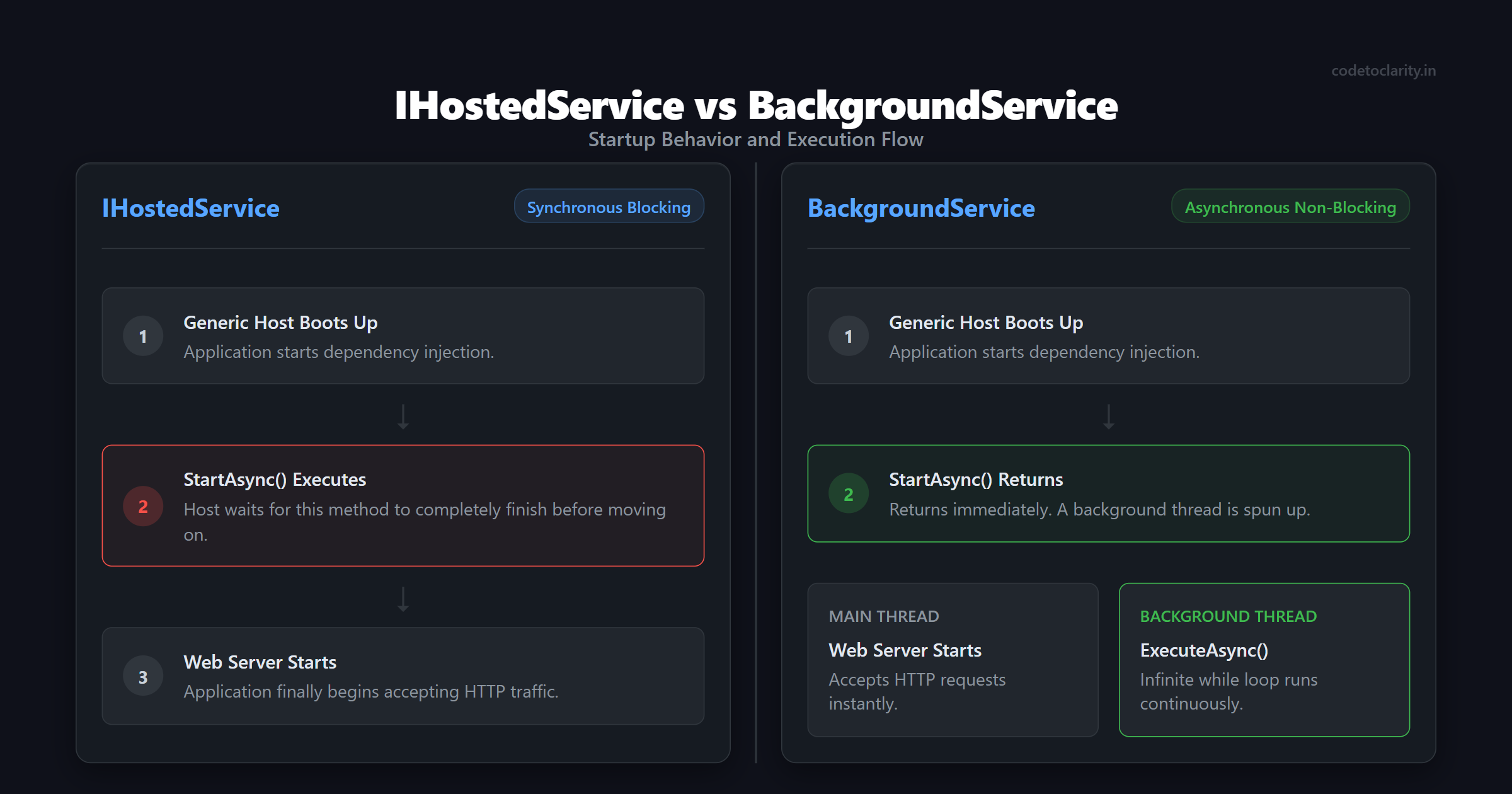
When the Generic Host starts up, it looks in your dependency injection container for anything registered as an IHostedService. It loops through them and calls the StartAsync method on each one. The host will actually wait for your StartAsync method to complete before it moves on. This is a very important detail to remember. If your web application has an IHostedService, the web server will not start accepting HTTP requests until your StartAsync method finishes running.
When the application is told to shut down, the host calls the StopAsync method. It gives your service a chance to clean up resources, close database connections, and finish any inflight work before the application process terminates completely.
When Should You Use IHostedService?
Because the host waits for StartAsync to finish, IHostedService is the perfect tool for one-time initialization tasks that absolutely must happen before your application starts doing its main job.
For example, imagine you have a web application that needs to apply database migrations before it serves any user requests. You definitely do not want users hitting the database while the schema is actively changing. You can use an IHostedService to run those migrations safely.
Let us look at a practical example. We will create a CodeToClarityDbMigrator service.
using Microsoft.Extensions.Hosting;
using Microsoft.Extensions.Logging;

public class CodeToClarityDbMigrator : IHostedService
{
    private readonly ILogger<CodeToClarityDbMigrator> _logger;

    public CodeToClarityDbMigrator(ILogger<CodeToClarityDbMigrator> logger)
    {
        _logger = logger;
    }

    public async Task StartAsync(CancellationToken cancellationToken)
    {
        _logger.LogInformation("Starting database migrations...");

        // Simulate a database migration process
        await Task.Delay(2000, cancellationToken);

        _logger.LogInformation("Database migrations completed successfully.");
    }

    public Task StopAsync(CancellationToken cancellationToken)
    {
        _logger.LogInformation("Migrator shutting down cleanly.");
        return Task.CompletedTask;
    }
}
You register this in your application startup file using the AddHostedService extension method:
builder.Services.AddHostedService<CodeToClarityDbMigrator>();
When you run your application, the host will run the migrations, wait two seconds for them to finish, and then start the web server. This is the ideal use case for the raw IHostedService interface. It is meant for short, discrete tasks that run once at startup or once at shutdown.
But what if you need a task that runs continuously? What if you need a worker that wakes up every thirty seconds to process emails from a queue? If you put an infinite loop inside the StartAsync method of an IHostedService, your StartAsync method will never complete. The Generic Host will wait forever, and your web server will never start accepting traffic.
To solve this continuous execution problem, Microsoft gave us a better tool.
BackgroundService: The Developer's Best Friend
To run continuous tasks without blocking the application startup, you have to do some tricky threading work. You need to start your long-running loop on a separate background thread, and then immediately return a completed task from StartAsync so the host can continue booting up. You also have to carefully manage cancellation tokens so your background thread knows when to stop.
Writing this boilerplate code is prone to errors. Fortunately, you do not have to write it. The .NET team built an abstract base class called BackgroundService that handles all of this complex lifecycle plumbing for you.
The BackgroundService class implements IHostedService internally. It does the hard work of spinning up a background task during startup and managing the shutdown signals. All you have to do is inherit from this class and override one single method called ExecuteAsync.
Let us build a codetoclarityEmailService that runs continuously in the background, waking up every ten seconds to process outgoing emails.
using Microsoft.Extensions.Hosting;
using Microsoft.Extensions.Logging;

public class codetoclarityEmailService : BackgroundService
{
    private readonly ILogger<codetoclarityEmailService> _logger;

    public codetoclarityEmailService(ILogger<codetoclarityEmailService> logger)
    {
        _logger = logger;
    }

    protected override async Task ExecuteAsync(CancellationToken stoppingToken)
    {
        _logger.LogInformation("Email service is starting.");

        // The while loop keeps the service running continuously
        while (!stoppingToken.IsCancellationRequested)
        {
            _logger.LogInformation("Checking the database for pending emails...");

            // Simulate sending emails
            await Task.Delay(1000, stoppingToken);

            _logger.LogInformation("Finished sending batch. Going to sleep.");

            // Wait for 10 seconds before checking again
            await Task.Delay(TimeSpan.FromSeconds(10), stoppingToken);
        }

        _logger.LogInformation("Email service is stopping gracefully.");
    }
}
Notice how clean this is. We simply write a while loop that checks the stoppingToken. As long as the application is running, IsCancellationRequested will be false. The loop will run, do some work, and then sleep for ten seconds. When you press Control-C to stop the application, the host will signal the stoppingToken. The loop condition becomes false, the method completes, and the service shuts down gracefully.
For the vast majority of your background task needs in .NET, BackgroundService is exactly what you should use. It abstracts away the complex threading and lets you focus entirely on your business logic.
Four Critical Traps in Production
Writing a BackgroundService looks easy in a simple tutorial. However, production environments are messy. Databases go offline. Network connections drop. If you do not write your background services carefully, they will crash your application or silently stop working entirely.
Let us walk through four common mistakes developers make and how you can avoid them.
Trap 1: Crashing the Host with Exceptions
What happens if your database is momentarily offline while your BackgroundService is trying to read pending emails? The database driver will throw an exception.
Prior to .NET 6, if an unhandled exception escaped your ExecuteAsync method, the background service would silently stop running, but the rest of the web application would stay alive. In modern .NET versions, Microsoft changed this default behavior for safety reasons. Now, if an unhandled exception occurs in a BackgroundService, the framework will crash the entire host process. Your entire web API will go down just because one background task failed to reach the database.
To prevent this catastrophic failure, you must handle exceptions inside your loop. You want the service to log the error, wait a few seconds, and try again on the next iteration.
protected override async Task ExecuteAsync(CancellationToken stoppingToken)
{
    while (!stoppingToken.IsCancellationRequested)
    {
        try
        {
            await ProcessEmailsAsync(stoppingToken);
        }
        catch (Exception ex) when (ex is not OperationCanceledException)
        {
            _logger.LogError(ex, "An error occurred while processing emails. Will retry shortly.");
        }

        await Task.Delay(TimeSpan.FromSeconds(10), stoppingToken);
    }
}
By wrapping the actual work inside a try-catch block, you ensure that temporary glitches do not kill your background loop or your host. We specifically ignore OperationCanceledException because that is a normal, expected exception thrown during a graceful application shutdown.
Trap 2: The Captive Dependency Problem
This is perhaps the most common bug developers face when building background services.
A BackgroundService is registered in the dependency injection container as a Singleton. This means there is only one instance of the service for the entire lifetime of the application.
Many developers try to inject a scoped service, like an Entity Framework DbContext, directly into the constructor of their BackgroundService. The container will gladly provide a DbContext, but because the background service lives forever, that single DbContext will also live forever. This mistake creates a captive dependency.
Entity Framework contexts are designed to be short-lived. They track changes and accumulate data in memory over time. If you use the same context in an infinite loop for days at a time, your application will suffer massive memory leaks. Eventually, the context will become corrupted or throw an exception, leaving it permanently broken.
The correct approach is to inject an IServiceScopeFactory. You use this factory to create a brand new scope for every single iteration of your loop. Check out the official Microsoft documentation on Dependency injection lifetimes to understand exactly how scopes work under the hood.
using Microsoft.Extensions.DependencyInjection;
using Microsoft.Extensions.Hosting;

public class codetoclarityDataProcessor : BackgroundService
{
    private readonly IServiceScopeFactory _scopeFactory;

    public codetoclarityDataProcessor(IServiceScopeFactory scopeFactory)
    {
        _scopeFactory = scopeFactory;
    }

    protected override async Task ExecuteAsync(CancellationToken stoppingToken)
    {
        while (!stoppingToken.IsCancellationRequested)
        {
            // Create a fresh scope for this specific iteration
            using (var scope = _scopeFactory.CreateScope())
            {
                // Resolve your scoped DbContext from the new scope
                var dbContext = scope.ServiceProvider.GetRequiredService<MyDbContext>();

                await DoDatabaseWorkAsync(dbContext, stoppingToken);
            }
            // The scope is disposed here, destroying the DbContext cleanly

            await Task.Delay(TimeSpan.FromSeconds(10), stoppingToken);
        }
    }
}
This ensures that every loop iteration gets a clean, fresh database connection. This completely avoids the memory leak problem and keeps your application healthy.
Trap 3: Ignoring the Cancellation Token
When the Generic Host starts shutting down, it gives your background services a grace period to finish their current work. By default, this timeout is only five seconds. If your service takes longer than five seconds to stop, the host will aggressively kill the application process.
The host signals your service to stop by triggering the stoppingToken passed into your ExecuteAsync method. If you do not pass this token down into your asynchronous methods, your code will have no idea that it is supposed to stop.
Imagine you are executing a database query that takes thirty seconds. If the host signals a shutdown, but you did not pass the stoppingToken to Entity Framework, the query will keep running. Five seconds later, the host will forcefully terminate the process, potentially leaving your database records in an inconsistent state.
Always pass the stoppingToken down the chain to every single async method you call. This allows the framework to cancel long-running HTTP requests or database queries instantly when a shutdown is requested. For more context on shutdown behaviors, you can read the authoritative Background tasks with hosted services in ASP.NET Core guide provided by Microsoft.
Trap 4: Thread Pool Starvation
The ExecuteAsync method runs on the standard .NET Thread Pool. The thread pool is a shared resource that handles all the web requests coming into your API.
If your background service performs intense, long-running synchronous work, such as heavy mathematical calculations or parsing massive text files directly on the CPU, it will hold onto a thread pool thread and refuse to let go. If you have several background services doing this, they will consume all available threads. Suddenly, your API will start timing out and rejecting user requests because there are no threads left to handle incoming web traffic.
Background services are designed to be lightweight orchestrators. They should spend most of their time asleep using await Task.Delay(). They should wake up, trigger an asynchronous operation like a database query or an HTTP call, and then go back to sleep. Asynchronous operations do not block threads.
If you absolutely must perform heavy, synchronous CPU work, you should wrap it in a dedicated thread using Task.Run() so that it does not choke the main thread pool.
When to Graduate to Advanced Tools
BackgroundService is fantastic for lightweight, in-process tasks. However, it does have significant limitations as your application scales.
First, it runs entirely in memory. If your server crashes or restarts, your application forgets everything it was doing. There is no built-in way to resume a failed job. Second, if you deploy your web application to three different servers behind a load balancer, all three servers will run the same BackgroundService simultaneously. If the service sends emails, your users will end up receiving three copies of the exact same email.
When your requirements grow beyond simple polling, you should stop building custom solutions and reach for a dedicated job scheduling library.
One of the most popular choices in the .NET ecosystem is the Hangfire NuGet package. Hangfire uses a database to store your background jobs. This guarantees that jobs survive application restarts. Furthermore, Hangfire uses distributed locks out of the box. Even if you have ten servers running simultaneously, Hangfire ensures that a scheduled job is only executed exactly once. It also provides a beautiful web dashboard where you can see the status of your jobs, view failed executions, and manually retry them.
Another excellent alternative is Quartz.NET. Quartz is incredibly powerful if you need complex scheduling logic, such as running a job only on the third Tuesday of every month, excluding national holidays.
Do not try to reinvent these tools using BackgroundService. Recognize when your application has outgrown in-memory processing and use the right tool for the job.
Summary
Understanding how to manage background tasks is a hallmark of a mature .NET developer. Let us quickly review the core concepts we covered today:
The IHostedService interface is the raw foundation. It forces you to implement StartAsync and StopAsync. You should use it primarily for one-off tasks that must execute before the application starts taking traffic, like database migrations or cache warming.
The BackgroundService abstract class is your default choice for continuous, long-running background tasks. It handles the complicated threading lifecycle for you safely. All you have to do is override ExecuteAsync and write a simple loop.
Remember the golden rules of production background services: Always handle your exceptions inside the loop, always use an IServiceScopeFactory to avoid captive dependencies, always respect the cancellation token, and keep your tasks lightweight to avoid starving the thread pool.
If you follow these guidelines, your background tasks will run reliably, silently, and efficiently.

Kishan Kumar
Software Engineer / Tech Blogger
A passionate software engineer with experience in building scalable web applications and sharing knowledge through technical writing. Dedicated to continuous learning and community contribution.