
The Complete Guide to Caching in ASP.NET Core: IMemoryCache, Redis, and HybridCache
Master caching in ASP.NET Core to build blazingly fast web applications. Learn IMemoryCache, Redis, the Cache-Aside pattern, avoiding cache stampedes, and the new HybridCache.
Imagine you are studying for a difficult exam in a massive, sprawling library. Every time you need a specific fact, you get up from your desk, walk down three flights of stairs, navigate a maze of bookshelves, find the encyclopedia, read the fact, and walk all the way back to your desk.
After doing this five times for the exact same fact, you realize something: this is terribly inefficient. The next time you walk down to the encyclopedia, you write the fact down on a sticky note and stick it right on your desk. The next time you need it? You look at the sticky note. It takes half a second instead of five minutes.
Congratulations! You have just implemented caching.
In the world of web development, caching is the equivalent of that sticky note. It is one of the most powerful, cost-effective, and straightforward ways to drastically improve your application's performance. When building modern applications, every millisecond counts. Users are impatient, and slow load times can directly impact your bottom line.
In this comprehensive guide, we are going to dive deep into how caching works in ASP.NET Core. We will explore everything from simple in-memory caching for single-server setups, to distributed caching using Redis for large-scale applications, the hidden dangers of cache stampedes, and the exciting new HybridCache feature introduced in .NET 9.
Whether you are building a small personal project or a massive enterprise system, mastering caching is an essential skill for any .NET developer.
Why Should You Care About Caching?
Before we start writing code, let's understand exactly why caching is so critical. It is not just about making things "faster." Caching provides a triad of benefits that completely change how your system behaves under load.
- Drastically Reduced Latency: Fetching data from a database, calling an external third-party API, or performing complex calculations takes time. Reading data from RAM (which is where caches typically live) takes a fraction of a millisecond. Caching directly reduces the time it takes to serve a request to your user.
- Reduced Server and Database Load: Databases are often the bottleneck in any web application. They are expensive to scale horizontally. By caching frequently accessed data, you prevent hundreds or thousands of duplicate queries from hitting your database. This frees up your database to handle writes and other complex queries that cannot be cached.
- Improved Scalability: When your backend systems are doing less work per request, your web servers can handle a significantly higher number of concurrent users.
If you are building APIs, combining caching with Minimal APIs can result in blisteringly fast response times that rival any framework on the market.
However, caching is notoriously difficult to get right. Phil Karlton famously said, "There are only two hard things in Computer Science: cache invalidation and naming things." We will see exactly why cache invalidation is tricky as we progress.
The Cache-Aside Pattern: The Industry Standard
When we talk about caching, we need a strategy for how we interact with the cache. The most common and widely used strategy is the Cache-Aside Pattern.
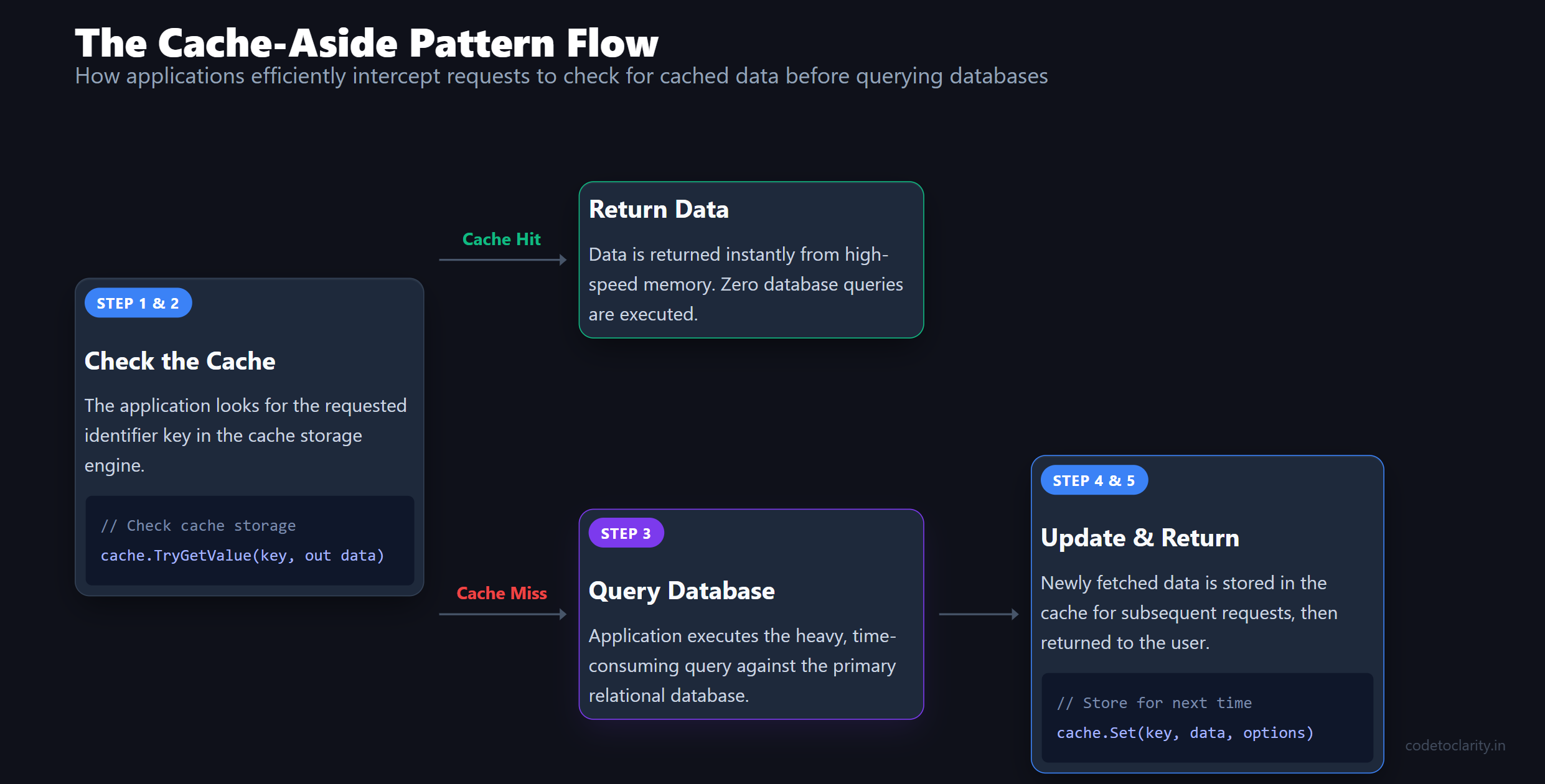
Think of Cache-Aside as a lazy-loading mechanism. The application always checks the cache first. If the data isn't there, it fetches it from the source, puts it in the cache for next time, and then returns it.
Here is the exact flow:
- The Request: The user requests a piece of data (e.g., a product with ID 42).
- Check the Cache: The application checks if the data for "Product 42" exists in the cache.
- Cache Hit: If it exists, return the cached data immediately. Done.
- Cache Miss: If it does not exist, the application queries the database (or external API) for "Product 42".
- Update Cache: The application stores the newly retrieved data into the cache.
- Return Data: The application returns the data to the user.
This pattern is brilliant because the cache only stores data that is actually requested. You don't waste memory storing the entire database, just the pieces people care about right now.
Now, let's see how ASP.NET Core provides built-in tools to implement this pattern effortlessly.
The Simple Start: IMemoryCache
For applications running on a single server, ASP.NET Core provides IMemoryCache. As the name suggests, this stores your data directly in the RAM of the web server where your application is running.
It is unbelievably fast because there is no network call involved. The data is serialized or stored as raw objects right inside the application's memory space.
Setting Up IMemoryCache
To use IMemoryCache, you first need to register it in your Dependency Injection (DI) container. If you need a refresher on DI lifetimes and setup, check out our guide on Dependency Injection in ASP.NET Core.
In your Program.cs, simply add:
var builder = WebApplication.CreateBuilder(args);

// Register IMemoryCache in the DI container
builder.Services.AddMemoryCache();

var app = builder.Build();
Implementing Cache-Aside with IMemoryCache
Let's implement a realistic scenario. Imagine we have an endpoint that fetches a user's profile. This profile data rarely changes, but it is accessed on almost every page load. It is a perfect candidate for caching.
Here is how you implement the Cache-Aside pattern using IMemoryCache:
app.MapGet("/users/{id}", async (int id, IMemoryCache cache, CodeToClarityDbContext context) =>
{
    // Define a unique key for this specific piece of data
    string cacheKey = $"user_profile_{id}";

    // Step 1 & 2: Check the cache
    if (!cache.TryGetValue(cacheKey, out UserProfile? profile))
    {
        // Step 3 (Cache Miss): Fetch from the source (Database)
        // We simulate a slow database call here
        await Task.Delay(500);
        profile = await context.UserProfiles.FindAsync(id);

        if (profile is null)
        {
            return Results.NotFound();
        }

        // Step 4: Update the cache
        // We configure options to tell the cache how long to keep the data
        var cacheOptions = new MemoryCacheEntryOptions()
            .SetAbsoluteExpiration(TimeSpan.FromMinutes(10));

        cache.Set(cacheKey, profile, cacheOptions);
    }

    // Step 5: Return the data
    return Results.Ok(profile);
});
Let's break down what is happening here. We first attempt to get the value using TryGetValue. If it is not there, we hit the database. Then, we use MemoryCacheEntryOptions to specify that this data should live in the cache for exactly 10 minutes.
If a thousand users request this same profile within those 10 minutes, the database is only queried once. The other 999 requests are served instantly from memory.
The Limits of In-Memory Caching
While IMemoryCache is fantastic for small apps or single-server deployments, it falls apart when your application grows.
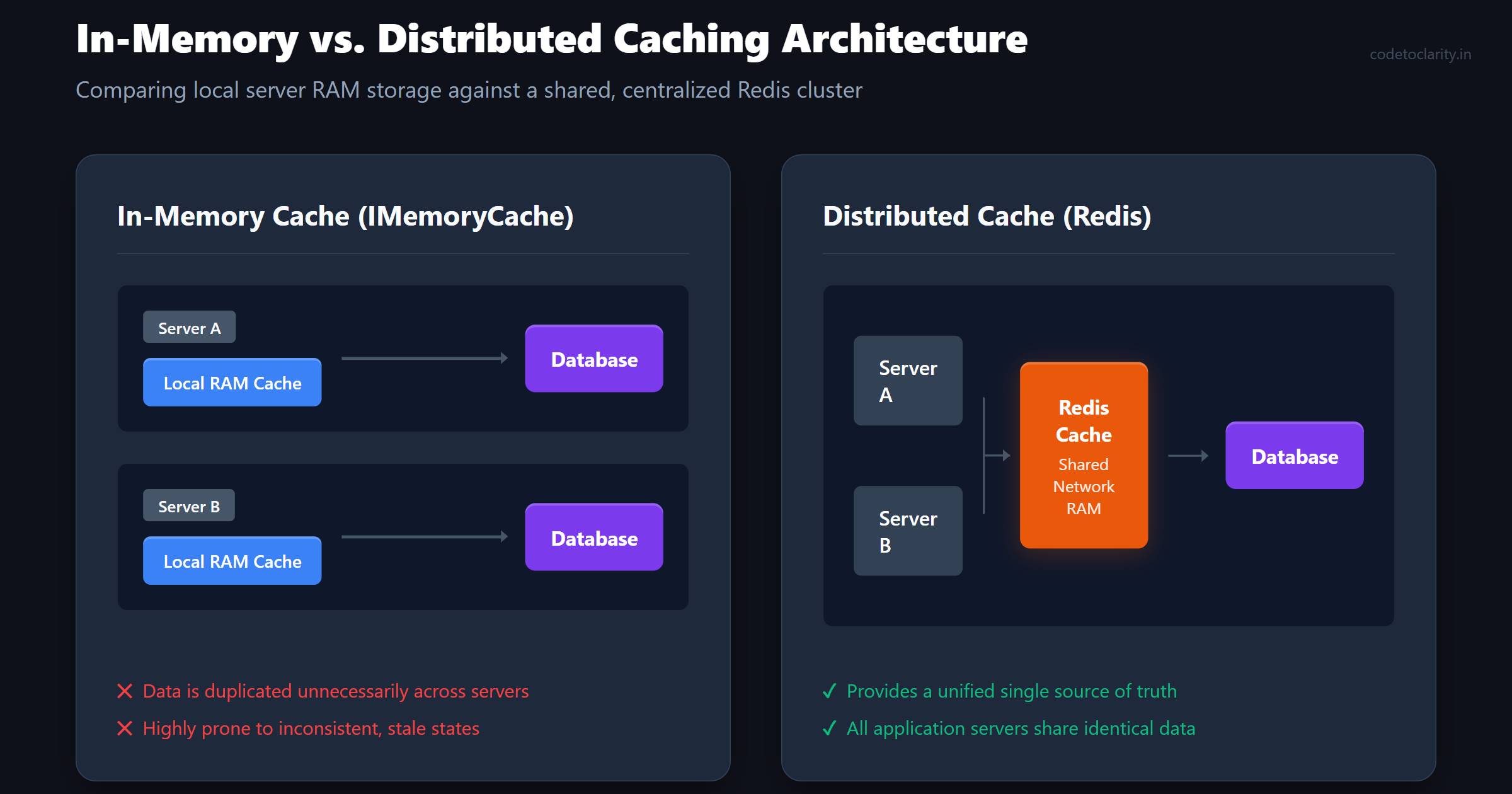
If you scale your application horizontally (meaning you run multiple instances of your app behind a load balancer), things get messy.
- Inconsistent Data: Server A might cache a profile. Then the user updates their profile on Server B. Server A still has the old, stale data in its RAM.
- Wasted Memory: Every server has its own separate cache. If you have 5 servers, you might cache the same piece of data 5 separate times, wasting valuable RAM on each machine.
- Data Loss on Restart: If a server crashes or restarts, its entire cache is wiped out, leading to a sudden spike in database queries as the cache rebuilds.
To solve this, we need to graduate to distributed caching.
Leveling Up: IDistributedCache and Redis
A distributed cache lives outside of your web servers. It is a separate service that all of your web servers talk to over the network.
When Server A caches a piece of data, it sends it to the distributed cache. If a subsequent request hits Server B, Server B will ask the distributed cache for the data and find it immediately. The cache is shared, consistent, and persists even if your web servers restart.
ASP.NET Core abstracts this beautifully with the IDistributedCache interface. The most popular technology used for distributed caching in the .NET ecosystem (and globally) is Redis.
Redis is an incredibly fast, open-source, in-memory data structure store. It is essentially a giant, shared RAM drive for your applications.
Setting Up Redis with IDistributedCache
First, you will need a Redis server running (locally via Docker, or managed via a cloud provider like Azure Cache for Redis). Then, install the official Microsoft package. This package is an implementation of IDistributedCache that uses the StackExchange.Redis GitHub repository under the hood. For easiest installation, grab the Microsoft.Extensions.Caching.StackExchangeRedis NuGet package.
dotnet add package Microsoft.Extensions.Caching.StackExchangeRedis
Next, configure it in your Program.cs:
var builder = WebApplication.CreateBuilder(args);

// Grab the connection string from appsettings.json
string redisConnectionString = builder.Configuration.GetConnectionString("Redis")
    ?? throw new InvalidOperationException("Redis connection string is missing.");

// Register the Redis implementation of IDistributedCache
builder.Services.AddStackExchangeRedisCache(options =>
{
    options.Configuration = redisConnectionString;
    // You can optionally add a prefix to all keys to avoid collisions
    options.InstanceName = "CodeToClarityApp_";
});

var app = builder.Build();
Using IDistributedCache
Working with IDistributedCache is slightly different from IMemoryCache. Because the cache is living on a different server over the network, interactions must be asynchronous. Furthermore, IDistributedCache typically works with byte arrays or strings, so you are responsible for serializing your objects (usually to JSON) before storing them.
Here is how we rewrite our user profile endpoint using the distributed cache:
app.MapGet("/users/{id}", async (int id, IDistributedCache cache, CodeToClarityDbContext context) =>
{
    string cacheKey = $"user_profile_{id}";

    // Step 1: Check the cache (asynchronously, and it returns a string/bytes)
    string? cachedData = await cache.GetStringAsync(cacheKey);

    if (!string.IsNullOrEmpty(cachedData))
    {
        // Cache Hit! Deserialize the JSON back into our object
        var cachedProfile = JsonSerializer.Deserialize<UserProfile>(cachedData);
        return Results.Ok(cachedProfile);
    }

    // Cache Miss: Fetch from database
    var profile = await context.UserProfiles.FindAsync(id);

    if (profile is null)
    {
        return Results.NotFound();
    }

    // Serialize the object to JSON
    string serializedData = JsonSerializer.Serialize(profile);

    // Set expiration options
    var cacheOptions = new DistributedCacheEntryOptions()
        .SetAbsoluteExpiration(TimeSpan.FromMinutes(10));

    // Update the cache asynchronously
    await cache.SetStringAsync(cacheKey, serializedData, cacheOptions);

    return Results.Ok(profile);
});
Notice how the core logic remains exactly the same. The only difference is that we are now awaiting asynchronous network calls to Redis and handling JSON serialization.
The Power of Extension Methods
Writing that serialization logic over and over gets tedious. A common practice is to write a generic extension method for IDistributedCache that handles the Cache-Aside pattern automatically.
public static class DistributedCacheExtensions
{
    public static async Task<T?> GetOrCreateAsync<T>(
        this IDistributedCache cache,
        string key,
        Func<Task<T?>> factory,
        DistributedCacheEntryOptions? options = null)
    {
        var cachedData = await cache.GetStringAsync(key);

        if (!string.IsNullOrEmpty(cachedData))
        {
            return JsonSerializer.Deserialize<T>(cachedData);
        }

        // Invoke the factory delegate to fetch the data
        var data = await factory();

        if (data is not null)
        {
            options ??= new DistributedCacheEntryOptions()
                .SetAbsoluteExpiration(TimeSpan.FromMinutes(5));

            await cache.SetStringAsync(
                key,
                JsonSerializer.Serialize(data),
                options);
        }

        return data;
    }
}
Now, your endpoint logic becomes beautifully concise:
app.MapGet("/users/{id}", async (int id, IDistributedCache cache, CodeToClarityDbContext context) =>
{
    var profile = await cache.GetOrCreateAsync($"user_profile_{id}", async () =>
    {
        return await context.UserProfiles.FindAsync(id);
    });

    return profile is not null ? Results.Ok(profile) : Results.NotFound();
});
This drastically reduces boilerplate code and ensures your caching logic is consistent across your entire application.
Dealing With Expiration: Stale Data and Eviction
One of the hardest parts of caching is deciding when data should expire. If you keep data forever, your cache will run out of memory, and your users will see outdated information.
ASP.NET Core provides two primary ways to expire data via MemoryCacheEntryOptions or DistributedCacheEntryOptions:
Absolute Expiration
This dictates the exact point in time when the cache entry becomes invalid, regardless of how often it is accessed. Analogy: A carton of milk. It doesn't matter how many times you open the fridge to look at it; on the expiration date, it goes bad. Use case: Data that changes on a known schedule or data where staleness is unacceptable after a certain period (e.g., daily stock prices).
options.SetAbsoluteExpiration(TimeSpan.FromHours(1));
Sliding Expiration
This dictates that the cache entry will expire if it is not accessed for a specified duration. Every time the item is accessed, the timer resets. Analogy: An automatic hallway light. It stays on for 2 minutes. Every time someone walks past, the 2-minute timer resets. If no one walks past for 2 full minutes, it turns off. Use case: User session data. If a user is active, keep their data in the cache. If they go inactive for 30 minutes, boot it out to save memory.
options.SetSlidingExpiration(TimeSpan.FromMinutes(30));
Crucial Warning: If you use Sliding Expiration alone, a highly active item might never expire. If that item's underlying data in the database changes, the cache will never update it because the timer keeps resetting! Always combine Sliding Expiration with an Absolute Expiration as an upper bound limit.
var safeOptions = new DistributedCacheEntryOptions()
    .SetSlidingExpiration(TimeSpan.FromMinutes(10))
    .SetAbsoluteExpiration(TimeSpan.FromHours(1)); // The ultimate kill switch
The Hidden Danger: Cache Stampedes
Let's imagine you run an e-commerce site, and you cache the details of your "Deal of the Day" product. It is a huge sale, and 10,000 users are hitting the product page every second.
Suddenly, the absolute expiration timer hits zero. The cache entry is deleted.
In the next millisecond, 50 concurrent requests arrive for the "Deal of the Day." They all check the cache simultaneously. They all see a Cache Miss. What happens next? All 50 requests simultaneously attempt to execute the database query to fetch the product details.
Your database, which was chilling peacefully while the cache handled the load, is suddenly hammered by 50 identical, heavy queries at the exact same time. This causes CPU spikes, query timeouts, and can completely crash your database.
This phenomenon is known as a Cache Stampede (or Thundering Herd problem). It negates the entire purpose of caching during peak loads.
Mitigating Stampedes with Locks
To solve a cache stampede, you need concurrency control. When multiple threads encounter a cache miss, only one thread should be allowed to go to the database. The other threads should politely wait for that first thread to finish its job and populate the cache. Once populated, the waiting threads can just read from the newly refreshed cache.
In .NET, we often use SemaphoreSlim to orchestrate this locking. If you want to dive deeper into how asynchronous coordination works in .NET, read our detailed guide on the Task Parallel Library Explained.
Here is a conceptual look at how we might adapt our GetOrCreateAsync method to use a semaphore:
public static class DistributedCacheExtensions
{
    // A semaphore that allows only 1 thread through at a time
    private static readonly SemaphoreSlim _semaphore = new SemaphoreSlim(1, 1);

    public static async Task<T?> GetOrCreateWithLockAsync<T>(...) // Arguments omitted for brevity
    {
        // 1. Check cache normally
        var cachedData = await cache.GetStringAsync(key);
        if (!string.IsNullOrEmpty(cachedData)) return JsonSerializer.Deserialize<T>(cachedData);

        // 2. Cache miss! Acquire the lock to prevent a stampede
        await _semaphore.WaitAsync();
        try
        {
            // 3. DOUBLE CHECK: Did another thread already do the work while we were waiting?
            cachedData = await cache.GetStringAsync(key);
            if (!string.IsNullOrEmpty(cachedData)) return JsonSerializer.Deserialize<T>(cachedData);

            // 4. We are the chosen thread. Fetch the data from the database.
            var data = await factory();

            if (data is not null)
            {
                await cache.SetStringAsync(key, JsonSerializer.Serialize(data), options);
            }
            return data;
        }
        finally
        {
            // 5. Release the lock so others can proceed
            _semaphore.Release();
        }
    }
}
This double-checked locking pattern is highly effective. However, using a single static SemaphoreSlim means all cache misses across your entire application have to wait in the same line, even if they are requesting completely different keys. A robust implementation requires maintaining a dictionary of semaphores keyed by the cache key, which gets incredibly complex to manage and clean up.
Isn't there an easier way?
The Future: HybridCache in .NET 9
Microsoft recognized that while IDistributedCache is powerful, implementing stampede protection, proper serialization, and multi-tier caching is too much burden to place on everyday developers.
Enter .NET 9 and the revolutionary HybridCache.
HybridCache is designed to be a drop-in replacement for IDistributedCache that solves almost all of the headaches we just discussed out of the box.
According to the official Microsoft documentation on HybridCache, it provides a multi-tier caching system. This means it intelligently combines IMemoryCache (L1 cache) and IDistributedCache (L2 cache).
When you ask HybridCache for data:
- It checks the ultra-fast local RAM (
IMemoryCache). - If it is a miss, it checks Redis (
IDistributedCache). - If it is still a miss, it calls your database logic.
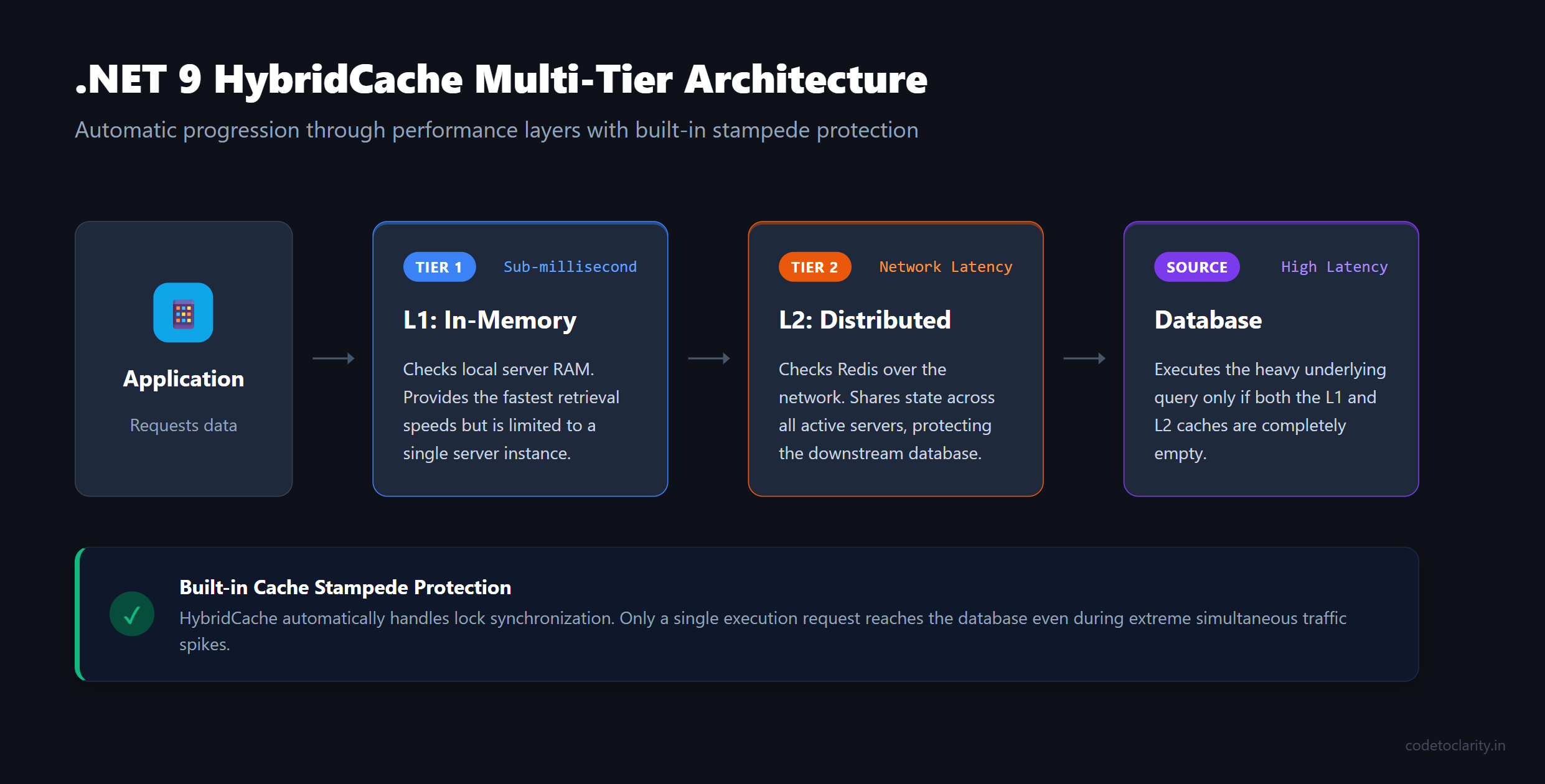
Furthermore, Cache Stampede protection is built-in by default. You do not have to write any SemaphoreSlim logic. HybridCache guarantees that if multiple concurrent requests ask for the same missing key, only one execution of your factory delegate will occur.
It also handles serialization internally, removing the need for manual JsonSerializer calls!
Here is how simple your code becomes with HybridCache:
app.MapGet("/users/{id}", async (int id, HybridCache cache, CodeToClarityDbContext context) =>
{
    // One line of code handles L1/L2 caching, stampede protection, and serialization!
    var profile = await cache.GetOrCreateAsync(
        $"user_profile_{id}",
        async cancel => await context.UserProfiles.FindAsync(id, cancel)
    );

    return profile is not null ? Results.Ok(profile) : Results.NotFound();
});
It is a monumental leap forward in developer productivity and application resilience. If you are starting a new .NET 9 project, HybridCache should be your default choice over raw IDistributedCache.
Best Practices for Caching Success
To wrap things up, here are some golden rules to keep in mind when implementing caching in your applications:
- Don't Cache Everything: Caching adds complexity. Only cache data that is expensive to compute or fetch, and is read far more often than it is updated. Do not cache a user's shopping cart if it changes every few seconds.
- Never Cache PII Unsafely: Be extremely careful about caching Personally Identifiable Information (PII) in a shared distributed cache without proper encryption or isolation.
- Plan for Cache Invalidation: The hardest part of caching is knowing when to delete things. If an admin updates a product's price in the database, you must write code to explicitly call
cache.RemoveAsync("product_123"). Otherwise, users will see the old price until the absolute expiration kicks in. - Use Meaningful Cache Keys: Develop a strong convention for your cache keys. Prefix them with entity names (e.g.,
Product:Details:42orUser:Permissions:99). This makes it easier to debug Redis and target specific prefixes for eviction later. - Monitor Your Cache Hit Ratio: A cache is only useful if it is being hit. Use metrics and observability tools to track your Cache Hit Ratio. If it is below 50%, you might be caching the wrong things or your expiration times are too short.
Conclusion
Caching is not a magical band-aid for terrible database design or inefficient algorithms, but it is an absolute necessity for building scalable, high-performance web applications.
We have covered the journey from the localized speed of IMemoryCache, to the shared resilience of Redis via IDistributedCache, explored the architectural hazards of Cache Stampedes, and looked ahead to the streamlined future of HybridCache in .NET 9.
Start small. Find the slowest, most frequently accessed read operation in your application today, and slap an IMemoryCache on it. Measure the performance difference. Once you experience the rush of seeing a 500ms database query drop to a 1ms cache read, you will never look back. Happy coding!

Kishan Kumar
Software Engineer / Tech Blogger
A passionate software engineer with experience in building scalable web applications and sharing knowledge through technical writing. Dedicated to continuous learning and community contribution.